377
OPUS Projektor Manual
CAN
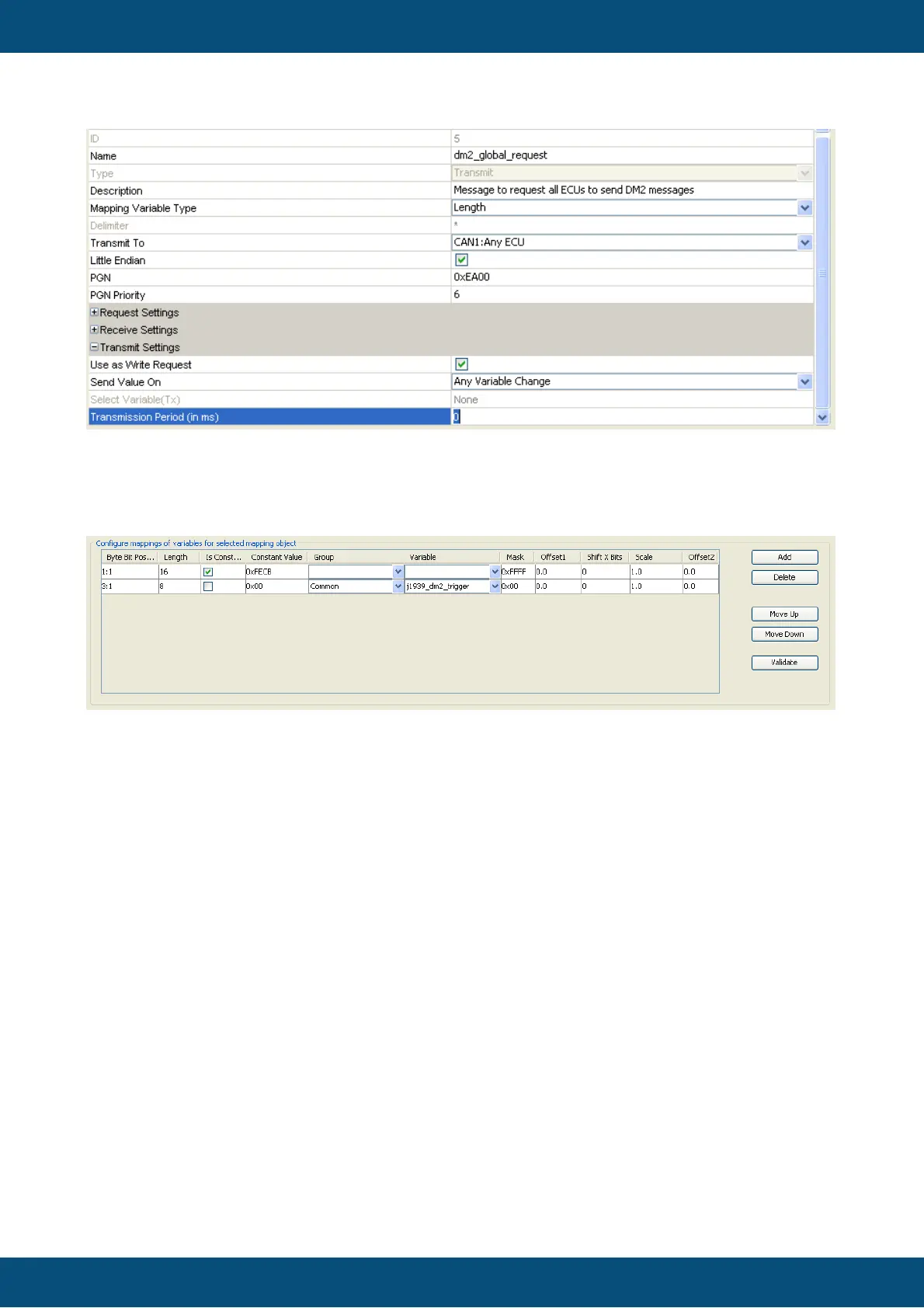
Now add two entries in the Configure mappings of variables for selected mapping
object section of the dialog by pressing the Add button twice. Make the same settings as in
the screenshot below:
Important is that the first 16 bit entry is constant with Mask 0xffff and the Constant Value of
0xfecb. The following byte is our j1939_dm2_trigger variable. Here the Mask has to be 0x0.
Click OK on both dialogs.
How to trigger sending of this request:
Select a button or softkey in your project and attach an action e.g. to “OnRelease”. As action
select “Execute Script”. Create a new script with the following content:
//Get the old variable value, increment it and set it again
//to trigger the sending of the DM2 global request.
var value = getVariableValue(“j1939_dm2_trigger”);
//overflow prevention
if (value >= 0x7fff)
{
value = 0;
}
value++;
setVariableValue(“j1939_dm2_trigger”, value);
Now every time the button/softkey is pressed and released, the DM2 request will be sent. You
can also attach this action e.g. to the “Page Init” event of the page where the table is
displayed.



 To Next Page