379
OPUS Projektor Manual
CAN
//Create an Array to store each line of the log file:
var logFile = new Array();
//create a string with the name of the log file (the same that
was configured in DM1 Settings)
var logFileName = “j1939_DM1_log_file.csv”;
//now a variable with the default log path:
var path = “/opt/logfiles/”;
//now read the file
logFile = readFile(path + logFileName);
//after reading, the data has to be assigned to the table
//(change tableID to the tableID your table has):
var tableID = 332;
setProperty(tableID, “Table Data”, logFile);
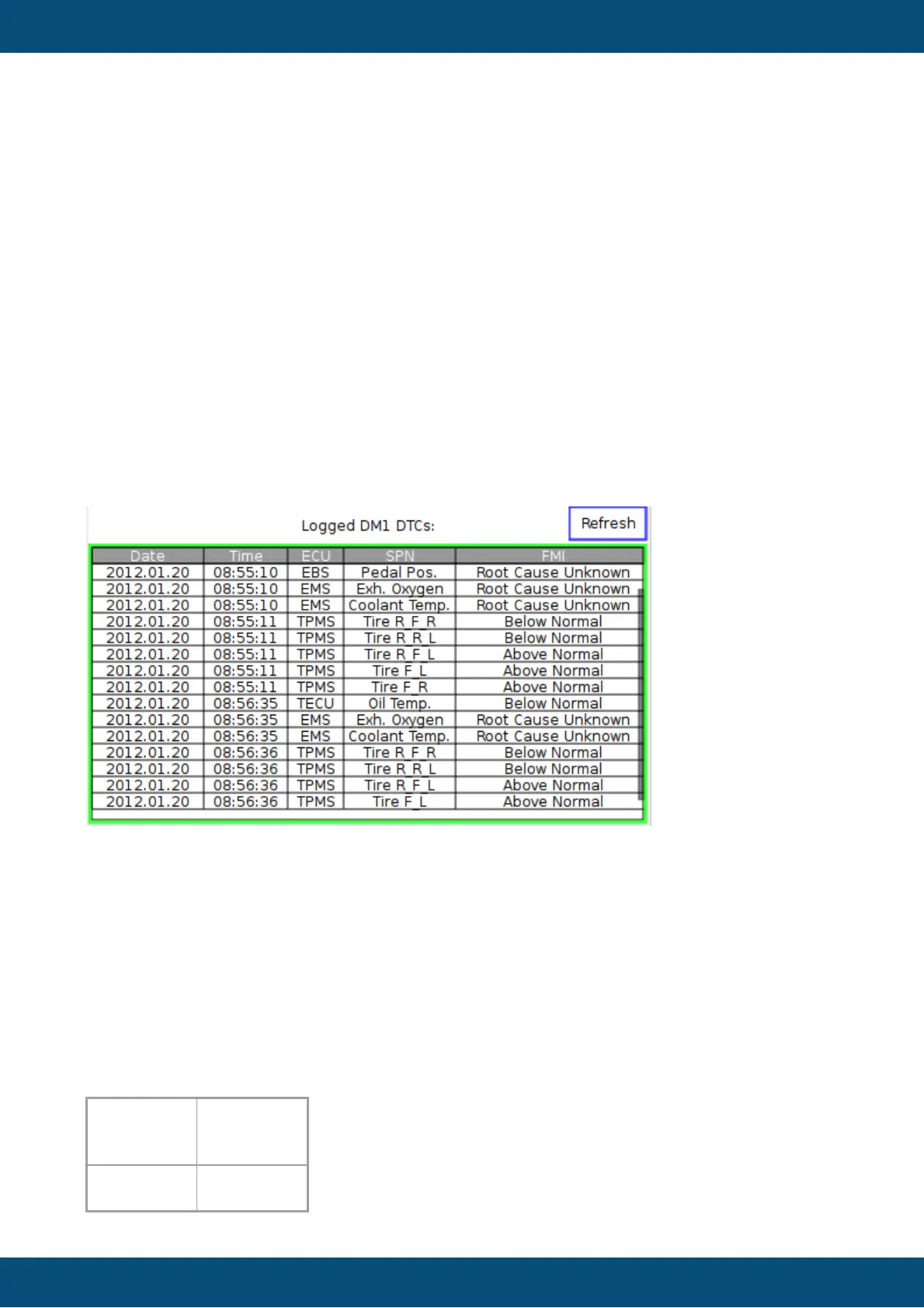
Here is a screenshot from the device displaying the log file contents:
Note: You can scroll through the table if “Set As Input” property of the table is enabled.
Note 2: The JavaScript readFile function is currently limited to only read the first 2MB of a file.
If the log file is larger than that, the rest of the content is not shown. Consider deleting the log
file if the size of it gets too big.
DM1 Lamps
The standard SAE J1939-73 defines four lamps:
- Malfunction Indicator Lamp
- Red Stop Lamp
- Amber Warning Lamp
- Protect Lamp
The status of these lamps is transmitted in the DM1 messages of each ECU in bytes 1 and 2.
Each lamp has a status value (byte 1):
Malfunction
Indicator
Lamp Status



 To Next Page