EasyManua.ls Logo

Topcon OPUS A6G2 - Page 591

Topcon OPUS A6G2
800 pages
Print Icon
To Next Page IconTo Next Page
To Previous Page IconTo Previous Page
Loading...
591
OPUS Projektor Manual
Functionalities
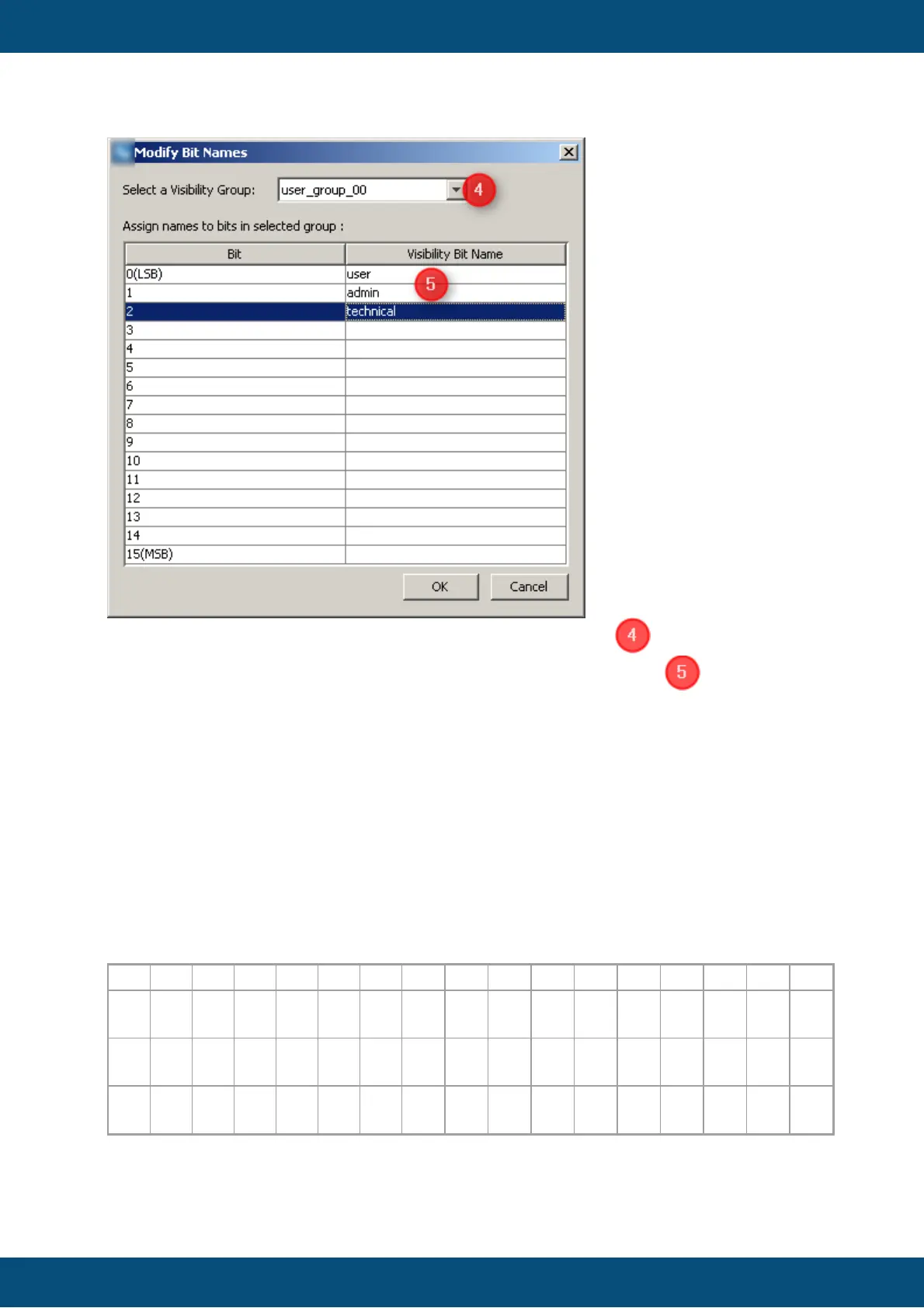
Please select the Visibility variable which you want to configure . Now you can define
for each of the 16 bis (Bit 0 - Bit 15) the correspondent visibility name .
After defining names for the Visibility bits please confirm both dialogs with 'OK'.
Now the Visibility variables is configured properly and it can be used in the project.
NOTE:
Each entry in both tables should be committed with 'Enter' key.

Structure of Visibility Variables
To show the object corresponding to the specific bit of the Visibility variable, this bit should
be set.
@Visibility00
Bit
15
14
13
12
11
10
9
8
7
6
5
4
3
2
1
0
Na
me
tech
nical
adm
in
user
Val
ue
Dec
imal
327
68
163
84
819
2
409
6
204
8
102
4
512
256
128
64
32
16
8
4
2
1

Table of Contents