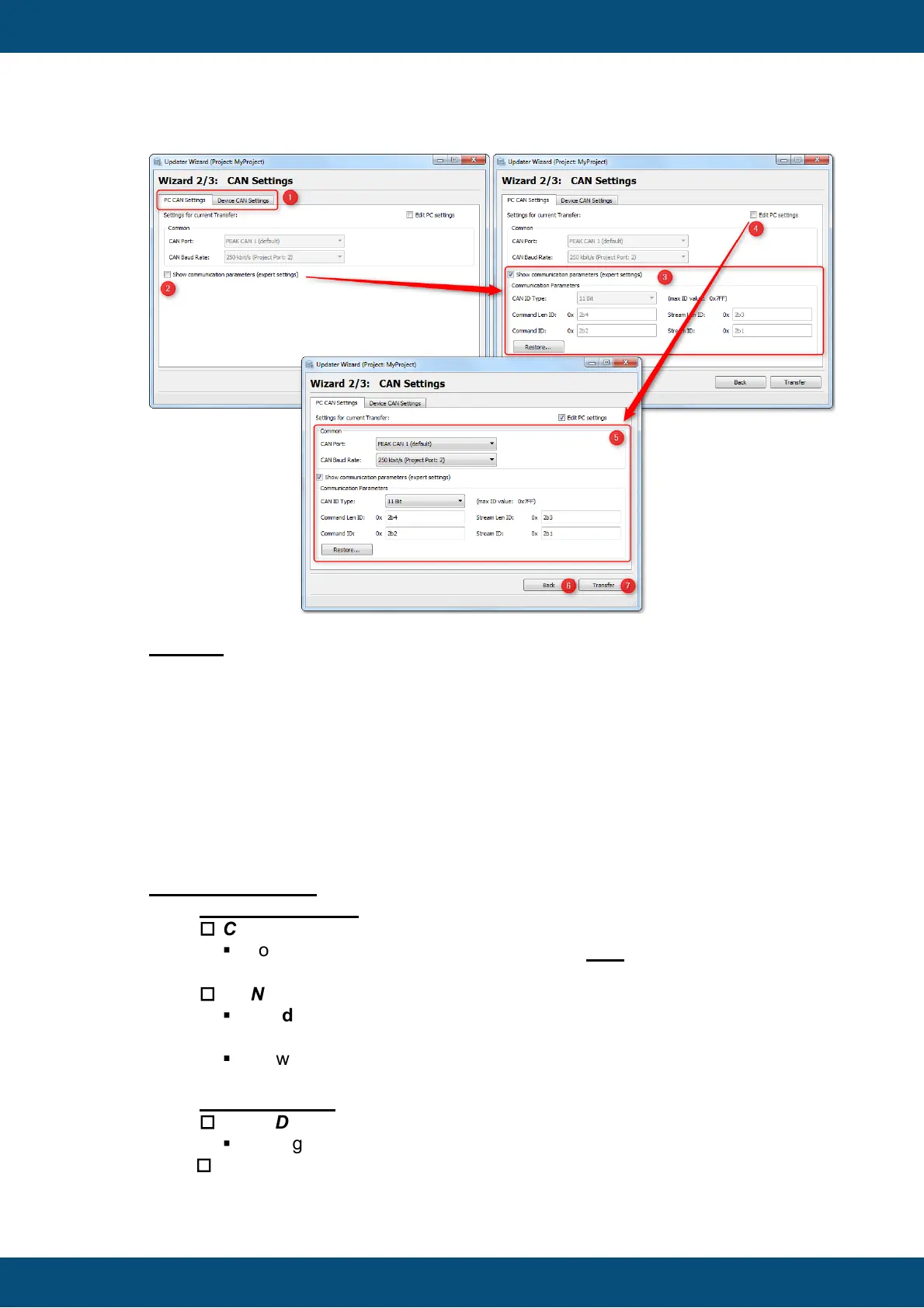
Legend:
(1) With the Tabs you can choose between PC and Device CAN Settings.
(2) Show communication parameters (expert settings) shows the communication
parameters (3).
(4) Edit PC settings enables the settings mask. If it is checked, all parameters can
now be edited (5).
(6) Back button to go back to Start Page.
(7) Starts CAN Transfer with current settings.
PC CAN Parameter
1. Common Settings
o
CAN Port
§
Port Number of the CAN dongle. Currently only PEAK CAN dongles are
supported on Port 1/2.
o
CAN Baud Rate
§
Baud Rate in [kbit/s]. The Project Package will be transmitted with this
Baud Rate
§
Allowed Baud Rates are (20, 50 , 83.333, 100 , 111.11, 125, 250 ,500
,1000)
1. Expert Settings
o
CAN ID Type
§
Setting CAN ID Type for IDs. Either 11 Bit or 29 Bit.
o
Command Len ID



 To Next Page