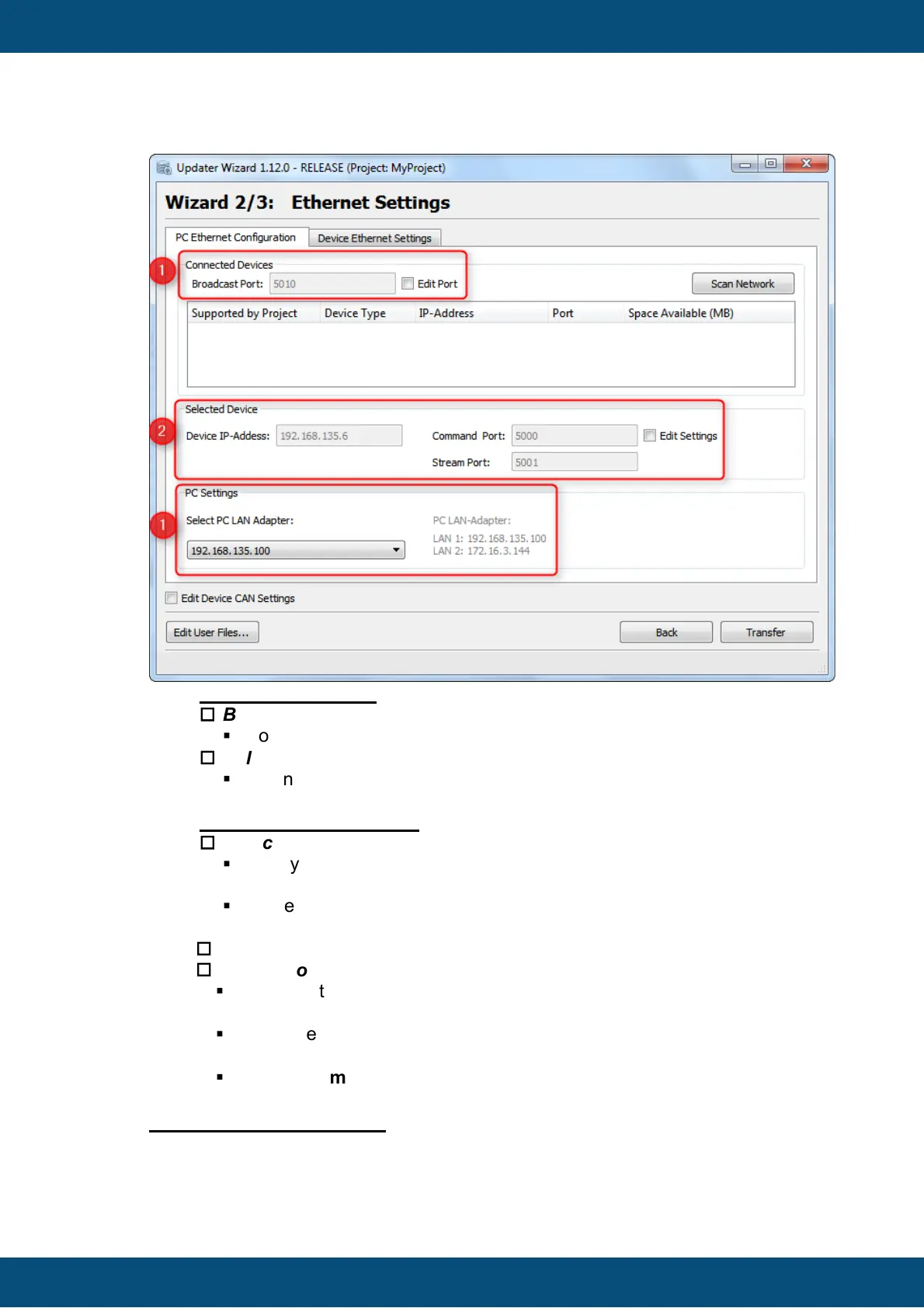
1. Broadcast Settings:
o
Broadcast Port
§
Port Number for Broadcast message to find connected devices.
o
Select PC LAN Adapter
§
When the PC has more than 1 LAN Adapter you can select the Adapter
(Device Net), where the Broadcast messages should be sent to.
2. Selected Device Settings
o
Device IP-Address
§
Here you can configure the IP-Address of the device, where the project
package shall be sent to.
§
If a device from the Connected Devices List is chosen, the IP-Address
will be set automatically.
o
Command Port
o
Stream Port
§
These Ports will be used for Ethernet communication between
HostUpdater on PC and ClientUpdater on device.
§
If a device from the Connected Devices List is chosen, the Ports will be
set automatically.
§
Only the Command Port can be edited, the Stream Port will be set
automatically. (Command Port + 1)
Device Ethernet Parameter



 To Next Page