715
OPUS Projektor Manual
Miscellaneous
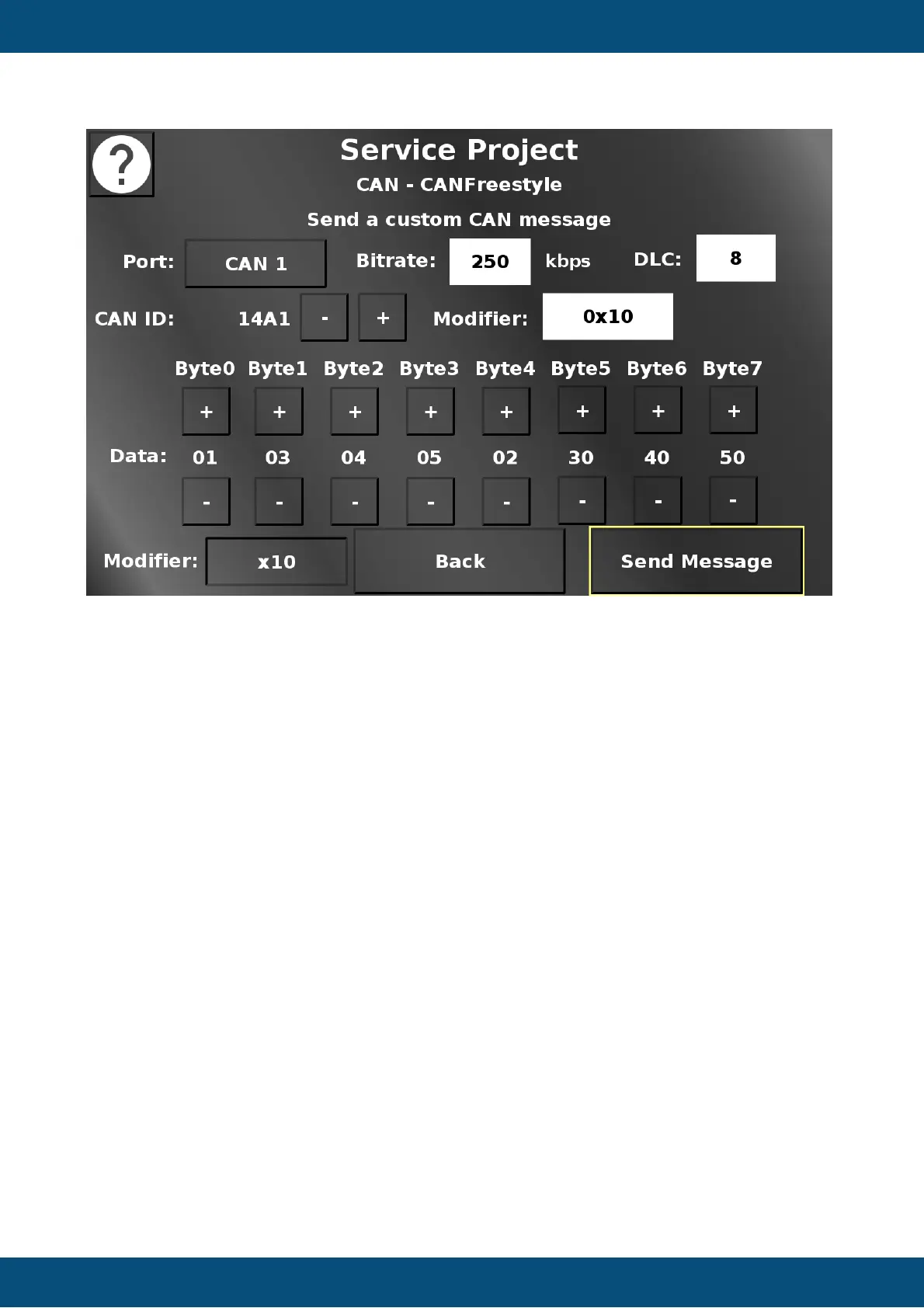
In this screen a custom CAN message can be set up which will be sent to the chosen CAN
bus.
Please note that creating the "wrong" message can be dangerous for the system the device
is connected to.
The CAN 1 / CAN 2 button chooses over which CAN bus the message should be sent.
In the Bitrate dropdown the bitrate can be chosen with which the message should be sent.
In the DLC drowpdown the length of the message can be chosen. Values from 0 to 8 are
possible.
The CAN ID - (minus) and + (plus) buttons change the value of the CAN ID of the message.
The Modifier dropdown chooses the modifier by which the CAN ID will be changed. In the
displayed setup, a press of the + button will change the CAN ID from 0x1A0 to 0x1B0.
The + and - buttons of the data bytes change the data value of each byte.
The segments for the data bytes will be made invisible depending on the DLC selection.
The modifier button in the bottom switches between 0x1 and 0x10. The - / + buttons for the
data bytes modify the value by the selected modifer.
Send Message sends the CAN message with the chosen settings.
Back returns to the CAN menu.
Service Project -> LED / Backlights



 To Next Page