Chapter 8 Operation 40058725 BTA Alpha HSM
Version: 12.19.17 Page 68 of 112 GB
Labeling operation start
Prerequisites
The initial commissioning (see page61) has been completed successfully.
The labeler is supplied with voltage and possibly with compressed air and label
material.
Instruction
This is how to start labeling mode.
Entanglement hazard! Keep away from moving system parts.
Switch on the labeler (see above section).
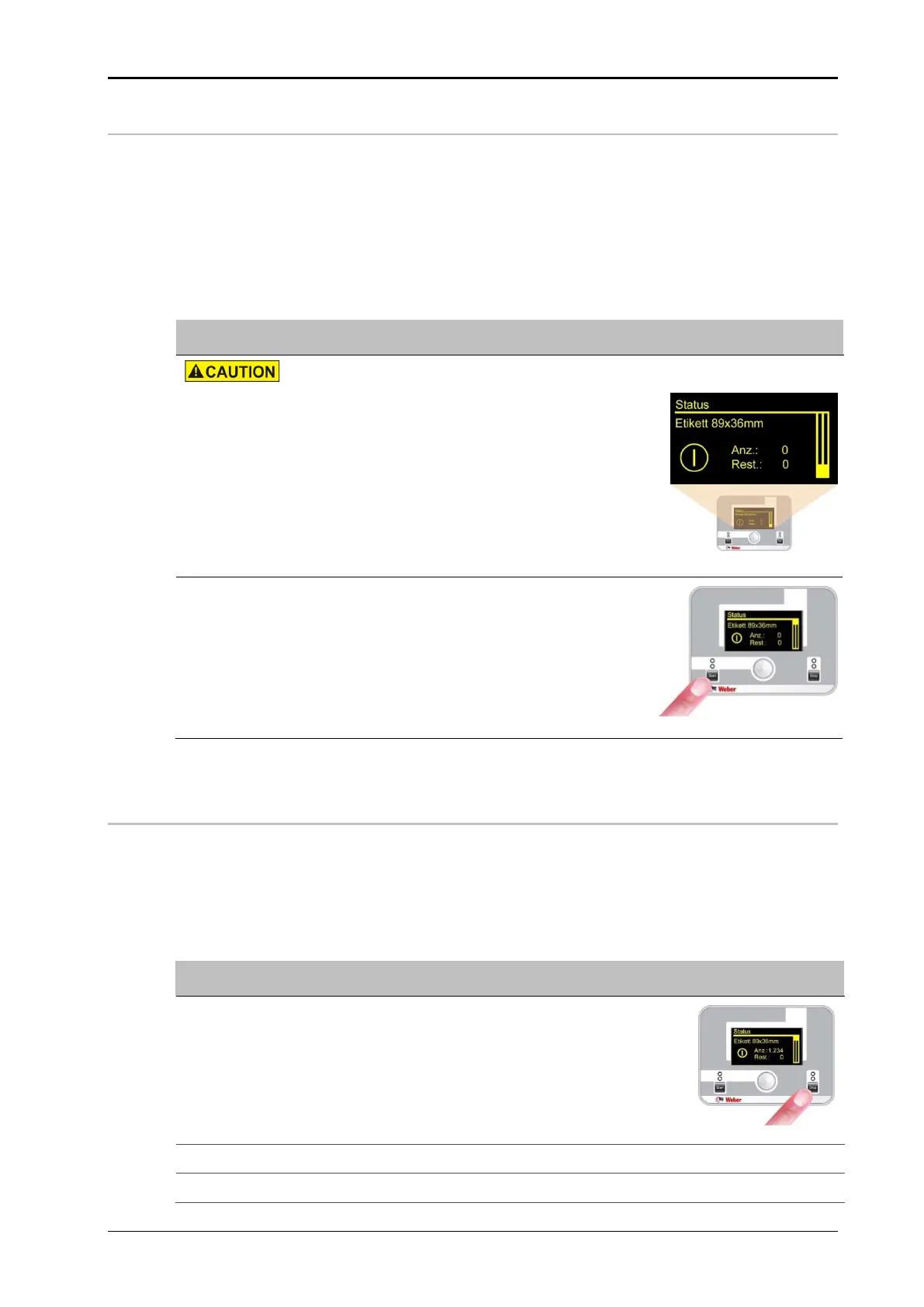
After switching on, the servomotor performs
a reference run and then the status menu is
shown on the display.
Press the [Start] button on the display to ac-
tivate the labeling operation.
Triggering a trigger signal (e.g. product sen-
sor) now leads to the dispensing of a label.
Fig. 8-3: Activate the labeling mode
Stopping labeling mode
Prerequisites
The labeler is in labelling mode...
Instruction
How to stop the labeling mode.
Press the [Stop] button on the display to ter-
minate the labeling operation.
Fig. 8-4: Stopping the labeling mode
Switch off the labeler (see page 67).
If necessary, observe the notes “Decommission the system" (see below).


 To Next Page