Chapter 7 Settings and commissioning 40058725 BTA Alpha HSM
Version: 12.19.17 Page 59 of 112 GB
Perform label calibration
The labeler has a calibration function. With this, the labeler automatically recognizes the
label length and the label stop position (the label stops at the dispensing edge). The cali-
bration function is executed with the HMI display.
When a new format is to be used, manually dispense several labels using the cali-
bration function, which will automatically store the label dimensions in the active
configuration.
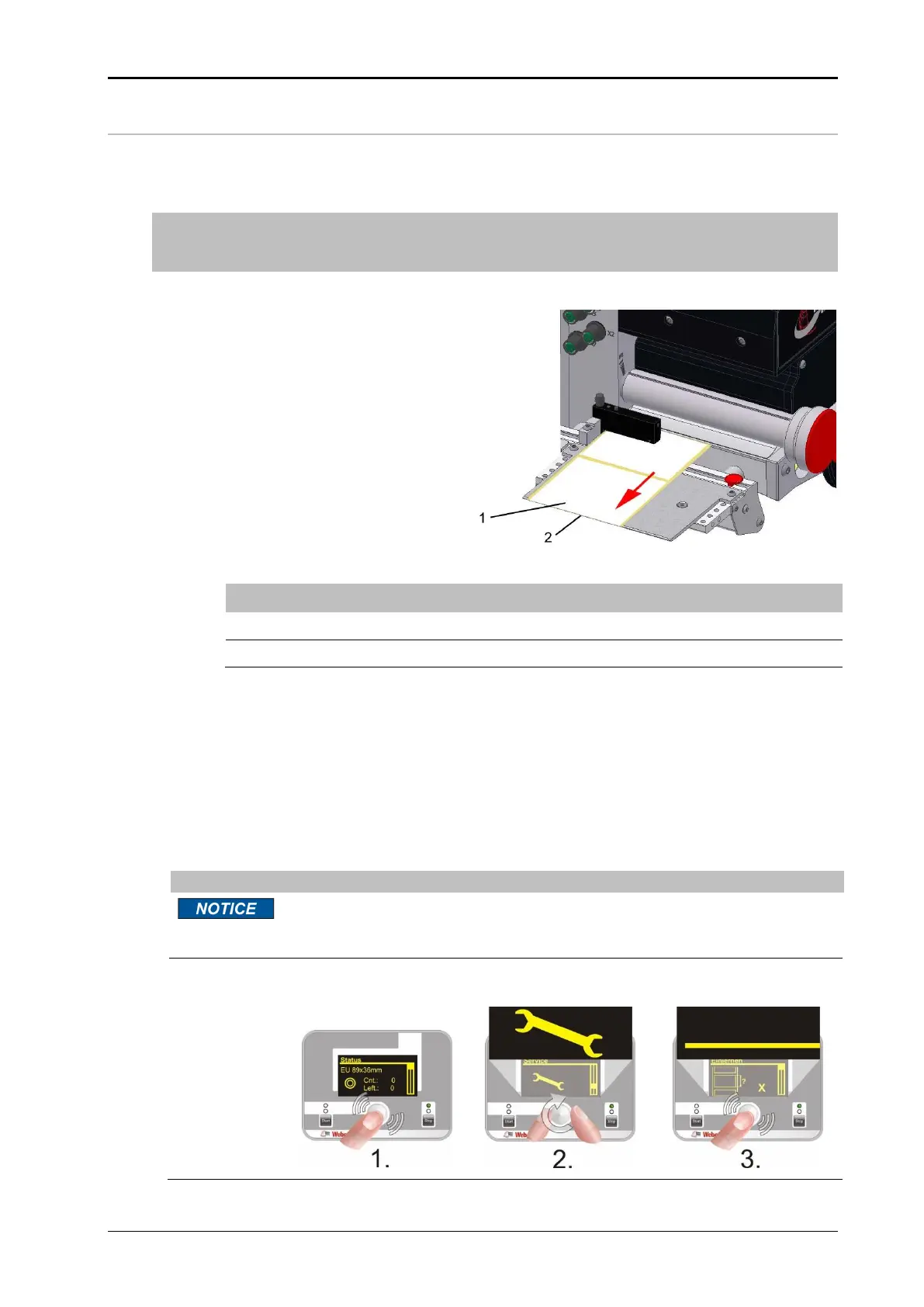
Fig. 7-13 Label calibration
Prerequisites
Label liner is inserted.
Product supply stopped.
Labeling machine is ready for operation.
Instruction
How to calibrate the labeler.
During the calibration process, the labeling system advances several labels
that must be manually removed. Stuck-together labels may cause system
faults.
Navigate to the "Teach" menu page (see Page 86) and confirm by pressing
the setting button.


 To Next Page