Disassembly and Assembly: Fluid Management System (FMS)
Issue 2
121
Part No. 306-0430-102
Fluid Management System (FMS)
WARNING - HANDLING INK, SOLVENT AND TOP-UP
The ink, solvent and top-up are irritating to the eyes and respiratory system. To prevent
personal injury when handling these substances:
Always wear protective clothing and rubber gloves.
Always wear goggles with side-shields or a face mask. It is also advisable to wear safety
glasses when carrying out maintenance.
Apply barrier hand cream before handling ink.
If ink or top-up contaminates the skin, wash immediately with soapy water. DO NOT use
washdown or solvent to clean ink stains from the skin.
Removal
2
7
3
4
5
6
1
(
1
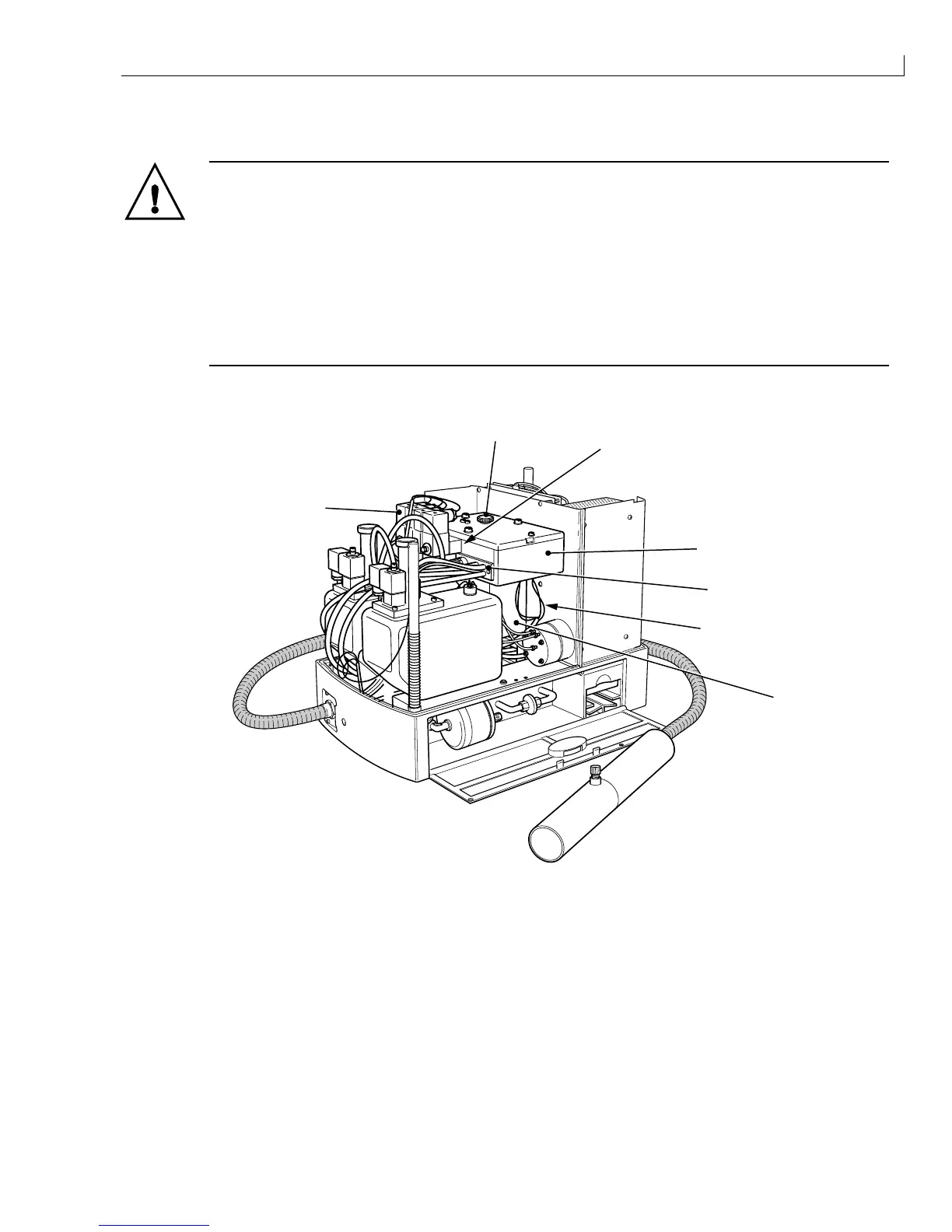
) Filler plug (
5
) VMS sensor connections
(
2
) Printhead manifold (
6
) Mixer tank
(
3
) FMS (
7
) Valves
(
4
) Main manifold
Figure 58 Ink System Removal
1
Remove the filler plug Figure 58 (
1
) and drain the ink system using a syringe and a length of plastic tubing.
2
Unsolder the connections to the VMS level sensors (
5
) and the mixer tank sensors (located in the base of
the mixer tank (
6
)). (Slide the heatshrink on each lead back on to the cable looms to reveal the soldered
connections). Note the colour and destination of each sensor lead.



 To Next Page