430 Ink Jet Printer Service and Maintenance Manual
2
Issue 2
Part No. 306-0430-102
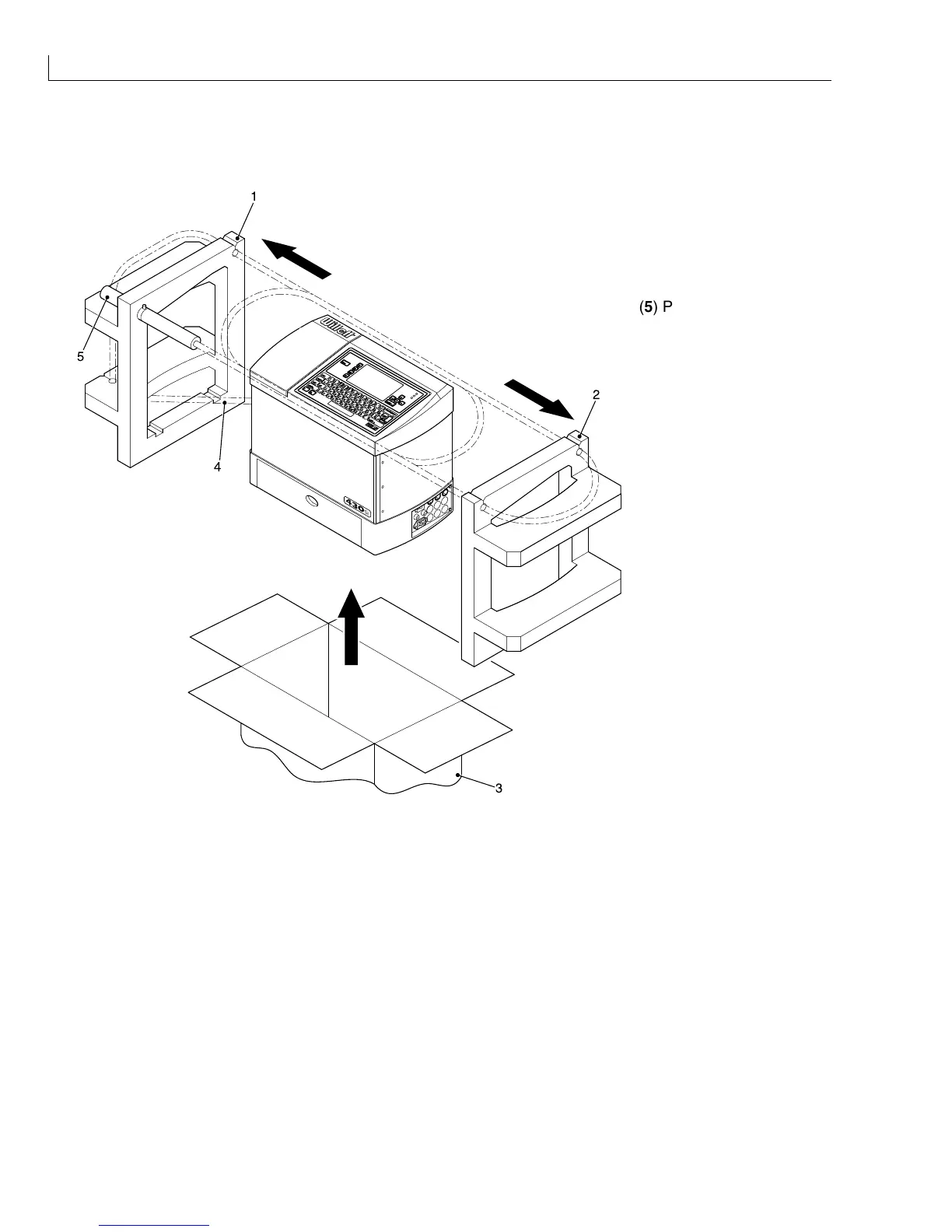
Unpacking
(
1
) Left-hand Insert
(
2
) Right-hand Insert
(
3
) Carton
(
4
) Umbilical
1
2
3
4
5
(
5
) Printhead
Figure 1 Unpacking the Printer
1
Open the top flaps of the carton and gently pull the complete machine and inserts (
1
and
2
) upwards from
the carton.
2
Place the printer and inserts on a clean level surface.
3
Remove the printhead (
5
) from the left-hand insert (
1
).
4
Remove the umbilical (
4
) from its transit routeing.
5
Remove the left-hand insert and right-hand insert (
2
).
6
Place the printer on a clean level surface for commissioning.



 To Next Page