430 Ink Jet Printer Service and Maintenance Manual
160
Issue 2
Part No. 306-0430-102
Umbilical Purge
Carry out an umbilical purge:
•
to prevent debris from blocking the nozzle if the printer hasn’t been used for a long time;
•
if contamination of the umbilical is suspected;
•
if a new umbilical has been fitted.
1
Set the mains switch to off and disconnect the printer from the mains supply.
2
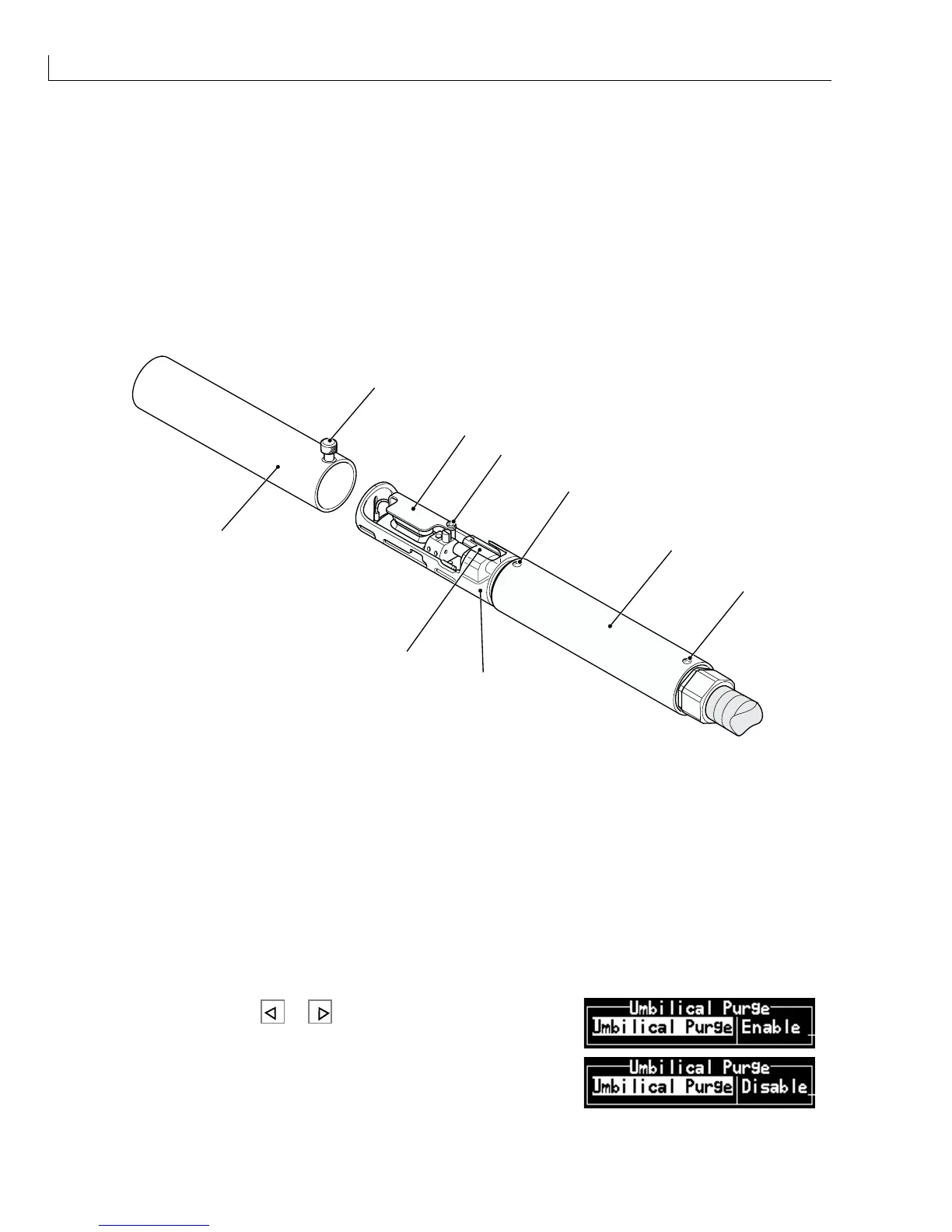
Loosen the knurled screw (Figure 79 (
3
)) and remove the printhead front cover (
8
).
1
3
2
8
7
6
4
4
5
(
1
) Ground potential deflector electrode (
5
) Rear cover
(
2
) Securing screw (
6
) Printhead body
(
3
) Knurled screw (
7
) Nozzle assembly
(
4
) Rear cover securing screws (
8
) Front cover
Figure 79 Printhead Assembly
3
Remove the rear cover securing screws (
4
) and slide the rear cover (
5
) off the printhead body (
6
).
4
Remove the umbilical feed and return pipes from the nozzle feed and return pipes and loop them together.
5
Connect the printer to the mains supply and set the mains supply to on.
6
Select the
Umbilical Purge
option from the System menu.
7
Select
Enable
and press
or to start the umbilical purge.
8
After fifteen minutes stop the umbilical purge, by selecting
Disable
from the
Umbilical Purge
option.



 To Next Page