System Calibration and Test: Phase Profile Adjustment
Issue 2
37
Part No. 306-0430-102
Phase Profile Adjustment
1
Ensure that the phase detector is approximately 1 mm from the ink jet. If not, align the printhead as
described in
Printhead Alignment
, page 161.
2
From the
Calibrate
menu select
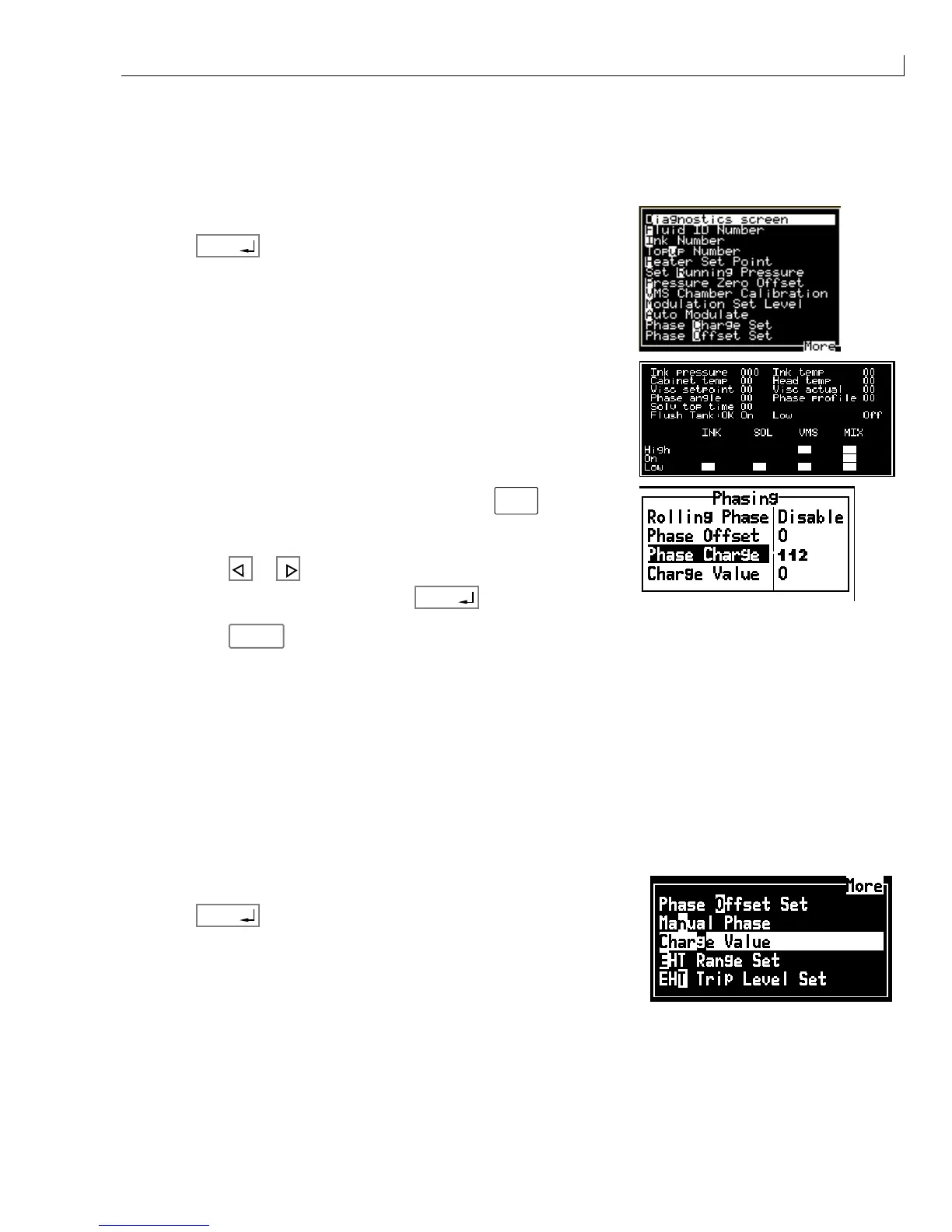
Diagnostics screen
.
3
Press
enter
.
4
Check that the Phase profile is 8 ±1.
If the Phase profile is incorrect, adjust it as follows:
a
Remain in the Diagnostics screen and press
alt
+
L,C
.
b
The display shows Phase Charge.
c
Press
or to adjust the Phase Charge until the correct
Phase profile is displayed then press
enter
.
d
Press
esc
to exit the Diagnostics screen.
5
Ensure that the jet is 4 mm ±0.25 mm from the +ve EHT plate. Also ensure that the 0 V EHT plate is parallel
to the jet. If any adjustments are required, refer to the printhead alignment procedure in
Printhead
Alignment
,
page 161.
Phase Offset Calibration
Set the phase offset to 11.
Print Charge Value Calibration
1
Enter a test message that represents the specific customer requirement.
2
From the
Calibrate
menu select
Charge Value
.
3
Press
enter
.



 To Next Page