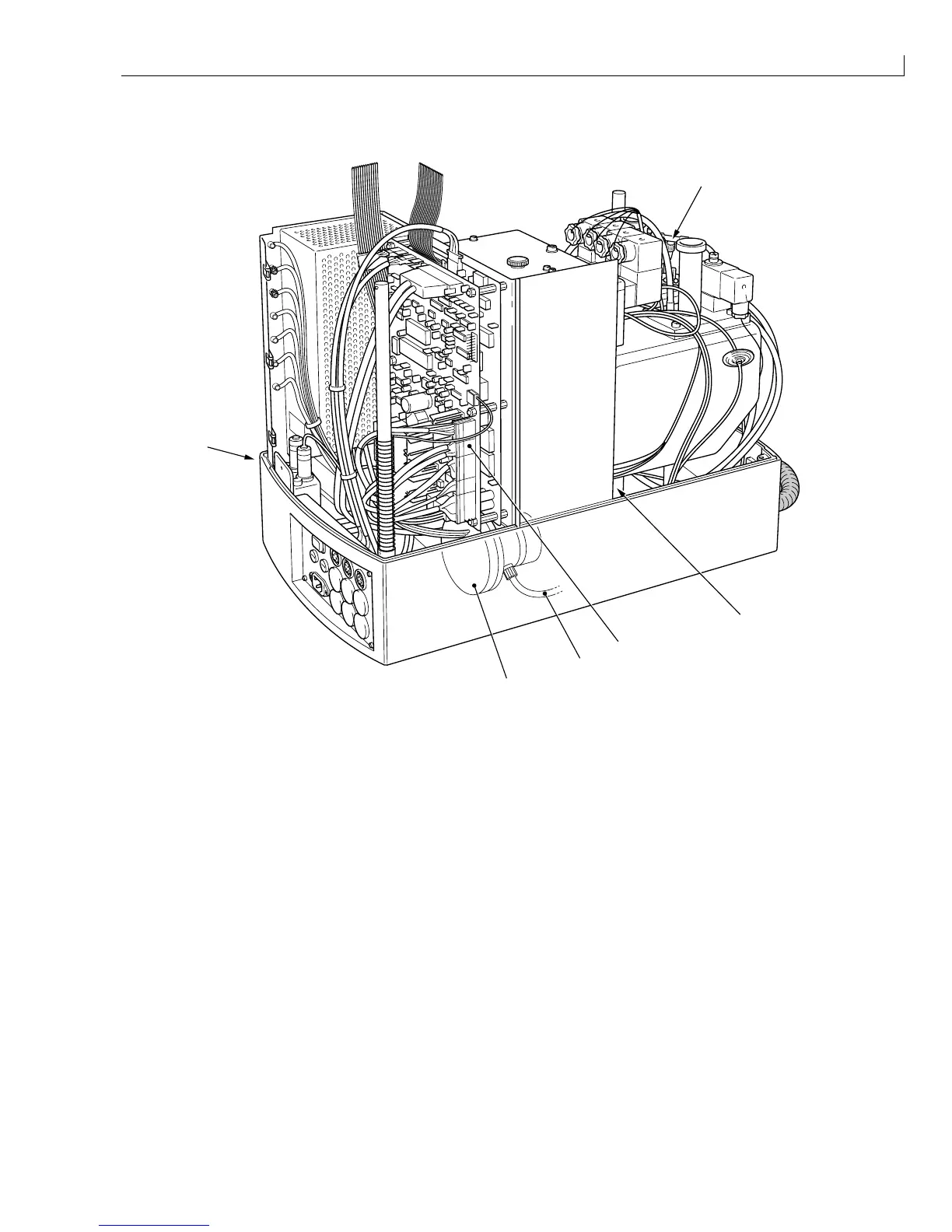
Disassembly and Assembly: Ink System Pump
Issue 2
123
Part No. 306-0430-102
Ink System Pump
2
3
4
5
1
2
(
1
) T connector (
4
) Pump feed pipe
(
2
) Baffle plate fixing screw (
5
) Ink system pump
(
3
) PUMP connector
Figure 59 Ink System Pump Removal
Removal
1
Disconnect the top of the pump feed pipe (
4
) from the T connector (
1
) located closest to Valve V1 (Top up
valve). This will prevent ink being siphoned from the ink system when the pump is disconnected.
2
Disconnect the PUMP connector (
3
) from the I/O board.
3
Remove and retain the two screws (
2
) securing the baffle plate to the base moulding.
4
Move the baffle plate assembly to one side to allow access to the pump.
5
Place a wad of tissue or absorbent cloth underneath the pump to catch any ink spillage.
6
Disconnect the ink feed (
4
) and outlet pipes from the pump.
7
Use the arrow on the pump head to note orientation.
8
Remove and retain the two screws securing the pump.



 To Next Page