430 Ink Jet Printer Service and Maintenance Manual
18
Issue 2
Part No. 306-0430-102
7
From the
Data Logging
menu, select the
Serial Port Functionality
option
8
Set
Status
to
Disable
and press.
9
From the
System
menu select Debug Monitor.
10
Set
Com1
to the active port. The prompt
MON>
should appear in the PC Terminal Window.
11
To confirm that the communications link is effective press
enter
on the PC. The prompt
MON>
should
appear a second time, e.g.:
MON>
MON>
12
Press
X
and then
enter
on the PC to return the printer to normal control.
13
From the
Data Logging
menu, select the
Serial Port Functionality
option.
14
Reset
Status
to
Enable
.
Windows 95/98 Procedure
Checking the Communications Link
1
Before attempting to download new software check the communications link between the PC and the
printer.
2
Using a pre-configured connection cable, connect Com1 of the PC to COMM1 of the 430 Printer.
3
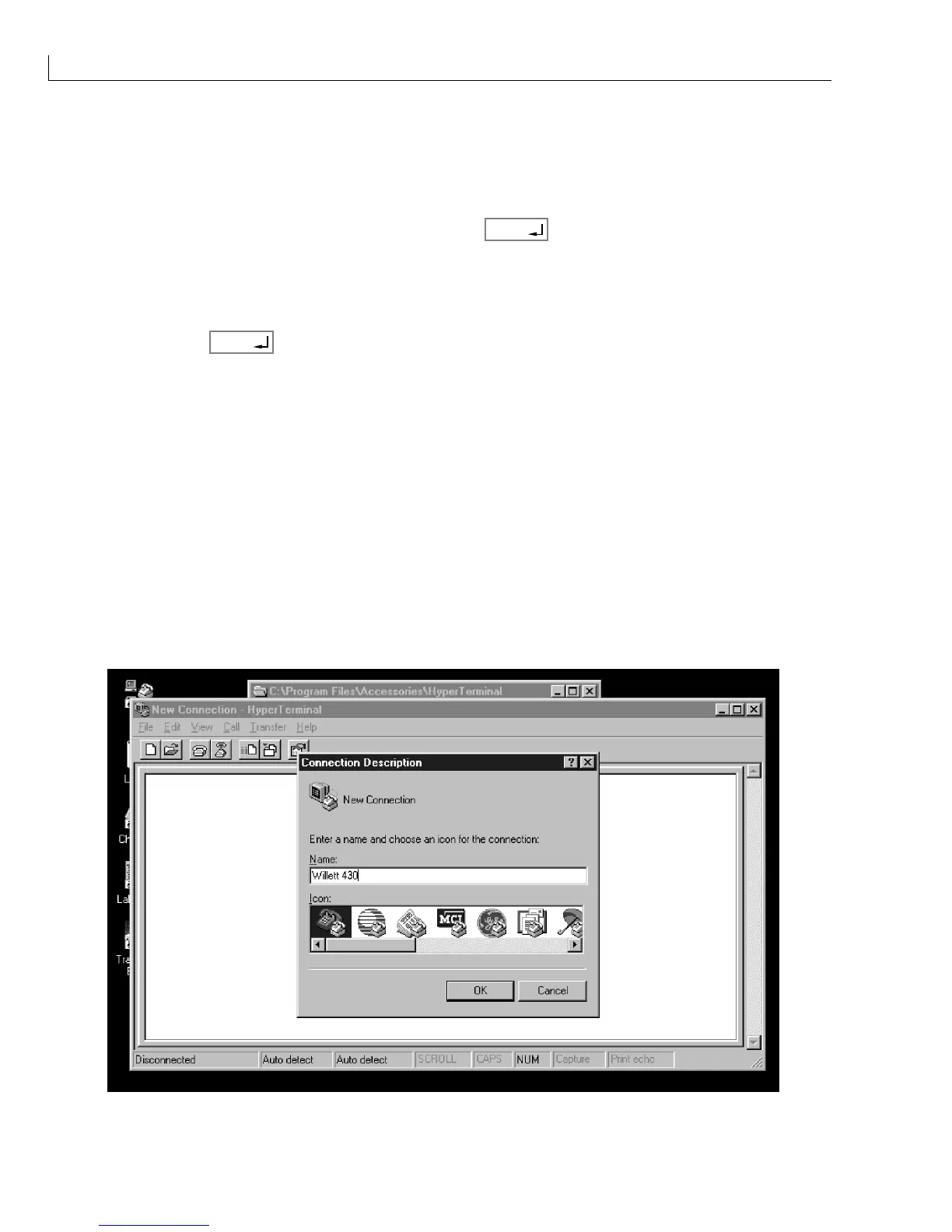
On the PC run the HyperTerminal program.
The
Connection Description
window opens requesting a title and an icon for the new connection.
4
Enter the details and click
OK
.
Figure 8 New Connection Menu



 To Next Page