430 Ink Jet Printer Service and Maintenance Manual
96
Issue 2
Part No. 306-0430-102
Quick Stop Jet Sequence
When the quick stop jet sequence is initiated the following automatically takes place:
1
Switch off EHT and set ink pressure to 3.5 bar.
2
Bleed valve V12 opens and jet valve V11 closes.
3
Wait 2 seconds - bleed valve V12 closes.
4
Wait 30 seconds - ink feed valve V6 and gutter valve V8 close.
5
Pumps switch off.
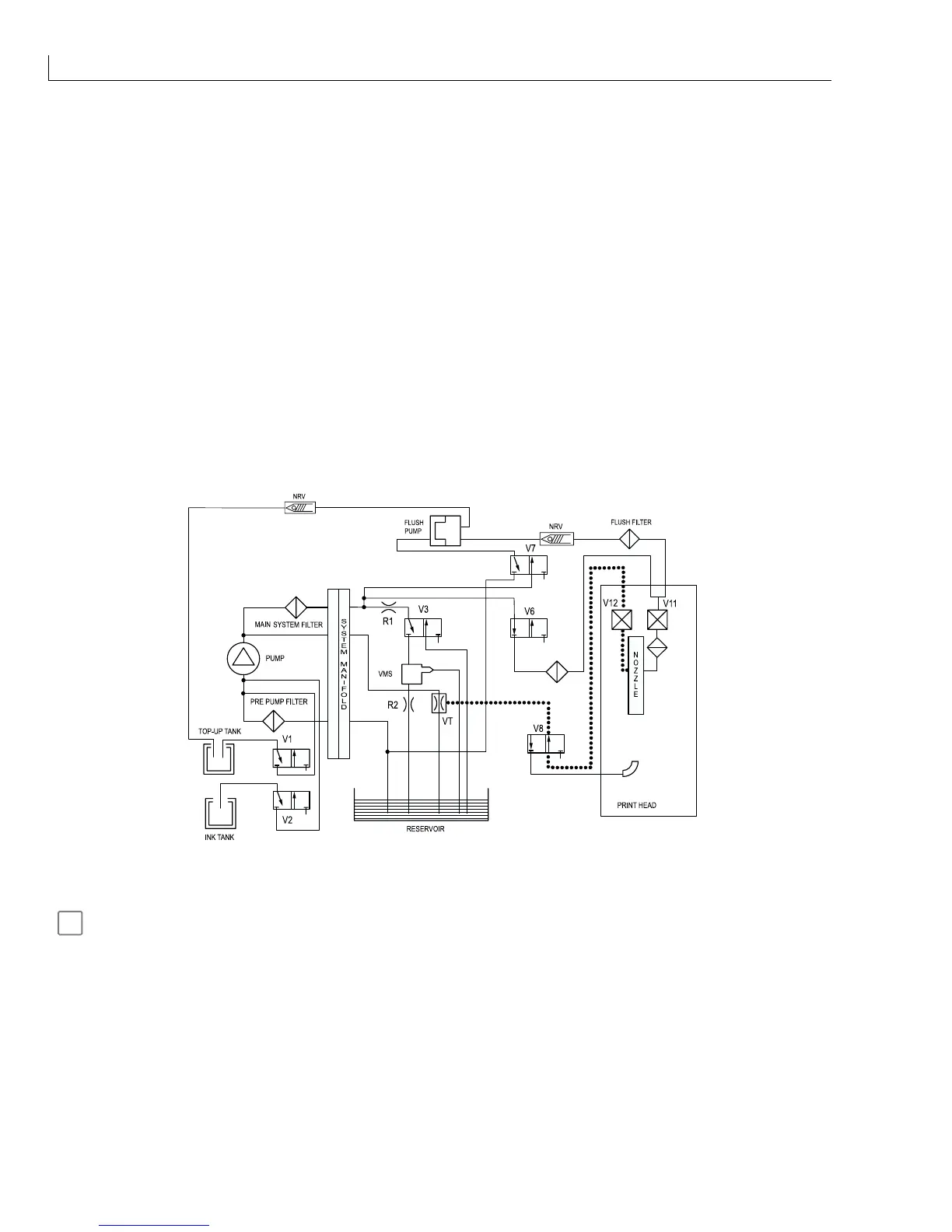
Nozzle Flush
When
Nozzle flush
is selected, the vacuum from the venturi is applied to the return side of the nozzle, creating
suction at the nozzle orifice. Solvent is applied to the nozzle orifice to clear any blockage (Figure 48).
PRE HEAD FILTER
NOZZLE
FILTER
GUTTER
Figure 48 Nozzle Flush
Nozzle flush will automatically time out after 2 minutes but can be stopped at any time before that by pressing
f1
Abort Flush
.
A nozzle flush can be started with the jet running or stopped. If the jet is running, selecting
Nozzle flush
will first
of all de-energise feed valve V6 to stop the flow of ink to the nozzle.



 To Next Page