Asynchronous Transfer Mode – ATM
Page 108 Acterna ANT-5
6.8.5 Viewing Results from the Channel Explorer
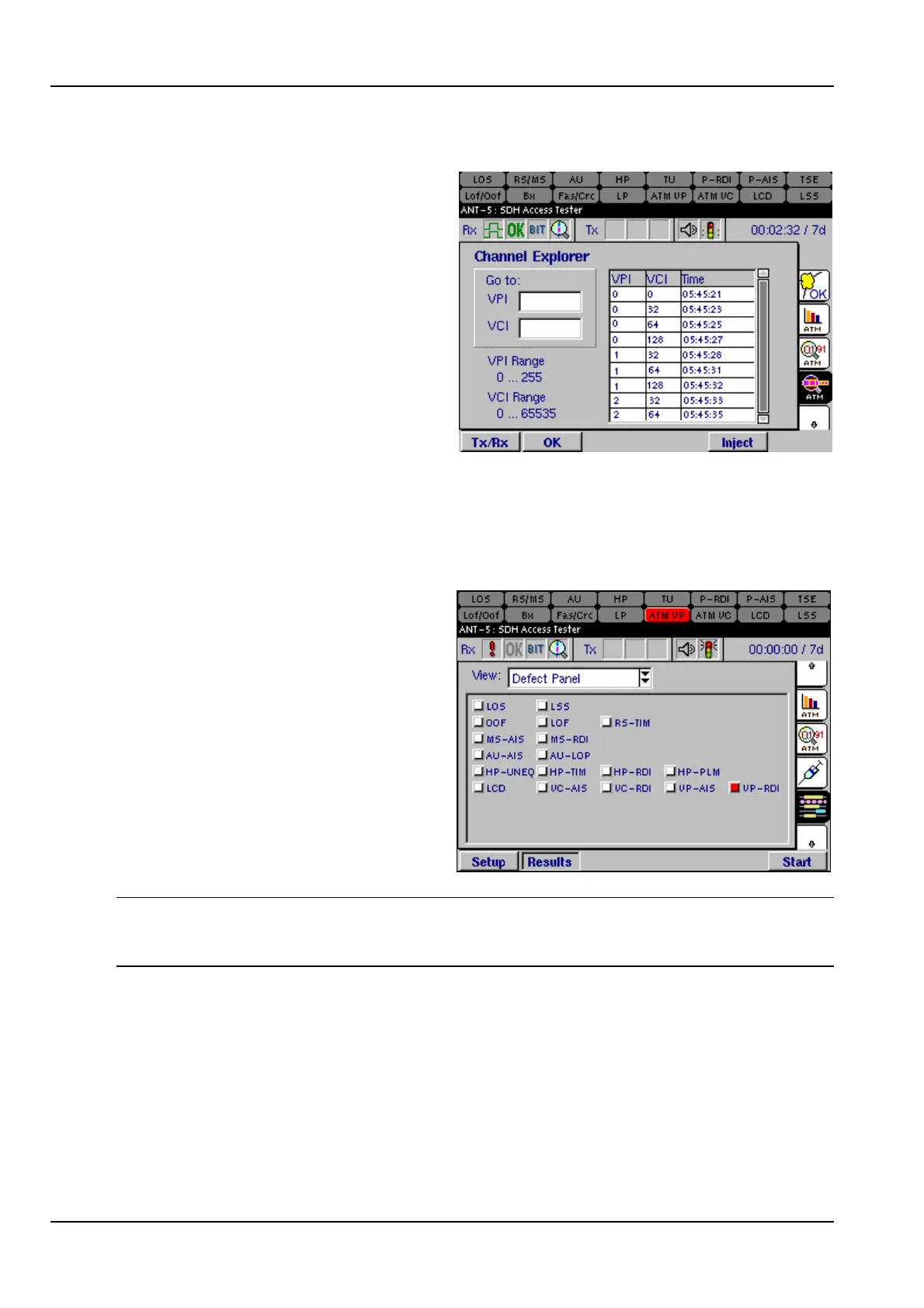
The Channel Explorer lists results for
channels on which the ANT-5 conducts
tests. You can scroll down the entire
list of channels, or type channel
numbers in the VPI and VCI text boxes.
If you type the number of a channel
that is not available, the Explorer lists
the next lowest channel. The time
stamp indicates the most recent time a
VPI/VCI channel was detected.
6.9 ATM anomaly and defect results
6.9.1 Defect Panel
The Defect Panel view lists the ATM
defects, namely LCD, VC-AIS,
VC-RDI, VP-AIS and VP-RDI defects.
The defect panel continually updates,
displaying active events in red. The
defect panel LED’s turn yellow during
a test to show historic alarms, that is,
defects that have been raised during
a test but are not currently active. To
reset the LEDS press Alt and Menu
and select System >LEDs >Reset
LEDs.
Note: PLM, UNEQ and TIM alarms are associated with G832 framing in PDH E3 or
E4 mode. If these alarms are generated the HP soft led situated at the top of the
screen will light up.



 To Next Page