The SDH Access Tester application
Acterna ANT-5 Page 63
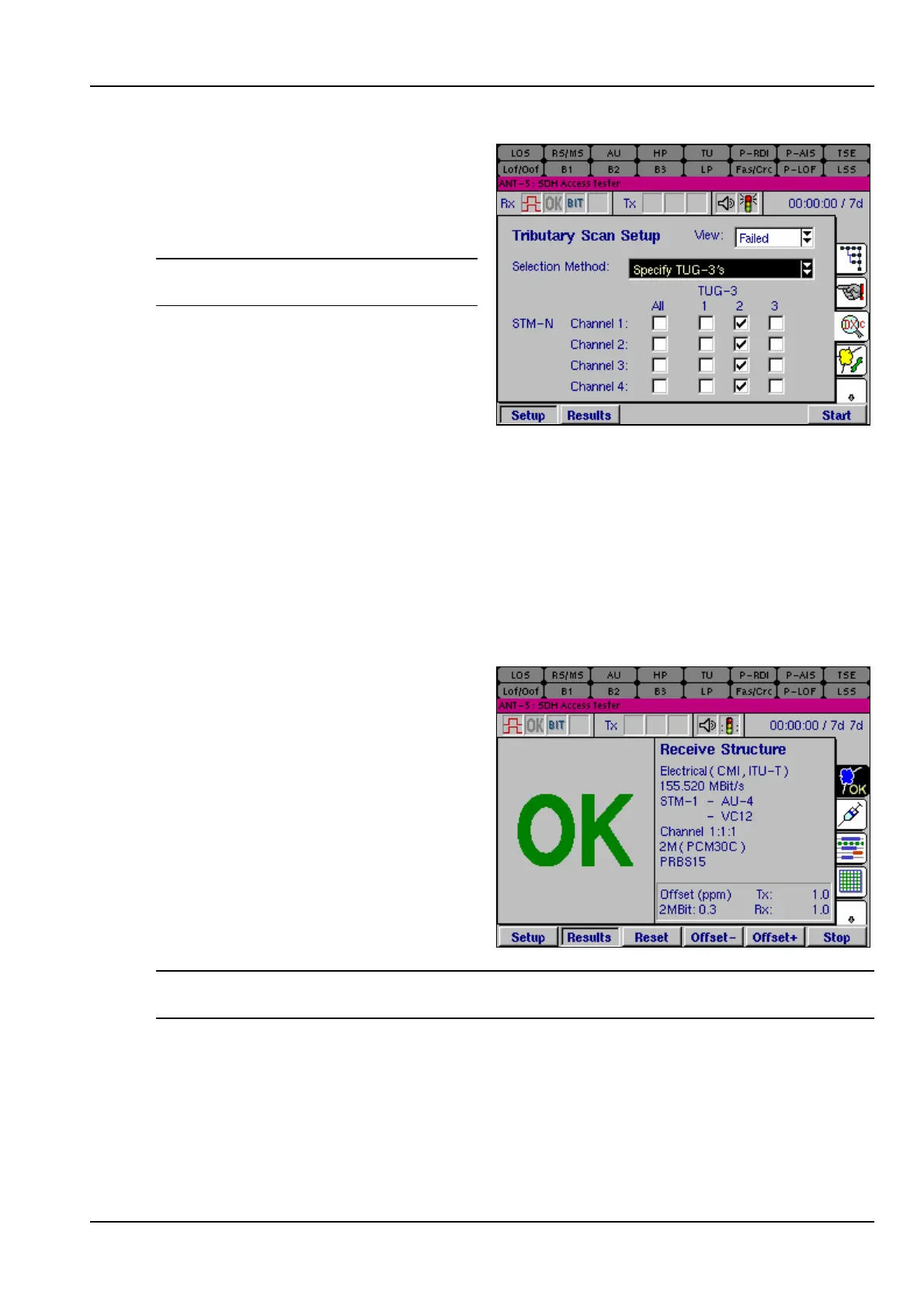
This example will validate the
tributaries within the second TUG-3
structure, for each of the STM-4
channels, (assuming the STM-4
option is fitted).
Note: See Section 4.16, VC12
Tributary Scanning Results.
4.9 Results
The results screens are selected by pressing the Results function key. This displays a
range of tabbed pages, similar to the setup pages. Some of the results pages use a
split screen layout, with the large OK in the left half of the screen, and other details of
the test in the right half of the screen. Other results pages use the whole screen and
may have multiple pages which can be selected from the main screen.
4.10 Results Summary
The first tabbed page displays a
summary of test results.
The left half of the page displays the
green large OK as long as there are
no defects or anomalies recorded. If
any defects or anomalies occur during
a test, the large OK disappears and is
replaced by a list of continually
updated defects and anomalies that
have been detected by the instrument
during the test.
Note: Assuming the previous test was successful, the large OK will be greyed out
whilst the current test is being configured.
4.10.1 Clock Offset results
Once the test has started the ANT-5 samples the received signal from the network
element then calculates and displays the result of the frequency offset. The ANT-5
displays the Rx offset to check a network element is transmitting correctly.



 To Next Page