Page A–50
DuRApulse GS4 AC Drive User Manual – 1st Ed, Rev A - 10/20/2017
Appendix A: Accessories
Fan Removal (continued)
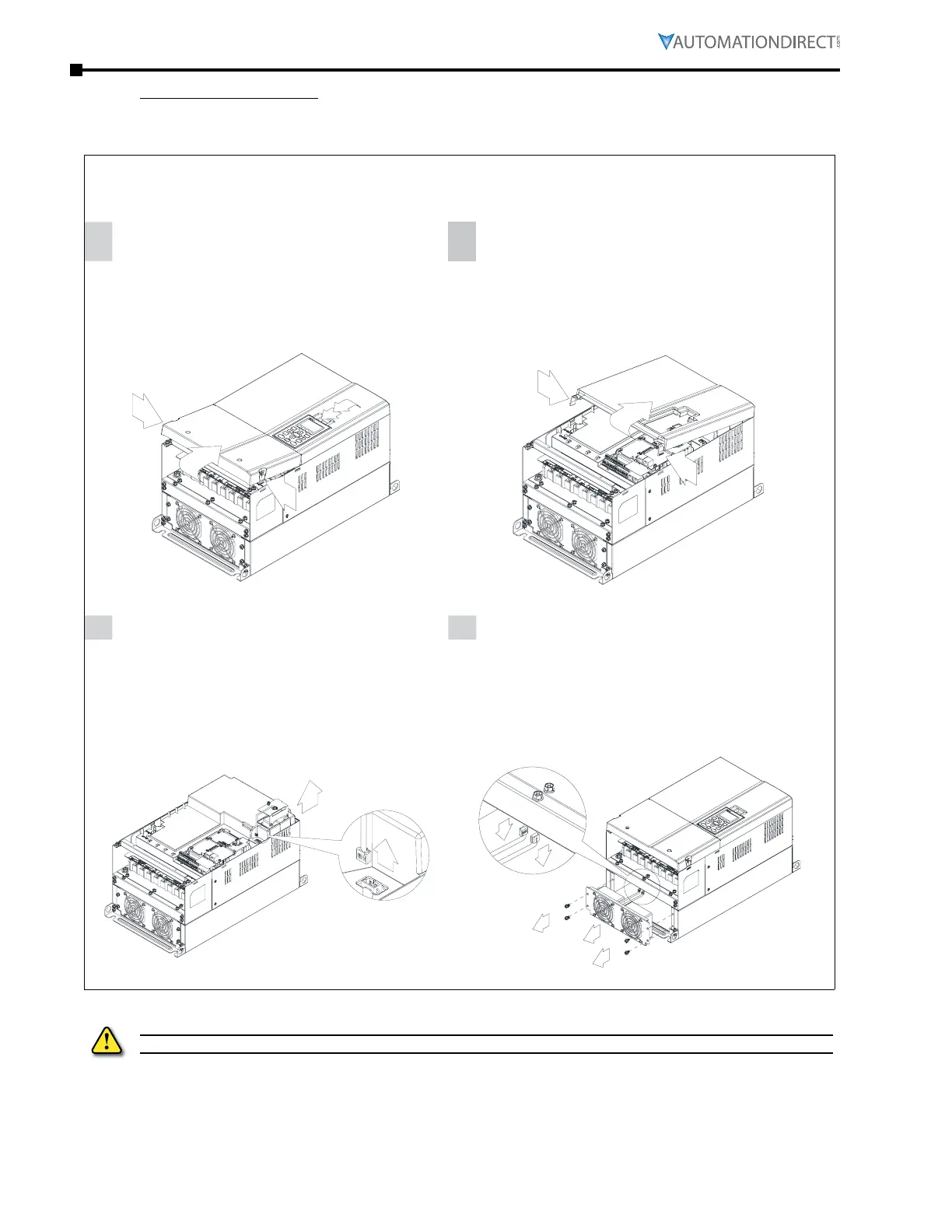
frame d0
Applicable models:
GS4-4050, GS4-4060
1
Loosen screws 1 and 2, press the tab on the
right and the left to remove the cover, follow
the direction the arrows indicate. Press the
tab on top of digital keypad GS4-KPD to
properly remove the keypad.
Screw torque: 10 - 12 kg·cm (8.6 - 10.4 lb·in)
2
Loosen screw 3, press the tab on the right and
the left to remove the cover.
Screw torque: 6 - 8 kg·cm (5.2 - 6.9 lb·in)
1
2
3
3
Loosen screw 4 and disconnect the fan power.
Screw torque: 10 -12 kg·cm (8.6 - 10.4 lb·in)
4
For heat sink fan:
Step 1. Loosen the screws.
Screw torque: 24 - 26 kg·cm (20.8 - 22.6 lb·in)
Step 2. Disconnect fan power and
pull out the fan.
4
1
2
3
4
Remove poWeR fRom dRIve pRIoR to INstAllAtIoN ANd/oR RemovAl of AccessoRIes.



 To Next Page
 Loading...

