MVX250i E, MVX200i E, MVX200 E
GENERAL DESCRIPTION OF PRODUCT
25
5-13 Built-in microphone Stereo using electret condenser microphone
5-13-1 Wind screen function Supported ; AUTO or OFF can be selected (Selected from menu. However, built-in microphone
only.)
5-14 Auxiliary light (MVX250i E, MVX250i E only)
Equipped with white LED
5-14-1 Lighting mode Night+ mode : LED is forcibly lighted.
Super Night mode : LED lights depending on brightness of the subject.
5-15 Other additional functions
5-15-1 Time code Displays recording time (0:00:00 to 7:59:59) and records in sub-code area.
5-15-2 Data code The date and camera information during recording are automatically recorded and can be dis-
played during playback.
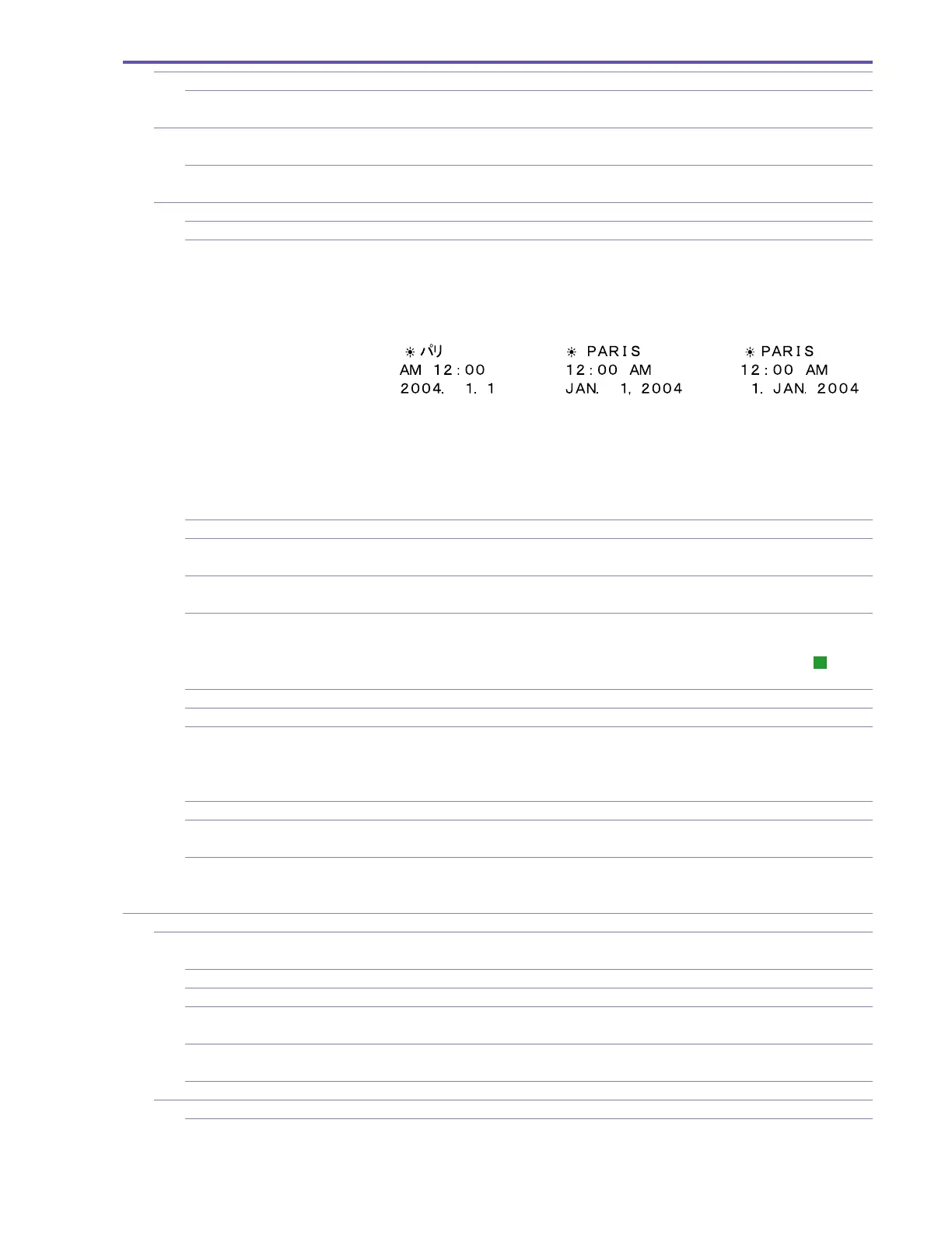
a. Time and date Automatic calendar range: January 1, 2004 through December 31, 2030 (the initial setting is
January 1, 2004)
One of the following three formats can be selected for the date / time display.
World clock capability (select the name of your destination city and the date and time are auto-
matically adjusted to the local date and time.) Supports daylight savings time.
During playback, time can be displayed in three different modes (date only, time and date, or
time only). (Time and date can be displayed for January 1, 1990 through December 31, 2089.)
b. Camera data Shutter speed and aperture value information are recorded (but not displayed during recording),
and can be displayed during playback.
5-15-3 Accessory shoe Supported. Advanced accessory shoe supported (MVX250i E only)
5-15-4 REC Search mechanism Supported. Tape can be played (forward or reverse) by pressing the REC Search button while
camera recording is paused. (When REC Search ends, camera recording is paused again.)
5-15-5 REC Review Supported. Accessed by operating the Recording Check button when camera recording is paused
(in Tape mode only).
5-15-6 Zero Set Memory Supported. This function allows you to rewind or fast-forward the tape to the position where the
WL-D83 Zero Set Memory key is pressed (the counter value is set to 0:00:00). (During record-
ing, only zero setting is allowed. This function can be used in Playback mode.) “
M
” display
appears at the far right of the counter.
5-15-7
Remote control reception ON/OFF
Possible. This can be done in Camera mode and VCR mode (by selecting from menu).
5-15-8 Headphone volume adjustment Possible. Adjustable with SET button
5-15-9 16:9 shooting High- resolution 16: 9 (CCD extraction equivalent to approx. 790,000 pixels when image stabi-
lizer is ON or CCD extraction equivalent to approx. 920,000 pixels when image stabilizer is
OFF). If 16: 9 mode is selected, the screen switches to a letterbox display (with black bands
(masked) at the top and bottom)). In Tape mode only
5-15-10 AEB shooting Included. (First shot : No correction, Second shot : -0.5 level, Third shot : +0.5 level)
5-15-11 Skin detail mode When skin areas are detected, they are expressed softly, and the small blemishes, lines, etc.
become unnoticeable. ON or OFF setting possible.
5-15-12 Still image check time setting The time used for checking still images can be set after the photo button is pressed and its
operation is released. One of 6 settings; OFF (0 sec), 2, 4, 6, 8 or 10 seconds can be selected as
the setting mode.
6 Recorder
6-1 Recording functions Camera shooting and recording, DV input recording**, analog input recording
** : MVX250i E, MVX200i E only
6-1-1 Recording format Consumer electronics digital DVC (SD specs)
6-1-2 Tape speed Approx. 18.83 mm / second (in SP mode), approx. 12.57 mm / second (in LP mode)
6-1-3 DV input recording Complies with IEEE1394.
Records video / audio signals from a digital video camera connected through a DV cable.
6-1-4 Analog input recording Records analog video / audio signals using an S-Video terminal or AV terminal.
(MVX250i E, MVX200i E only)
6-1-5
Priority of terminals during recording
DV terminal > S-Video terminal > AV terminal (MVX250i E, MVX200i E only)
6-2 Audio Dubbing Recording Possible. (SD spec tapes only)
6-2-1 Insert-capable tape Only tapes with 12- bit/ SP recording (other than 4- channel simultaneous recording) can be used
in Audio Dubbing Recording.



 To Next Page