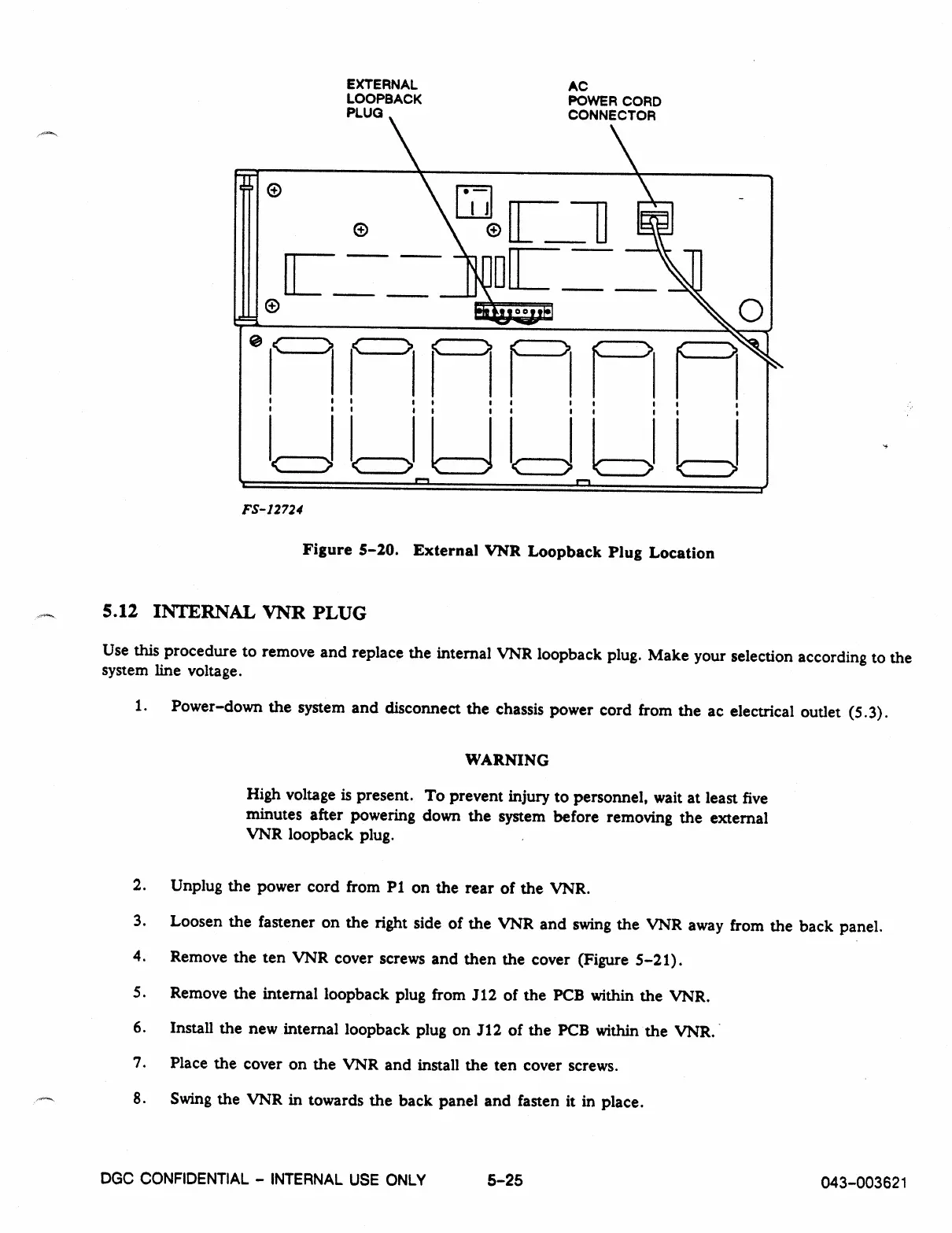
EXTERNAL
AC
LOOPBACK
POWER CORD
PLUG
CONNECTOR
0
1
<
!
> L:=).
FS-12724
Figure 5-20. External VNR Loopback Plug Location
5.12 INTERNAL VNR PLUG
Use this procedure to remove and replace the internal VNR loopback plug. Make your selection according to the
system line voltage.
1.
Power-down the system and disconnect the chassis power cord from the ac electrical outlet (5.3).
WARNING
High voltage is present. To prevent injury to personnel, wait at least five
minutes after powering down the system before removing the external
VNR loopback plug.
2.
Unplug the power cord from P1 on the rear of the VNR.
3.
Loosen the fastener on the right side of the VNR and swing the VNR away from the back panel.
4.
Remove the ten VNR cover screws and then the cover (Figure 5-21).
5.
Remove the internal loopback plug from J12 of the PCB within the VNR.
6.
Install the
new
internal loopback plug on J12 of the PCB within the VNR.
7.
Place the cover on the VNR and install the ten cover screws.
8.
Swing the VNR in towards the back panel and fasten it in place.
DGC CONFIDENTIAL - INTERNAL USE
ONLY
5-25
043-003621



 To Next Page