AUSTROMAT
®
664 iSiC
®
/ 674 baSiC
2
5. User interface
Operating Instructions (Version 03/2018) 45
5.2. Screen display
The screen display for operating the AUSTROMAT
®
is divided into different areas.
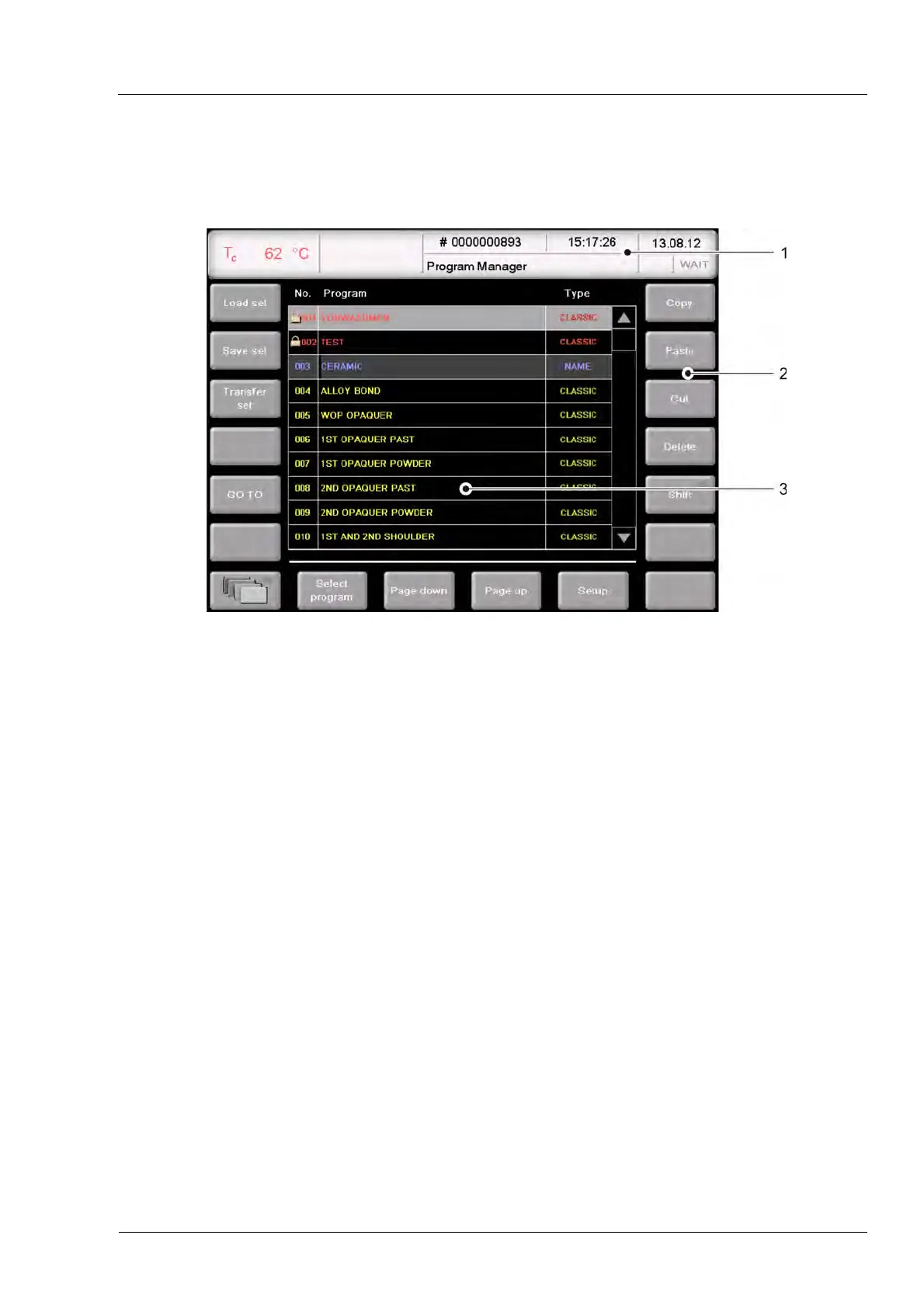
Fig. 5-4 Screen display (example of the Program Manager)
1 Information bar 3 Display area
2 Function bar
Information bar Shows all of the important parameters:
• The Temperature in the firing chamber: "Tc",
• The firing number "#", that is, how many firings have been
properly concluded,
• The time and date when the firing furnace was used, or if a
program has been selected, the probable duration or remaining
time of the program,
• The current menu (in this case, the "Program Manager"), A lock
indicates that a program is protected by the general code,
• The status of the firing furnace:
"Wait": The firing furnace is in wait mode,
"Run": A program is being processed (program is running),
"Edit": A program is being edited (program editor).
Function bar The function bar contains the buttons for controlling and operating
the firing furnace. The names of the buttons depend on the selected
menu.
Display area The display area shows the current menu of the firing furnace control
such as the Program Manager in Fig. 5-4.



 To Next Page