Part II: Settings and Measurements
Chapter 13: Upstream Signal Generator
The upstream signal generator (USG) optional function is used to characterize the quality of a signal being
transmitted in an RF upstream HFC link.
The USG generates upstream carrier signals from 5~210MHz (PRBS coding with a QAM signal is desirable if
FEC coding of an upstream QAM carrier is required for Pre-Post FEC performance verification). It supports
QPSK, 16QAM, 64QAM and 256QAM modulation modes, as well as J.83Annex A & J.83 Annex B FEC code
modes. The symbol rate range is 1~7MS/s. MER performance >43db.
13-1 Basic Operation
From the
Home
menu, press
Upstream
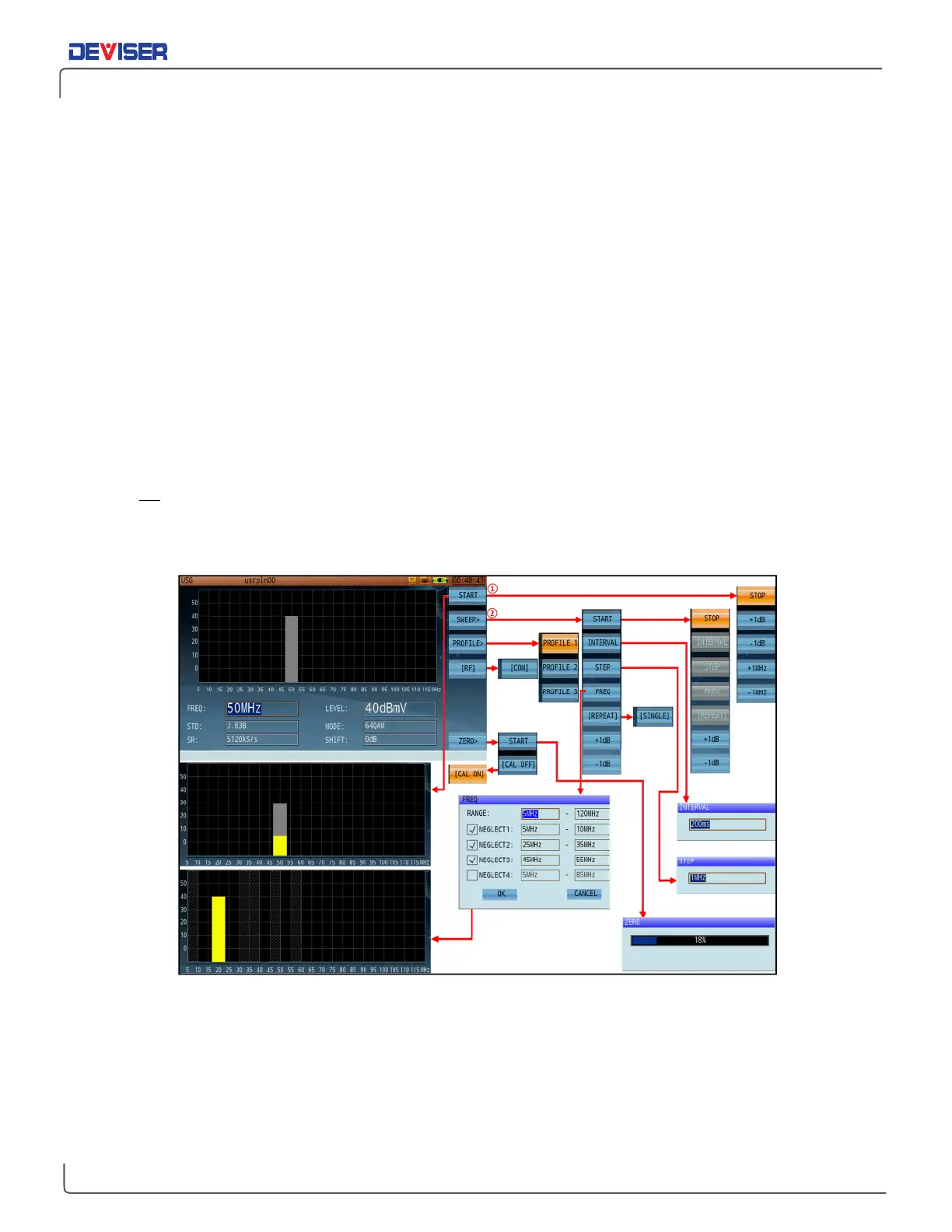
(F2) and use the rotary knob to open the Upstream Signal Generator
application. To adjust parameters (see below), use the rotary knob to highlight and select the desired
setting. Then use the arrow keys to adjust its value. Click the rotary knob to confirm your choice. FREQ, STD,
SR (Symbol Rate), LEVEL, MODE and SHIFT may be adjusted.
NOTE:
Before pressing
Start
, first ensure that no active signals are present at the same frequency, as the USG
signal will disrupt existing live signals on the network (e.g., DOCSIS signals).
The gray bar will fill up with yellow if USG is successful, indicating transmitting signal.
Upstream Signal Generator and function submenus



 To Next Page