Part II: Settings and Measurements
9-1 Transport Stream Real-time Analysis
This function parses the information from audio and video ES. It supports MPEG-1/2/4, H.264 video format
and MPEG-1/2/4, AAC audio format. Up to two sets of audio information can be displayed.
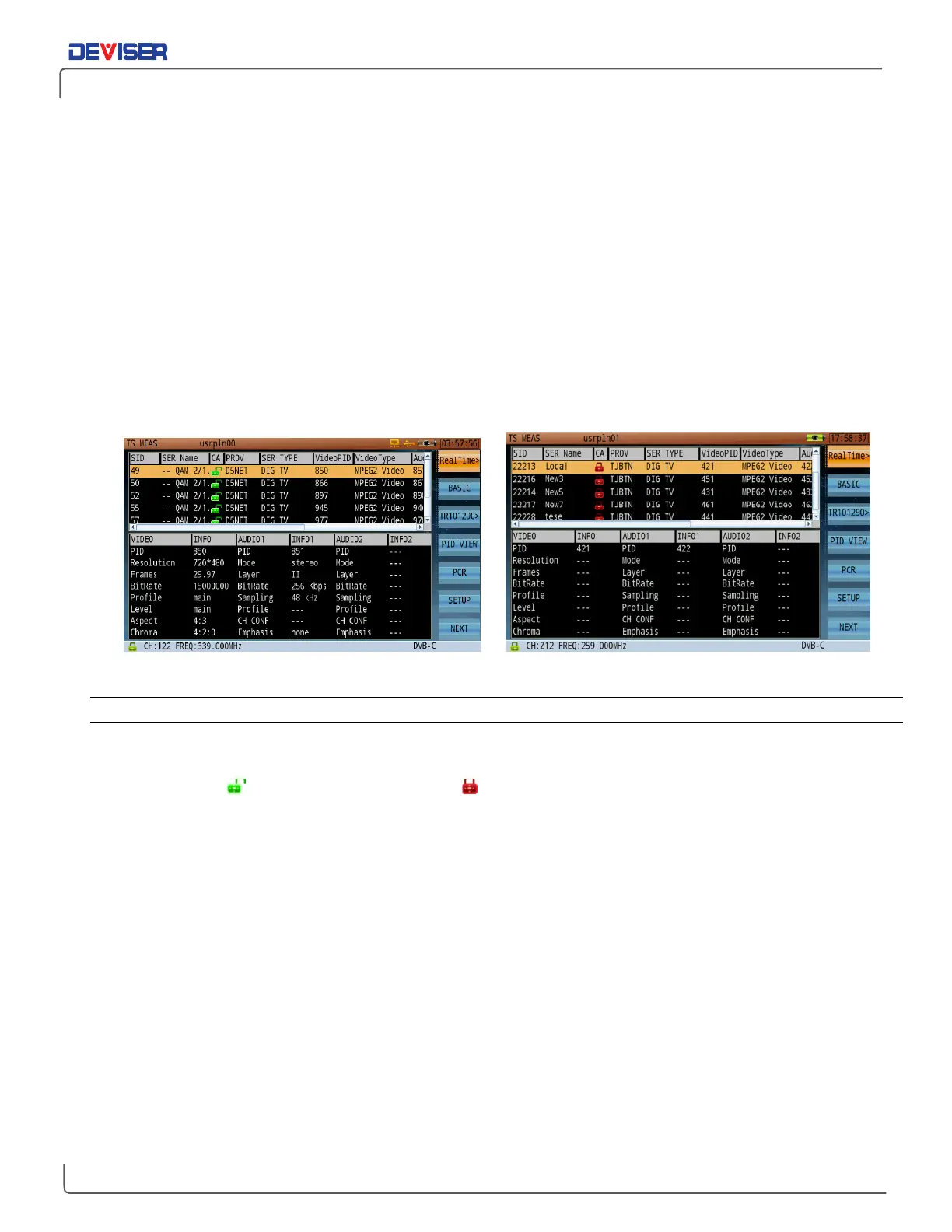
It lists all programs' SID, Service Name, CA, provider, service type, video PID, video type, Audio1 PID, Audio2
PID, Audio type in the top pane.
The bottom pane displays video/audio information of the selected program. Video information includes
resolution, frame rate, bit rate, profile, level, aspect ratio and chroma type. Audio information includes
mode, layer, bit rate, sampling, profile, channel configuration and emphasis.
These parameters may be different according to the audio/video format (below, left) If the parameter is
not parsed or the program is an encrypted program, ‘---’ will be displayed (below, right). If the program has
no video information, the message “No PAT” will appear.
Transport Stream: Real-Time Analysis Encrypted Program Information
9-1.1 Settings
SID: The program number in decimal or hexadecimal according to the Setup.
Service Name: The service name of the program. ‘---’is displayed if the description doesn’t exist.
CA: stands for not encrypted, and stands for encrypted.
Provider: The provider of the program. ‘---’is displayed if the description doesn’t exist.
Service Type: A brief description of the service type of the program.
Video PID: The video PID of the selected program.
Video Type: The video type of the program. ‘---’is displayed if video information is not available.
Audio PID1: The first audio PID of the selected program.
Audio PID2: The second audio PID of the selected program.
Audio Type: The audio type of the program, e.g. MPEG2 Audio.
Program information is displayed at the bottom of the screen.
The real-time analysis option offers two submenus: video/audio information and bandwidth. Bandwidth
shows the selected program’s bandwidth information in the highlighted program list. The yellow curve is the
video BW rate curve (if video information is included in the program). The green and purple curves are the
first and second audio BW curves (if audio information is included). The horizontal coordinate describes the
percentage of the current over a period of time. The vertical coordinates on the left and right respectively
describe the percentage of the video bandwidth and audio bandwidth in the program. If the program is
not a digital TV program, no curve will be displayed.



 To Next Page