Part II: Settings and Measurements
4-3 Importing and Exporting Channel Plans
To transfer user channel plan data to and from the DS2831, you will first need to insert a USB storage device
into the instrument’s top panel.
Once the application reads the USB device, the
Export
(F5) key appears. In addition, if the USB device
already contains some channel plan data,
Import
(F4) appears. This indicates that plans can be imported
to the DS2831, as well as exported for use in a PC or other instrument.
Procedure:
1.
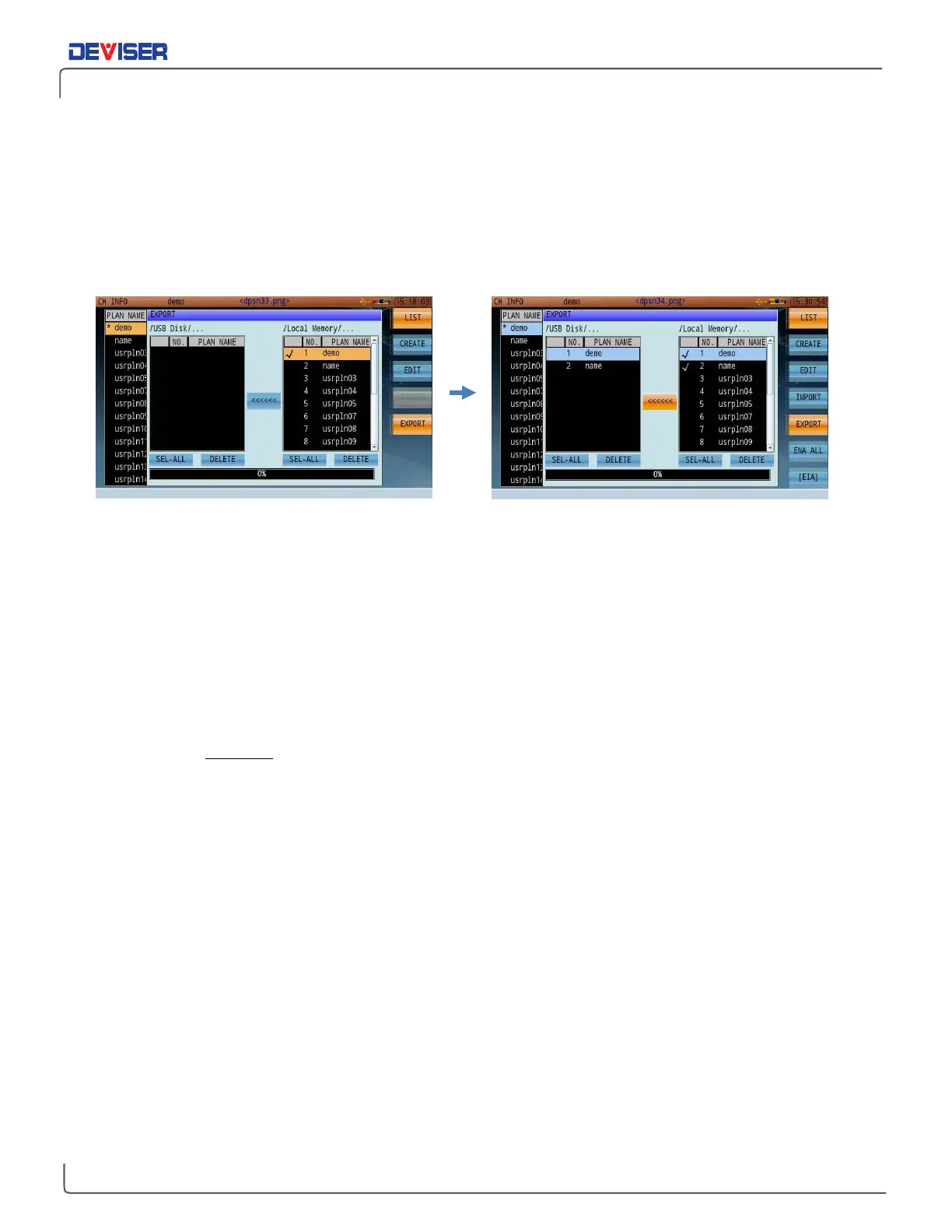
Press Export to open a dialog, as shown above. The plans saved to the DS2831’s local memory appear
on the right, with plans (if any) saved to the USB device on the left.
2.
Using the arrow keys, highlight a plan in local memory and click the rotary knob to place a check mark
next to it. Repeat until all plans for export are marked.
3.
Then, turn the rotary knob to highlight the
[<<<<<<]
button between the two panes and click the knob
to confirm.
The selected plan(s) will be transferred to the USB device.
If a plan with the same name already exists on the destination USB device, a message will pop up asking if it
is to be replaced. Click OK to overwrite, or press
Esc
(below F7) to cancel.
The process for importing channel plans to the DS2831 is similar. Simply insert a USB storage device with
saved channel plan data, select
Import
instead of Export, and select your desired plans in the left-hand
pane. Then navigate to the
[>>>>>>]
button and confirm the copy operation.



 To Next Page