Part II: Settings and Measurements
8-5 MER & BER Statistics Graph
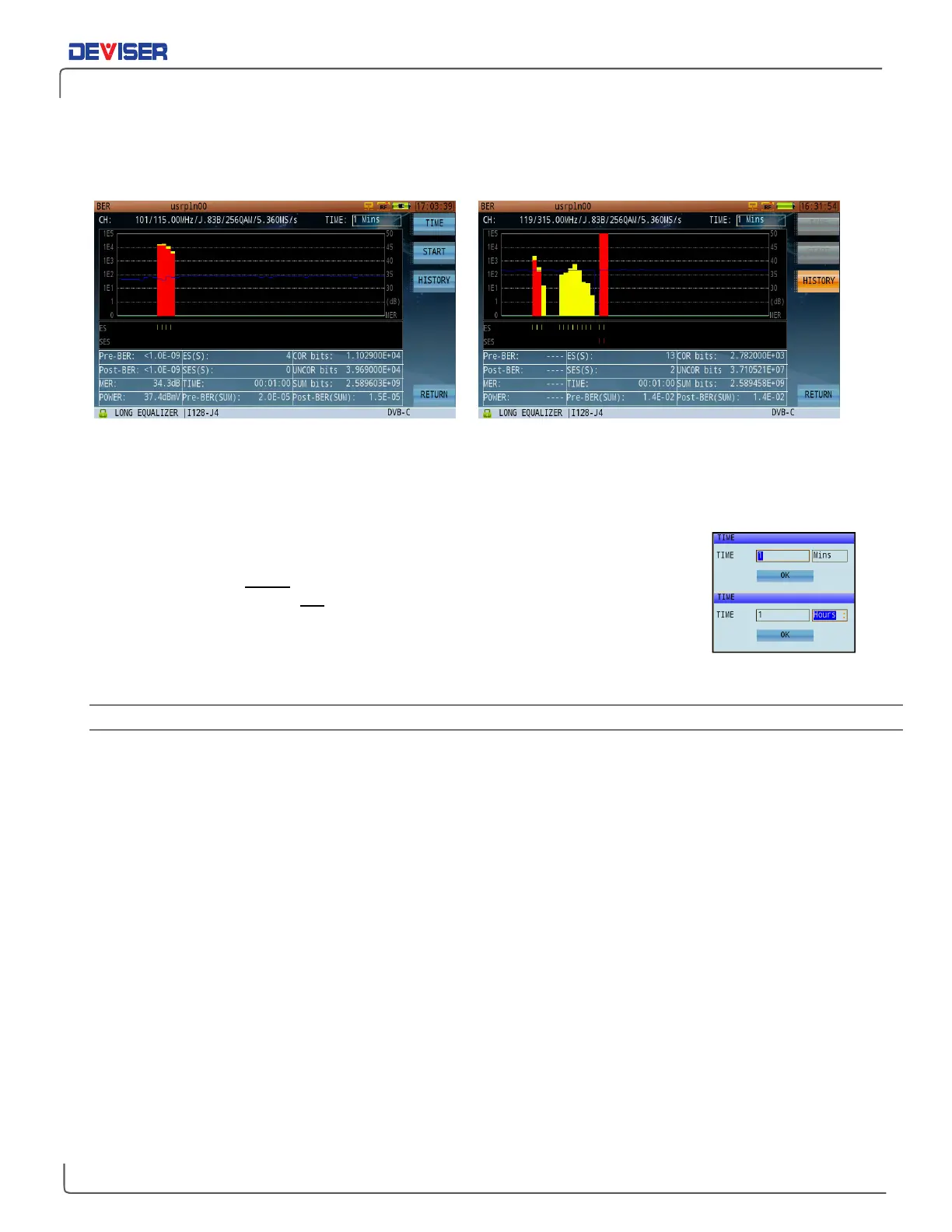
The DVB-C MER & BER statistics function, shown below, provides analysis over time.
BER & MER Statistical Graph BER & MER Statistical History Record
The statistics interface is divided into two parts: a statistical graph of change over time, and a summary of
current measurement settings. The graph displays Pre-BER in yellow and Post-BER in red (per the reference
scale on the left). MER is displayed by the blue line and referenced to the scale on the right.
Two bar graphs appear under the statistical curve: ES (Errored Seconds) and SES
(Severely-Errored Seconds). When Pre-BER measures worse than 1.0E-09, the ES bar
records and displays yellow lines. When Post-BER measures worse than 1.0E-03, the
SES bar records and displays red lines.
Press
Time
(F1) to set the recording duration from 1 min to 48 hrs. in 1-sec. intervals
(see right). Note that an errored second (ES) is one in which 1 bit error occurs within
1s. A severely errored second (SES) is one in which the error rate is equal to or worse than 10E-3.
8-5.1 Settings
NOTE: the parameters listed below the graphical interface cannot be edited directly. For any modifications,
press the
CH
key below the display to open the Channel Plan Editor. (See Chapter 4 for more details.)
MER: Modulation error ratio.
PRE-/POST-BER: Bit error rate before / after error correction.
ES: Errored second. If one or more correctable or uncorrectable bit errors occurs in a one-
second time window, the ES increases by 1.
SES: Severely-errored second. If the number of uncorrectable bit errors divided by the total
number of transmitted bits is equal or more than 1.0E-3, then the SES increases by 1.
TIME: Duration of the test.
COR / UNCOR: Total number of corrected / uncorrected bit errors.
SUM: Total number of received bits.
Pre-BER (SUM): The bit error rate before total error correction. Pre-BER (SUM) = (COR+UNCOR)/SUM.
Post-BER (SUM): The bit error rate after total error correction. Pre-BER (SUM) = UNCOR/SUM.
Button Operation
Time: Set the duration of the test.
Start: Start/end the test.



 To Next Page