Part II: Settings and Measurements
Control and spectrum calculation mode
The DS2831 offers two spectrum calculation modes, FFT and DFT. The DFT is the foundation of FFT, and the
FFT is the fast algorithm of DFT. Every result calculated with DFT represents a pixel point of the spectrum
trace, while every result calculated with FFT represents a segment of the spectrum trace. If a faster sweep
speed is required, the FFT mode is better suited for the task. In the digital persistence mode introduced later,
only the FFT mode can be used.
Spectrum hold mode
While in the DS Spectrum analyzer mode, press F7 to reveal the
Hold
button. This pauses the trace for
analysis. Press Hold again to resume normal operation.
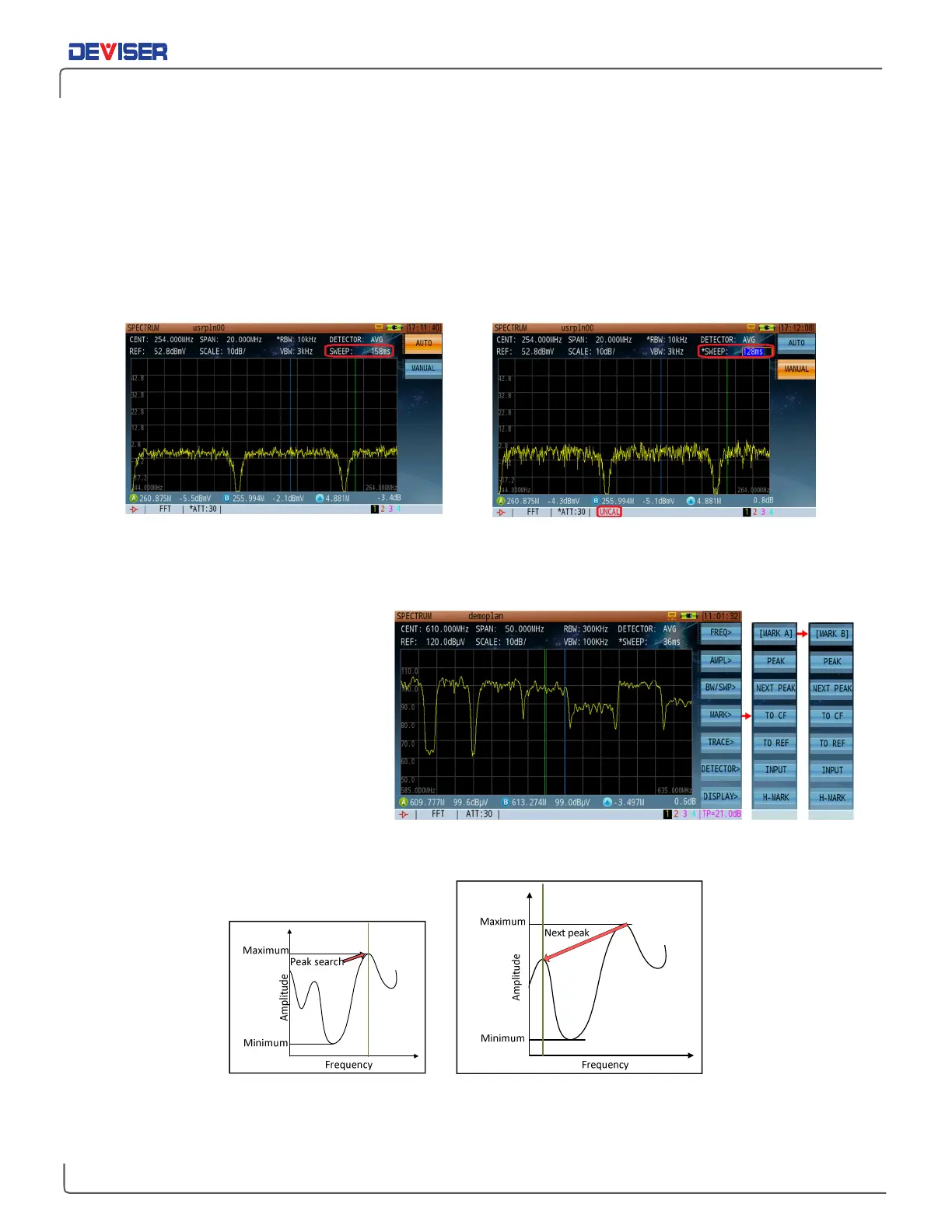
Auto Sweep Time Manual Modify Sweep Time Cause UNCAL Information
10-4 Markers
The DS2831 offers two markers; A and B.
Press
Mark
(F4) to enter the submenu.
Then press F1 to toggle between
Mark
A
and
Mark B
. Only one can be active
at a time.
Peak Search
Automatically finds the highest
amplitude peak on the spectrum
analyzer trace (below, left).
Next Peak
Automatically finds the next highest amplitude peak on the spectrum analyzer trace (below, right).



 To Next Page