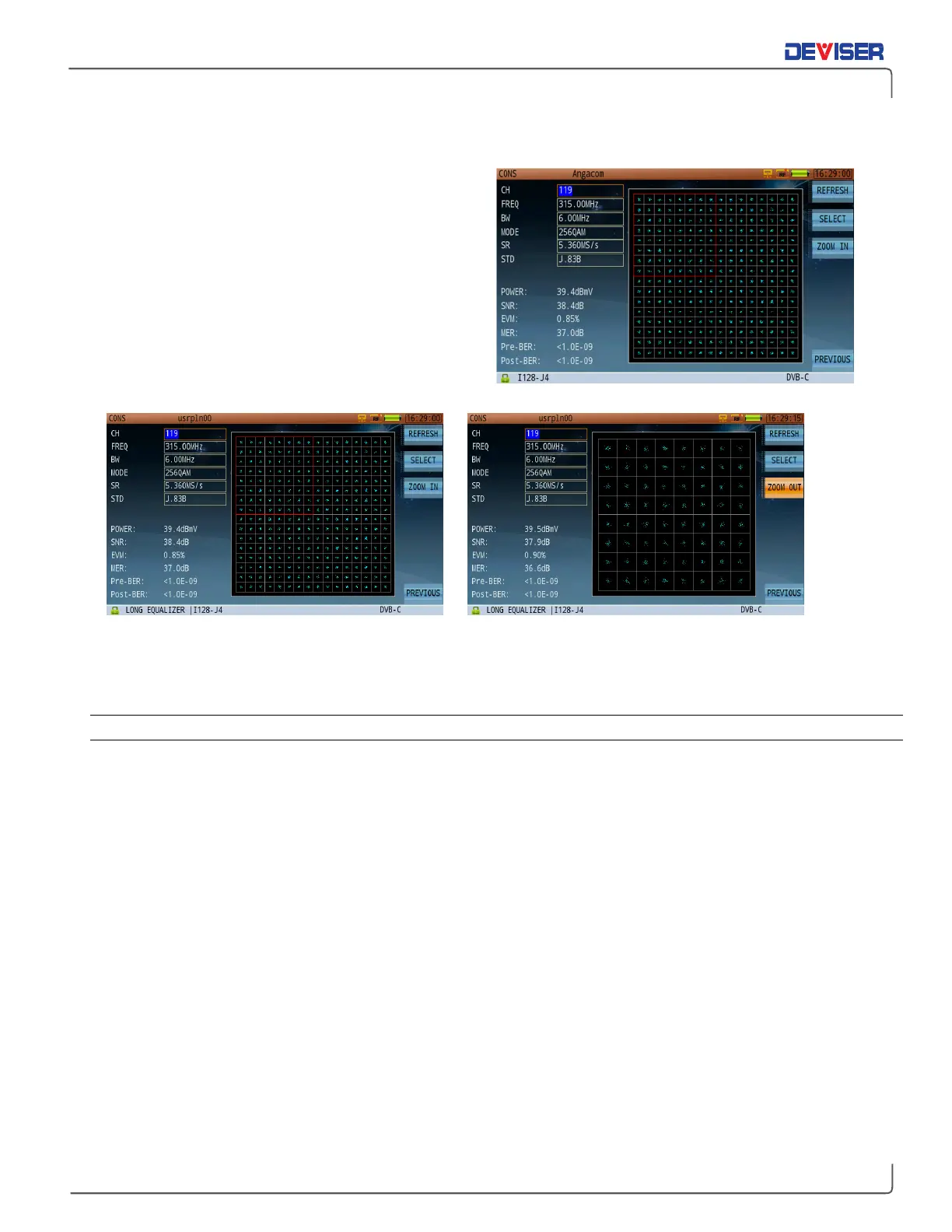
8-4 Constellation Diagram
From the main measurement menu (
Home
), use the
rotary knob to select the Constellation application.
The DVB-C constellation diagram function interface is
shown to the right.
Press the
Next
function key to open the constellation
diagram menu. Here, you can refresh and zoom the
constellation. To zoom in, first press
Select
to select
one quadrant to view. After choosing the quadrant,
press
Zoom IN.
The selected quadrant will expand to
fully occupy the screen. (See below.)
Constellation Zoom – Select a Quadrant Constellation Zoom – Zoom In & Zoom Out
Use the rotary knob to move between parameters: channel, frequency and bandwidth. When the cursor
highlights a field, you can adjust the value with the arrow keys or input your desired value with the keypad.
8-4.1 Settings:
Button Operation
Measure: Opens the channel measurement function.
Equalizer: Opens the Equalizer coefficient & in-band response function.
BER Statistics: Opens the MER & BER statistics diagram function.
EVS: Opens the EVS function.
HUM: Opens the digital HUM function.
TS Measurement: Opens the MPEG-2 TS analysis.
Next: Switch to next page of the menu.
Refresh: Clear the current constellation diagram and refresh.
Select: Select a quadrant to focus on.
Zoom In/Out: Zoom in on the selected quadrant. Press again to zoom out to the original display.
Previous: Switch to previous page of the menu.



 To Next Page