Chapter 23: DOCSIS 3.1 OFDM DS Channel Test
New to the DS2831, this application allows you to test DOCSIS 3.1 OFDM downstream channel parameters
and metrics. Before using this function, be sure to set up your channel plan with a valid DOCSIS 3.1 channel.
See Chapter 4: Channel Plans for instructions.
If there are no DOCSIS 3.1 channels in your channel plan, one channel (#0, 600 MHz) will be automatically
generated for you when the application is launched.
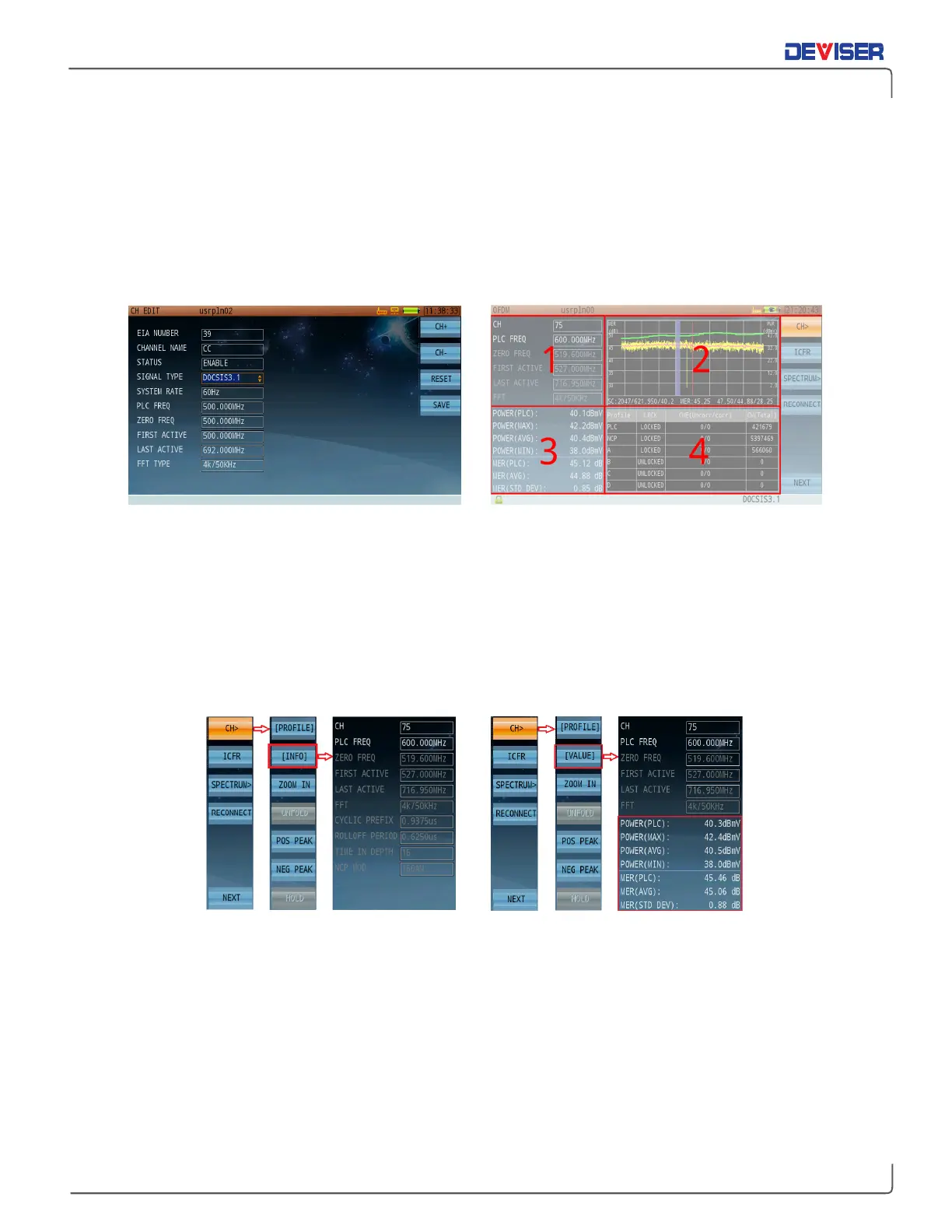
Adding a DOCSIS 3.1 channel OFDM test four-panel interface
The OFDM test interface is divided into four panes (above, right). In general, statistical data (e.g. channel
settings, power levels, and MER readings) are shown on the left, and graphical data on the right.
The OFDM test application contains three different modes. Use the function keys to configure integrated
channel test (
CH>
), in-band frequency response test (
ICFR
), or spectrum analysis (
Spectrum
) settings.
Use the submenus to alter which information is shown on the current measurement.
For example:
Press
CH>
(F1),
[INFO]
(F2) (above, left) to show the full channel info pane.
Then press
[VALUE]
(F2 again) (above, right) to show power and MER statistics, which overlay part of the
channel info pane.
You can freely toggle between these view modes at any time.
If the unit loses test connection, press
Reconnect
(F4) to try again.



 To Next Page