Part II: Settings and Measurements
Chapter 10: Downstream Spectrum Analysis
The spectrum frequency band of the DS2831 covers cable, terrestrial and satellite frequency bands. The
following sections contain instructions for setting up spectrum analysis functions.
Press
Downstream
(F1) in the home screen and tap
Spectrum
to launch the application.
The spectrum analysis function is one of the primary, basic and most powerful functions of the DS2831.
For several decades, it has been suggested that a good spectrum analyzer is one of the most effective
troubleshooting tools a field CATV engineer can use to help identify impairments on a HFC network.
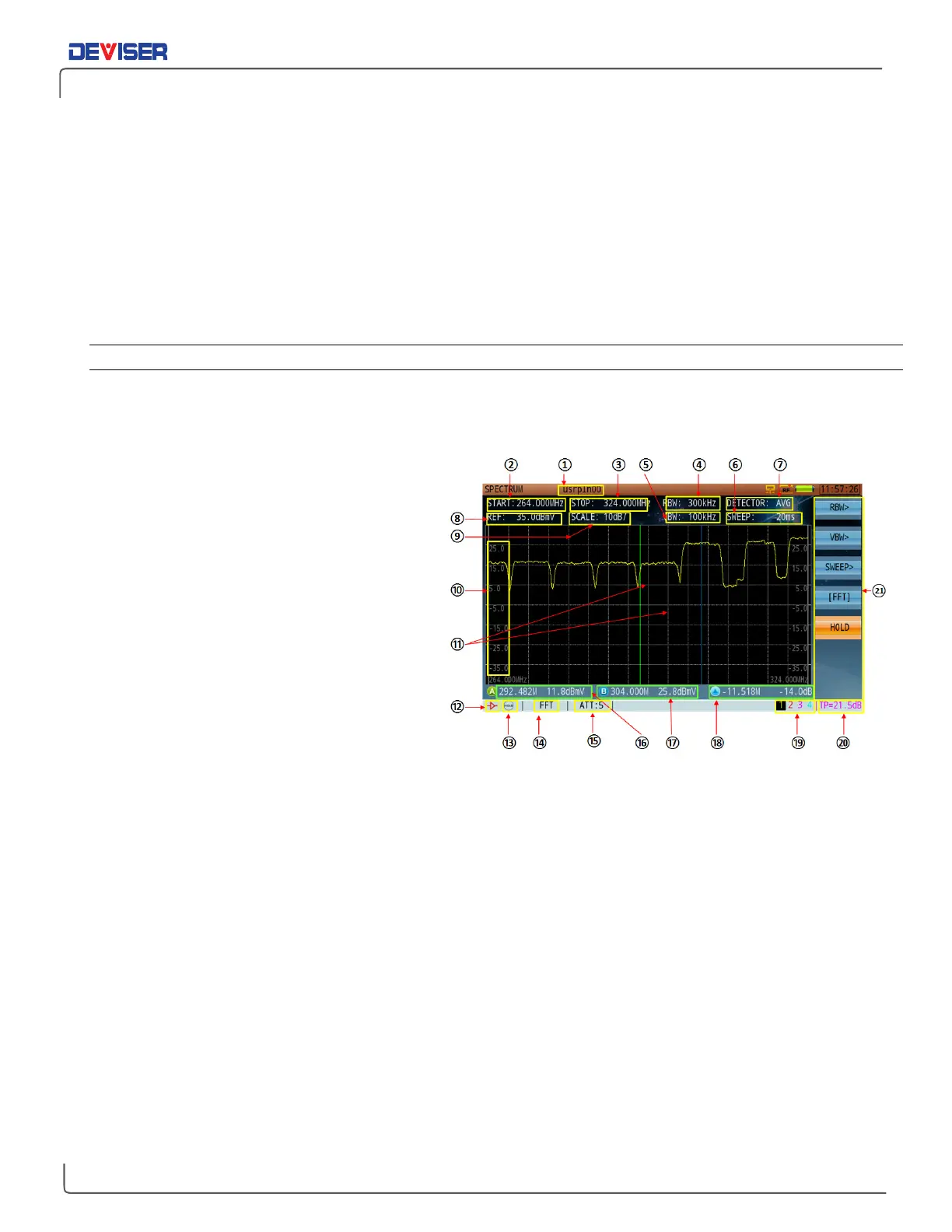
Spectrum Analyzer Display Overview
In the spectrum analysis mode, use the rotary knob or touchscreen to select a measurement parameter.
Edit with the keypad or arrow keys, then confirm by pressing the rotary knob or Enter to set. Refer to the
numbered figure and associated definitions below.
1.
Channel plan name.
2.
Start frequency.
3.
Stop frequency.
4.
Resolution bandwidth filter. (RBW)
5.
Video bandwidth filter. (VBW)
6.
Sweep time.
7.
Detector mode.
8.
Reference level.
9.
Graph display scale, in dB per division.
10.
Amplitude scale.
11.
Markers.
12.
During simultaneous spectrum & QAM
analysis, the lock icon is red (QAM signal
locked) or green (unlocked).
13.
Pre-amplifier: icon appears when pre-amp is activated. Otherwise empty.
14.
Spectrum analysis mode: DFT or FFT.
15.
Attenuation level.
16.
Frequency and level of marker A.
17.
Frequency and level of marker B.
18.
Delta variation between marker A and B (in frequency and level).
19.
Active trace: up to 4 traces can appear at once on the DS2831. Only 1 trace is controlled at a time.
20.
Test Point Compensation. (TP)
21.
Multi-function soft-keys: a button followed by an arrow “>” means there is a sub-menu available. A
button with a bracket “[ ]” means the button offers multi-functions.
The 7 function keys (F1-F7) on the first level menu represent the frequency, amplitude, bandwidth/sweep,
marker, trace, detector and display control parameter settings.



 To Next Page