12-3 Measurement Setup
12-3.1 Headend Equipment Setup
DS1610 communication setup:
Using a PC server, log in to the DS1610 client interface (shown below). Note that proper login credentials
are required to access the system and all configuration settings. Contact your system administrator for more
information.
DS1610 Login Interface
DS1615 downstream FSK communication setup:
1.
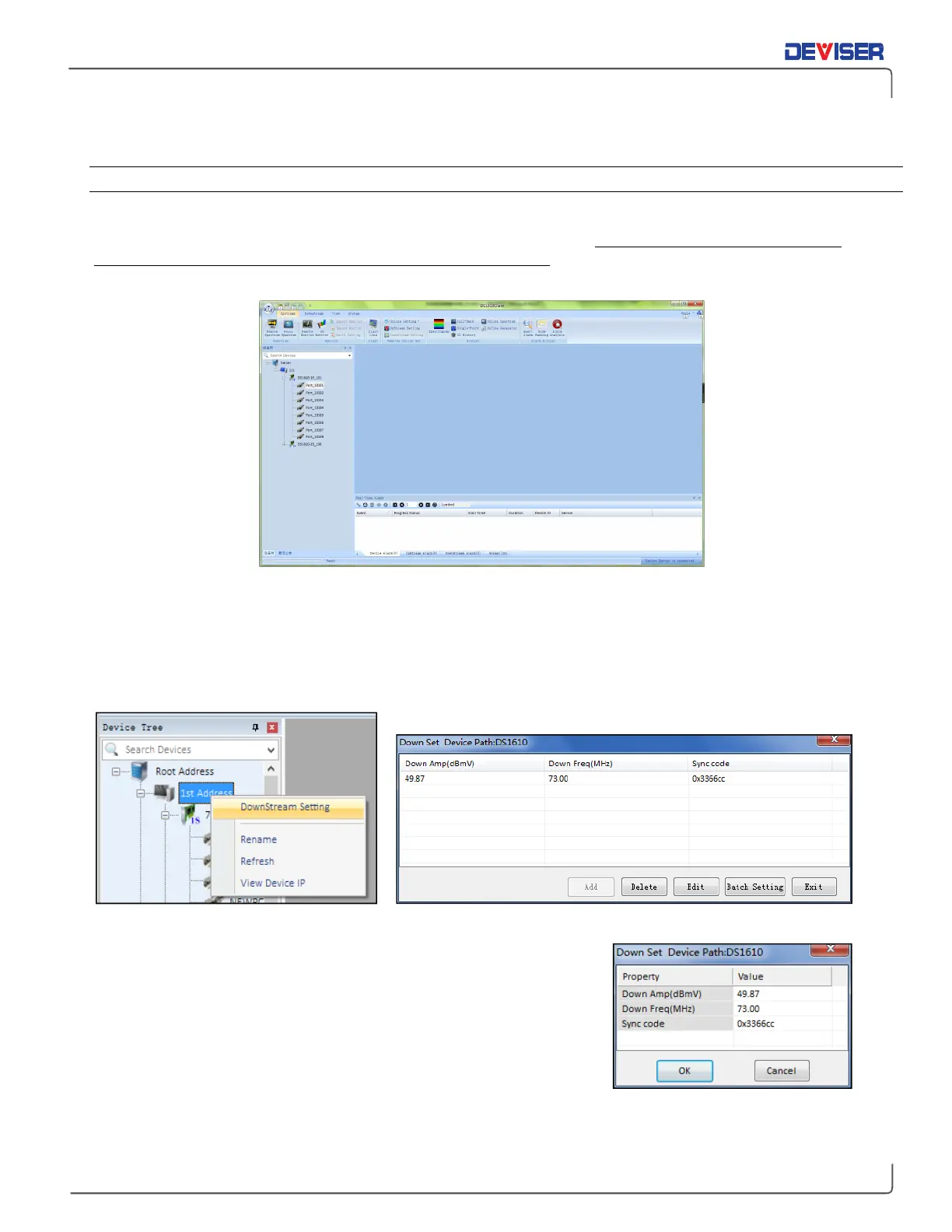
Right-click the DS1610 icon (shown below, left) and select Downstream Settings.
2.
If entering the downstream parameter setup menu for the first time, click the "Add" button. If a set of
parameters already exists, click to highlight it and select
Edit
.
Find out DS1615 Parameters Setting Menu Open DS1615 Downstream Parameters Setting Interface
3.
In the parameter settings menu (right), input the downstream
amplitude and frequency. Click OK to save the new settings. If
settings fail to save, verify that the software was installed properly
and that the network connection is valid.
4.
The "Batch Setting" function can be used to set several DS1615
units to the same parameters simultaneously.



 To Next Page