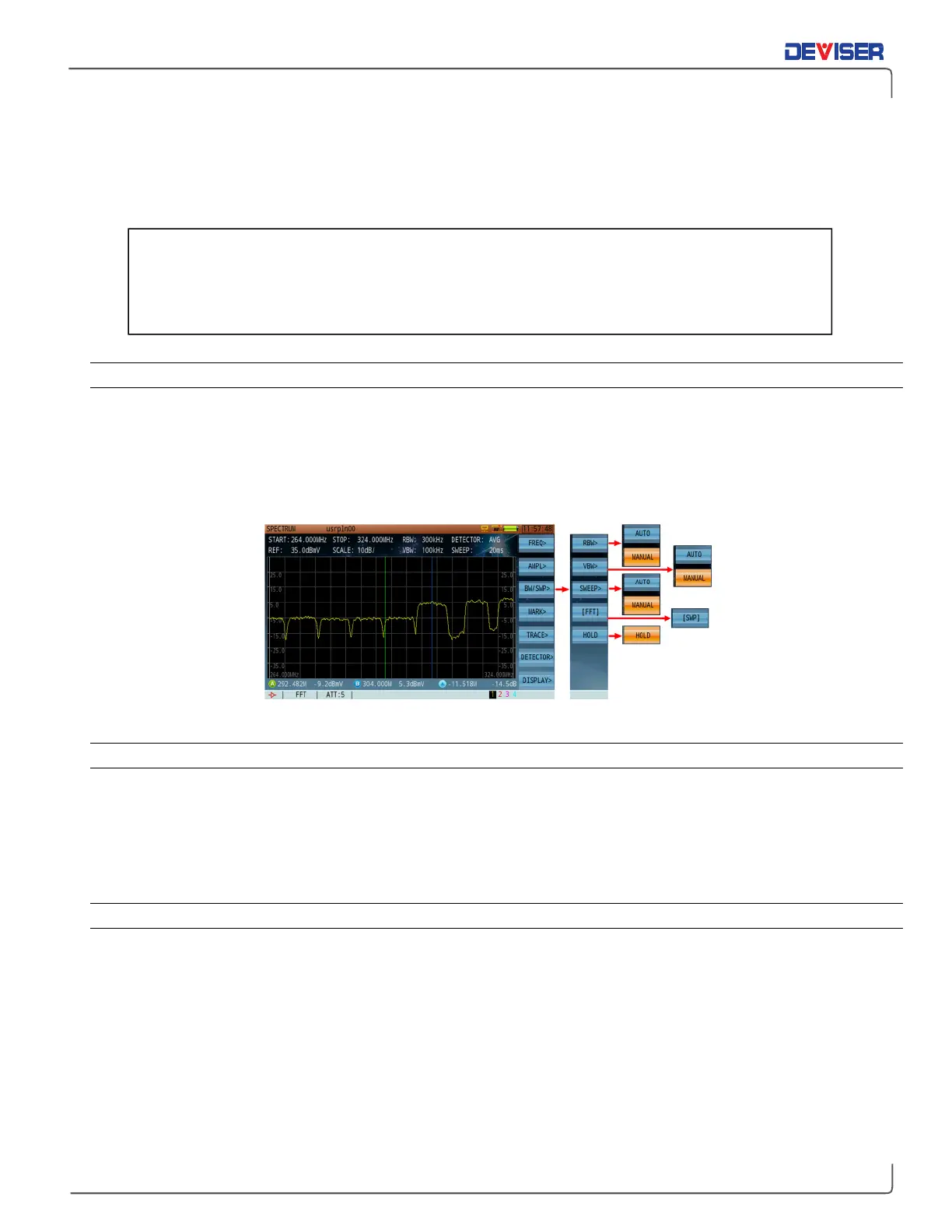
10-3 RBW & VBW Bandwidth/Sweep Setting
In this section, we cover procedures for setting up RBW, VBW and sweep time values; spectrum calculation
mode; and trace hold features.
10-3.1 Resolution Bandwidth (RBW) Filter
The RBW filters can be used in manual or automatic mode. In manual mode, an asterisk (*) appears before
the RBW parameter at the top of the screen.
Press
BW/SWP>
(F3) to enter the submenu and then
RBW>
(F1). Select
Auto
to allow the DS2831 to choose a
suitable RBW according to sweep speed, span and VBW selections, or Manual to choose an RBW from the
following choices: 1 kHz, 3 kHz, 10 kHz, 30 kHz, 100 kHz, 300 kHz, 1 MHz and 3 MHz.
Bandwidth/Sweep Menu
10-3.2 Video Bandwidth (VBW) Filter
The VBW can be used in manual and automatic mode. In manual mode, an asterisk (*) appears before the
VBW parameter under the RBW parameter at the top of the screen.
Press
BW/SWP>
(F3) to enter the submenu and then
VBW>
(F2). ). Select
Auto
to allow the DS2831 to choose
a suitable VBW according to sweep speed, span and RBW selections, or Manual to choose a VBW from the
following choices: 1 kHz, 3 kHz, 10 kHz, 30 kHz, 100 kHz, 300 kHz, 1 MHz and 3 MHz.
10-3.3 Sweep Time (SWP)
There are two ways to set the sweep time: manual and automatic. In manual mode, an asterisk (*) appears
before the sweep time parameter.
Press
BW/SWP>
(F3) to enter the submenu and then
Sweep>
(F3). Select
Auto
to allow the DS2831 to choose
a suitable sweep time according to the active Span, VBW and RBW settings, or Manual to choose a sweep
speed using the arrow keys in steps of 10ms. Press the rotary knob to confirm.
Spectrum analyzers normally couple sweep time, span setting and resolution bandwidth selections
automatically. This allows the signal to be measured enough time to achieve full amplitude within the RBW
for an accurate & calibrated measurement. If any of the parameters are not in “sync”, an “UNCAL”
message will appear in the status bar at the bottom of the screen.
For less experienced users: changing RBW, VBW, and sweep time settings in manual mode
may produce inaccurate measurement results. If analyzer measurements are uncalibrated
because of faulty relation between RBW, VBW, and sweep time settings, an "uncal" message
will appear in the bottom toolbar."



 To Next Page