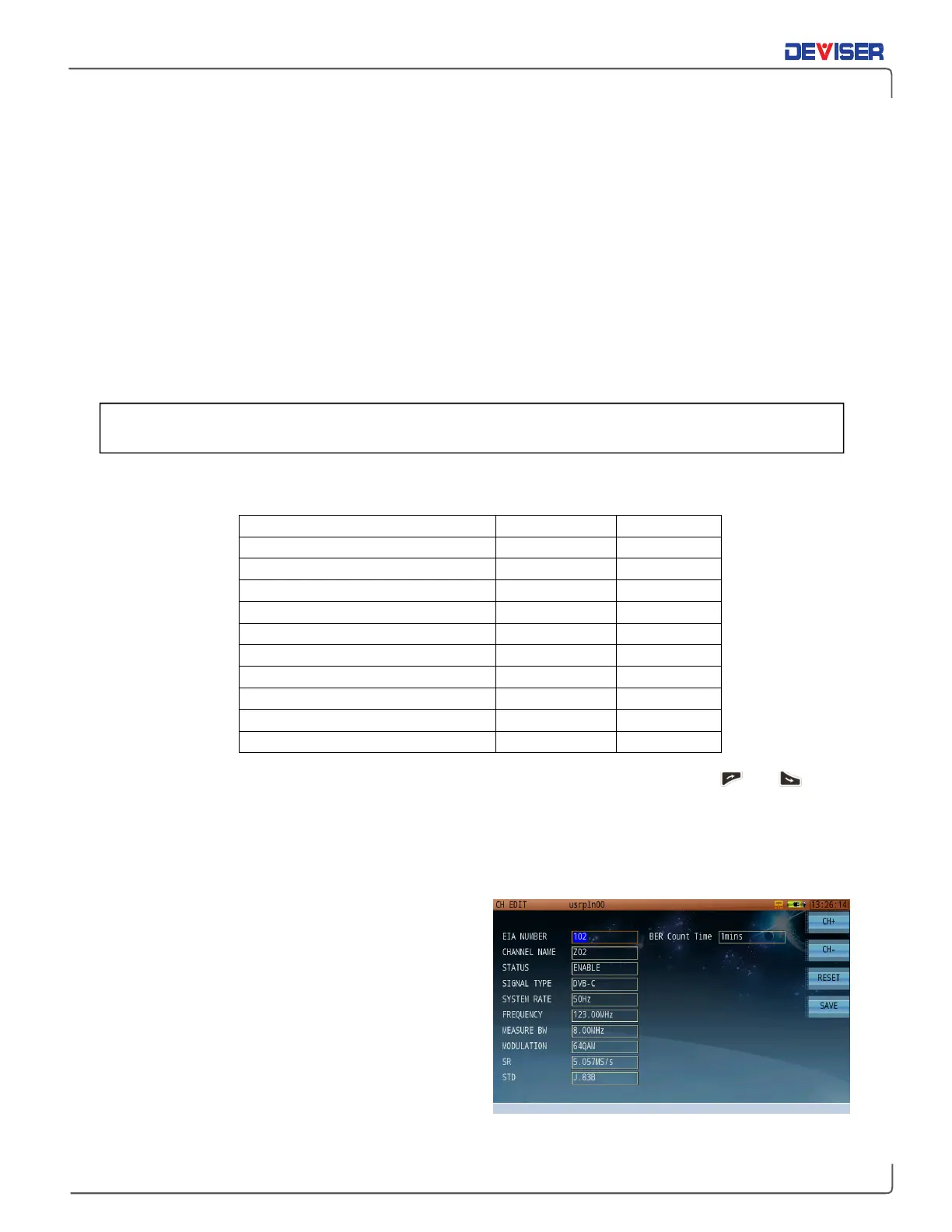
Digital Channel Parameters
Channel serial number:
Channel name: Edit with keypad
Channel status: [Enable / Disable]
Signal type: [Analog FM / Analog TV / DOCSIS / DVB-C]
System rate: [50Hz / 60Hz]
Frequency: Edit with keypad
Measure BW: Edit with keypad
Modulation: [16QAM / 32QAM / 64QAM / 128QAM / 256QAM]
SR (System Rate): The symbol rate is auto-configured according to the modulation type and standard. It
will set automatically once the modulation type and standard are selected. Users can
input values manually, ranging between 4.00MS/s ~ 7.00MS/s.
STD (Standard): [J.83A / J.83B / J.83C / DOCSIS / EurDOCSIS]
BER Statistical Time: The BER measurement time in BER statistical and auto test BER statistical functions.
US and EU Default Symbol Rate for DVB-C and DOCSIS
Standard and Modulation Type Symbol Rate Bandwidth
ITU-T J.83 Annex A 64QAM 6.952MS/s 8MHz
ITU-T J.83 Annex A 256QAM 6.952MS/s 8MHz
ITU-T J.83 Annex B 64QAM 5.057MS/s 6MHz
ITU-T J.83 Annex B 256QAM 5.361MS/s 6MHz
ITU-T J.83 Annex C 64QAM 5.274MS/s 6MHz
ITU-T J.83 Annex C256QAM 5.274MS/s 6MHz
DOCSIS 64QAM 5.057MS/s 6MHz
DOCSIS 256QAM 5.361MS/s 6MHz
EuroDOCSIS 64QAM 6.952MS/s 8MHz
EuroDOCSIS 256QAM 6.952MS/s 8MHz
Turn the rotary knob to move the cursor to the parameter you want to modify. Press the and arrow
keys to choose your setting.
NOTE: Some parameters are auto-coupled together. Editing one of these will auto-edit related settings as
well, optimizing your configuration. If the auto-adjusted settings do not match your requirements, you
may proceed to adjust them manually.
Each signal type selection (i.e., Analog TV, DVB-C or
DOCSIS) will automatically populate default values
for the chosen standard. Use the CH+ and CH- keys
(F1 and F2) to quickly switch from one channel to the
next. When switching channels or exiting the edit
dialog, you will be prompted to save your changes.
Select
OK
to save, or
Cancel
to discard changes.
More channel plan templates are available in the
DS2831 Toolbox software. Deviser may be able to
write customer-specific channel plans upon request.
For Digital channels, the
You must instruct your channel plan on the line 4 of the channel edit window.



 To Next Page