Part IV: System Functions
30-2.6 GPS
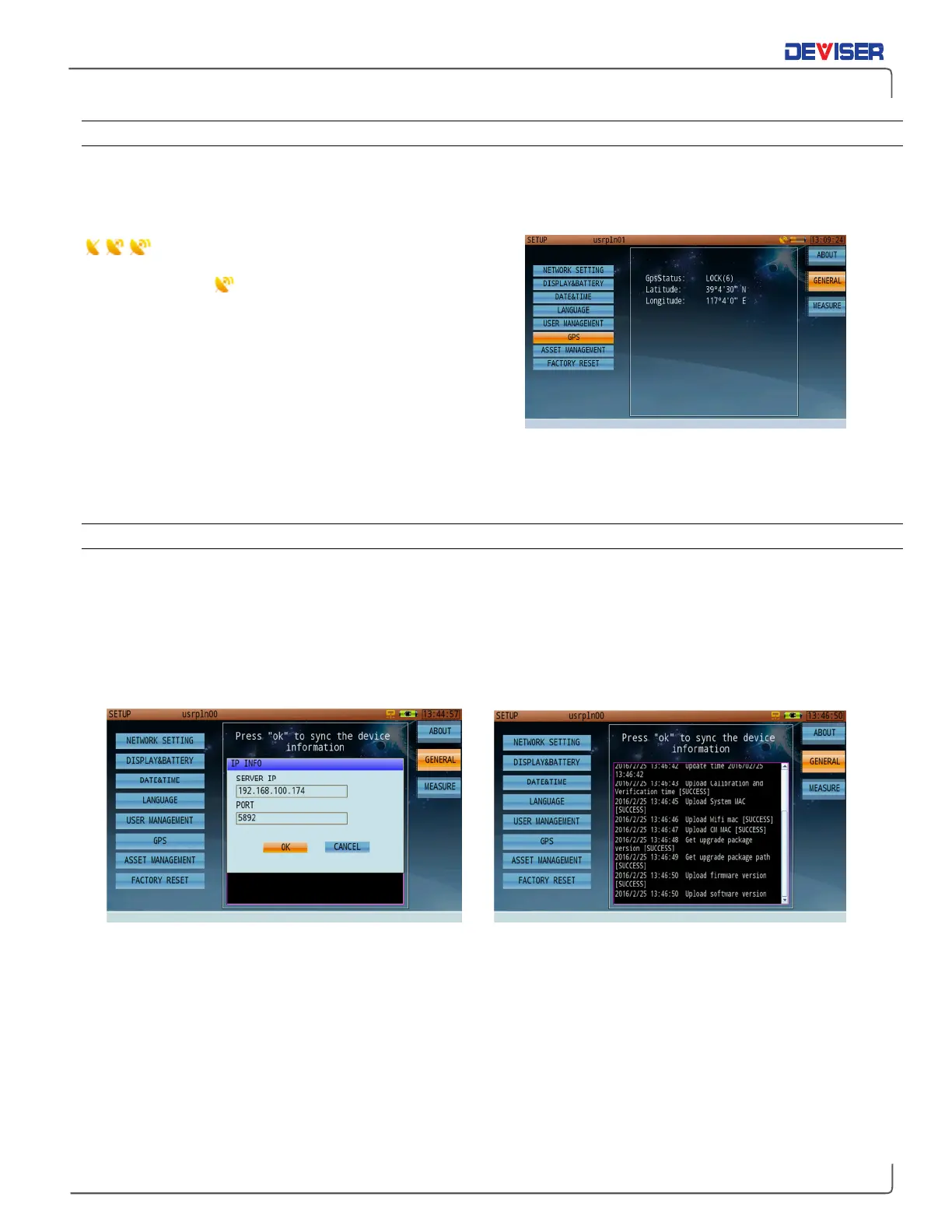
If the GPS functionality is enabled, and a USB GPS antenna is connected to the instrument’s top panel, this
page will display the current longitude and latitude coordinates of the device. This is useful in measurement
applications like pinpointing interference. If GPS is disabled, the page will display zeroes.
An animated dish icon (left) indicates that the
GPS module is searching for a satellite signal. When it stops
on a full dish icon , the module has successfully locked
on to the signal and acquired the user’s location info. The
status will appear in the “GpsStatus” field. “LOCK(6)”
indicates that the GPS module has located 6 satellites.
Once signal location is successful, latitude and longitude
information will be added to any measurement operation
data saved by the user.
GPS coordinates are recorded at all times when a clear GPS positioning antenna has clear line of sight to
the skies. The GPS coordinates are saved when a measurement is saved in "DATA" format, however, the GPS
coordinates will not be displayed on a "Picture" file format.
30-2.7 Asset Management
Deviser EDGE is cloud-based and can be accessed through the URL provided by Deviser. See the EDGE user
guide for complete setup instructions.
The option-enabled asset management tab allows you to synchronize your device’s information (including
saved data, firmware version, and system clock) with data stored on EDGE. Enter the server IP address and
port number, then select
OK
to sync.



 To Next Page