7700 Multiframe Manual
7725DSK-LG / 7725DSK-LG-HD HD/SD Logo Inserter & Media Keyer
Page 5-2 Revision 1.4 HTML
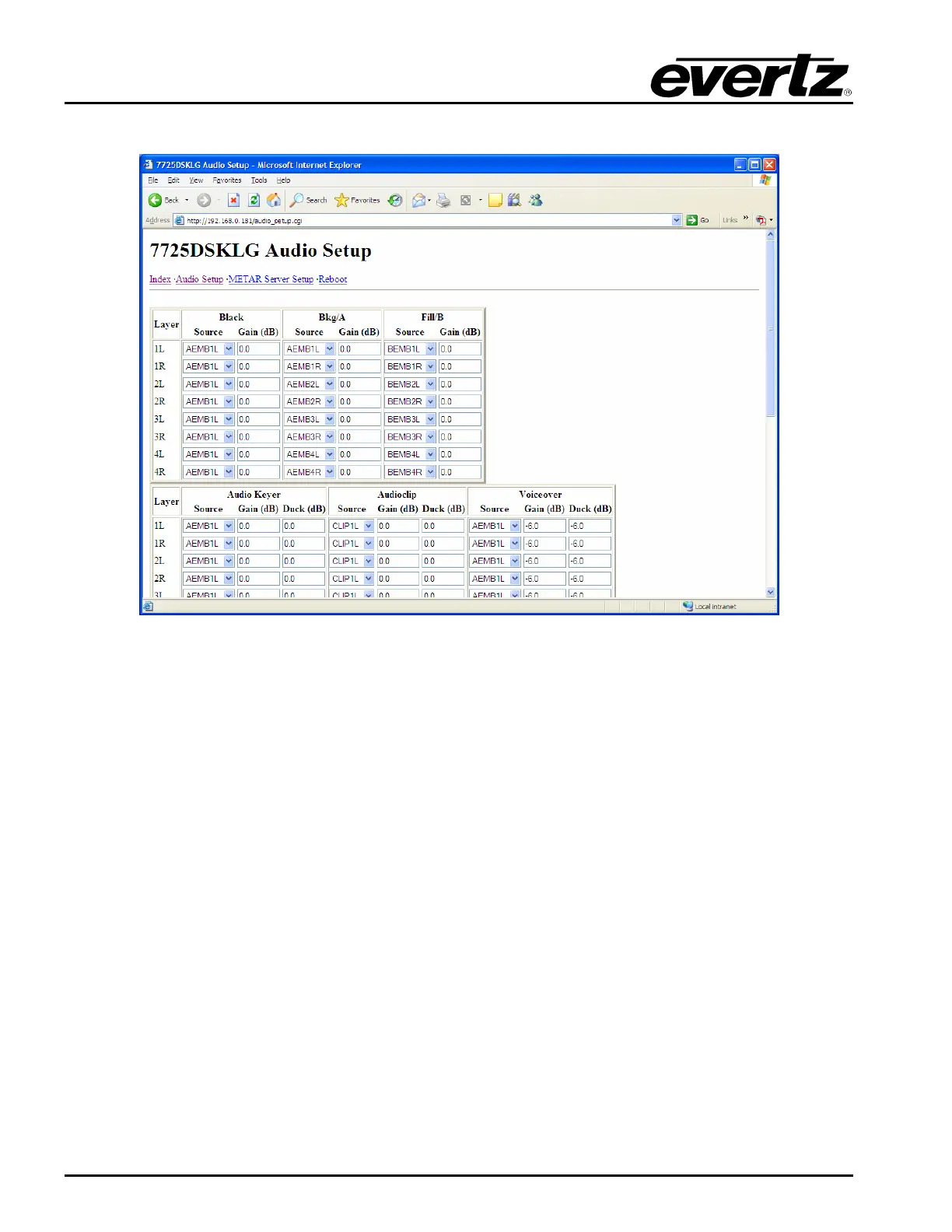
If you select the Audio Setup button, a window similar to the following screen will be displayed:
Figure 5-2: HTML Audio Setup Page
LAYER: This represents the output audio channel for the embedded audio out.
BLACK: This column configures the audio that is used when the 7725DSK-LG is outputting black.
The black function is only accessible via automation commands.
INPUT: This column configures the audio that is used when the 7725DSK-LG is passing the video,
which is connected to the INPUT BNC connector. The 7725DSK-LG has 2 video inputs that can be
used for extracting embedded audio. They are marked as PGM IN A and PGM IN B on the rear panel.
The 7725DSK-LG can be set to activate these inputs on the preview or program output using the front
panel buttons or automation control. The audio settings in the respective columns will be active when
the output is set to these bus selections.
AUDIO KEYER: The gain settings boost the associated input audio channel and the duck affects the
Bkg layer. The setting above is only active when the unit is in the DSK mode as indicated by the Front
Panel LED bus selection. Switching to DSK mode can be executed through the front panel or
automation control protocol.



 To Next Page