7700 Multiframe Manual
7725DSK-LG / 7725DSK-LG-HD HD/SD Logo Inserter & Media Keyer
VLPRO OPERATION Revision 1.4 Page 3-23
"
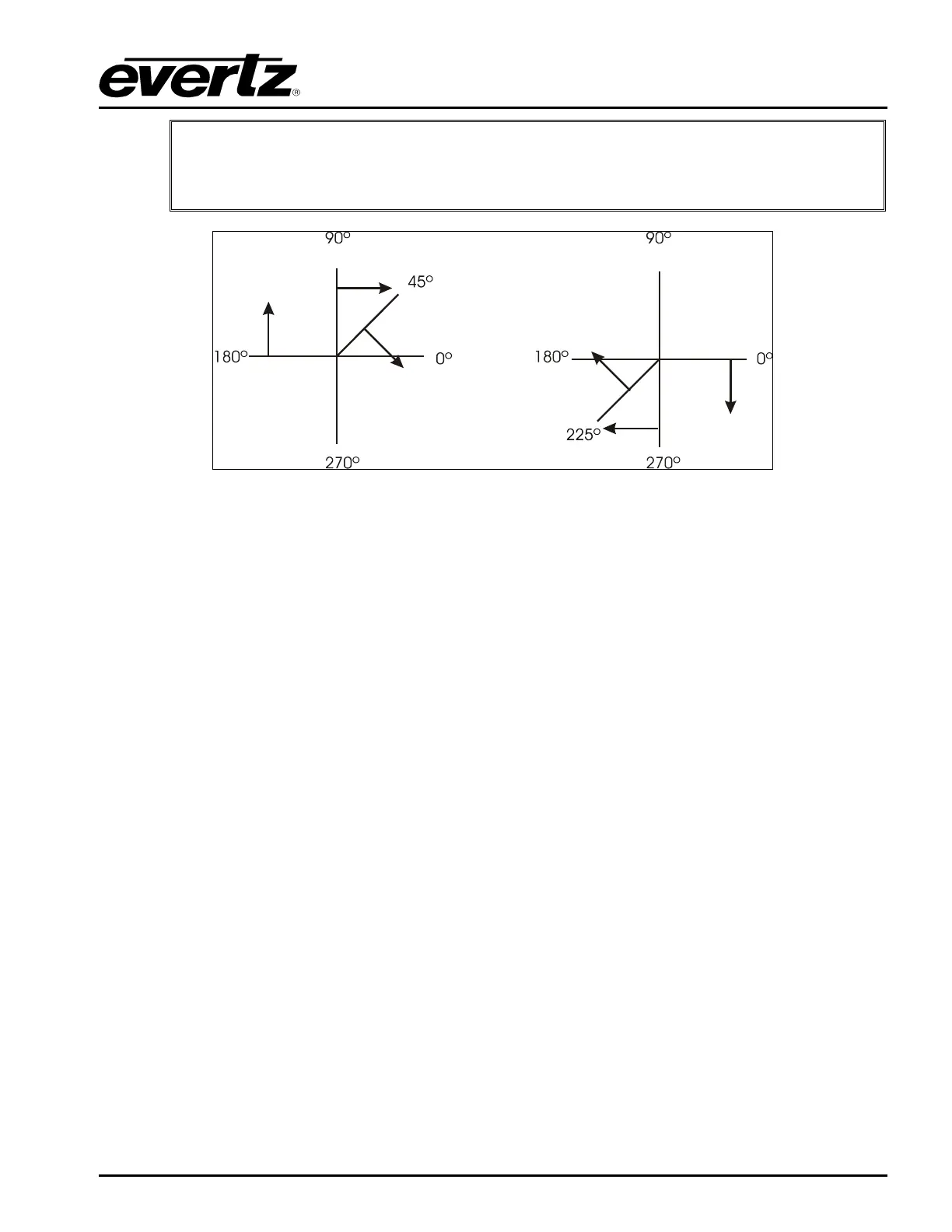
The numbers following the wipe patterns reference the angle of the wipe and
direction of the wipe. Arrows indicate direction of wipe. For example, a Wipe 45
transition will start a 45 degree wipe that will progress from the top left of the screen
to the bottom right of the screen. Please refer to Figure 3-10.
Figure 3-10: Wipe Pattern Angles
3.10.2. Setting the Transition Rate
This option is used to set the duration (time) of the transition. The duration is measured in frames.
3.10.3. Setting the Transition Swap Mode
When set to Swap the input video and audio of the Preview Bus and the Program Bus will be swapped
at the end of the transition. Logos and other media being keyed on the respective buses will also be
swapped with the inputs.
When set to No Swap the input video and audio of the Preview Bus will be transferred to the Program
Bus transition. Logos and other media being keyed on the Preview Bus will also be transferred to the
Program Bus. The Preview Bus will remain unchanged.
3.10.4. Pausing a Transition
This option is used to set whether the Transition can be paused.
When set to On, the transition may be paused by pressing the TAKE button while the transition is
being performed. To continue the transition, press the TAKE button again.
When set to Off, the transition cannot be paused.



 To Next Page