7700 Multiframe Manual
7725DSK-LG / 7725DSK-LG-HD HD/SD Logo Inserter & Media Keyer
VLPRO OPERATION Revision 1.4 Page 3-35
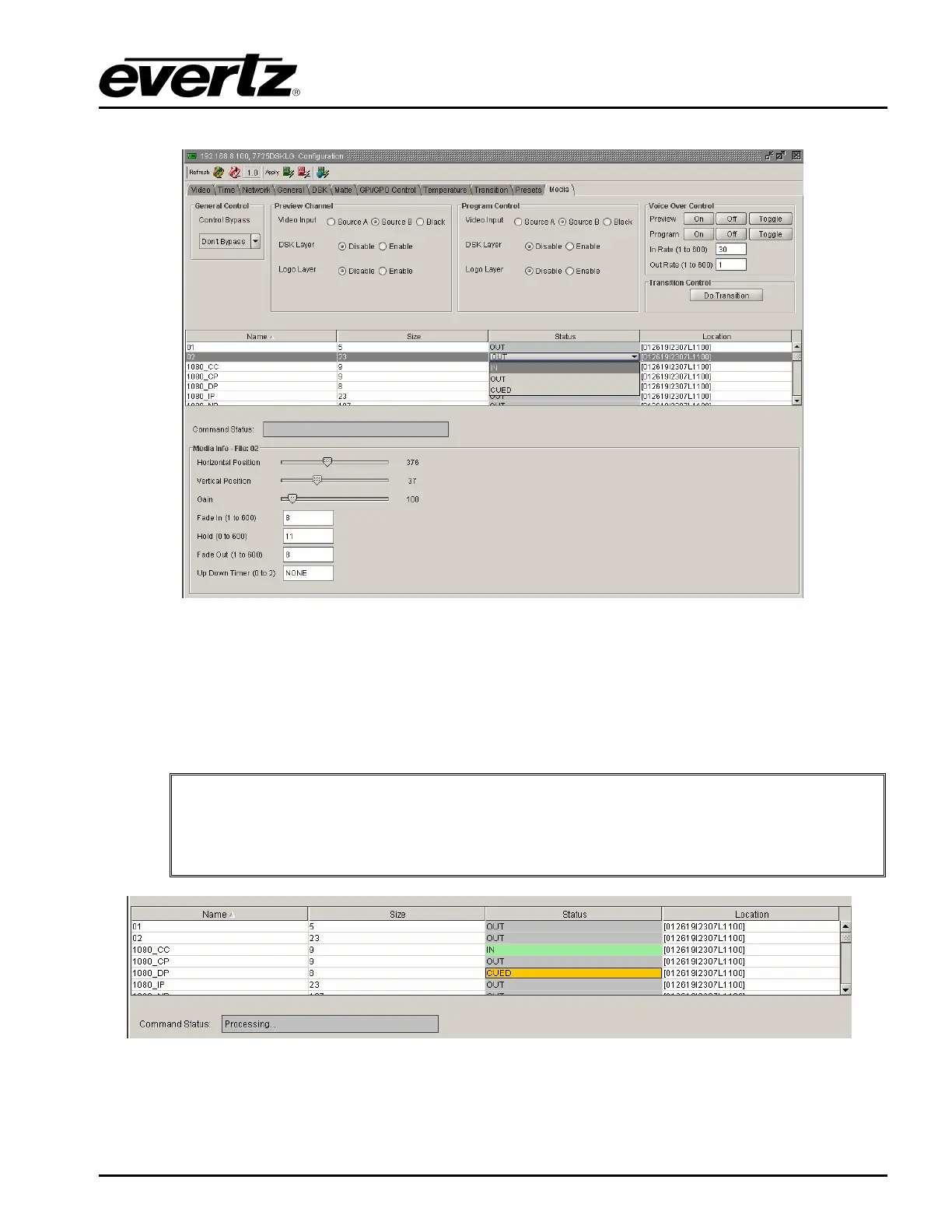
3.13.9. Selecting a Logo or Media Item and Issuing a Fade/Cue/Fade Out
Figure 3-18: Issuing a Fade/Cue/Fade Out
Upon selecting a logo or media item under the “Name” column, the user can click on the “Status”
column, adjacent to the desired logo, and a drop down screen for selecting ‘IN, CUED, OUT” will
appear. This will allow user to cue, fade in, and fade out the logo or media item.
Command Status indication will be displayed in the middle of the screen to indicate that the command
has been processed and the logo action is successful.
"
Note: The logos or media items can be ordered alphabetically (using the “Name”
column), numerically (by “Size”), or by IN/CUE/OUT status (using the “Status” tab).
Simply click on one of the three column headings to view logos or media items in
the preferred order.
Figure 3-19: Command Status Table
As shown in Figure 3-19, logos that are “on air” are highlighted in green, and logos that are cued are
highlighted in orange.



 To Next Page