7700 Multiframe Manual
7725DSK-LG / 7725DSK-LG-HD HD/SD Logo Inserter & Media Keyer
Page 8-6 Revision 1.4 UPGRADING FIRMWARE
8.3.2.3. Uploading the New Firmware
8. You should now see a prompt asking you to upload the file. Please refer to Figure 8-3.
9. Upload the “boot2.bin” file supplied using the X-Modem transfer protocol of your terminal program.
If you do not start the upload within 10 minutes the unit’s Boot code will time out. You can restart
the upgrade process by power cycling the unit.
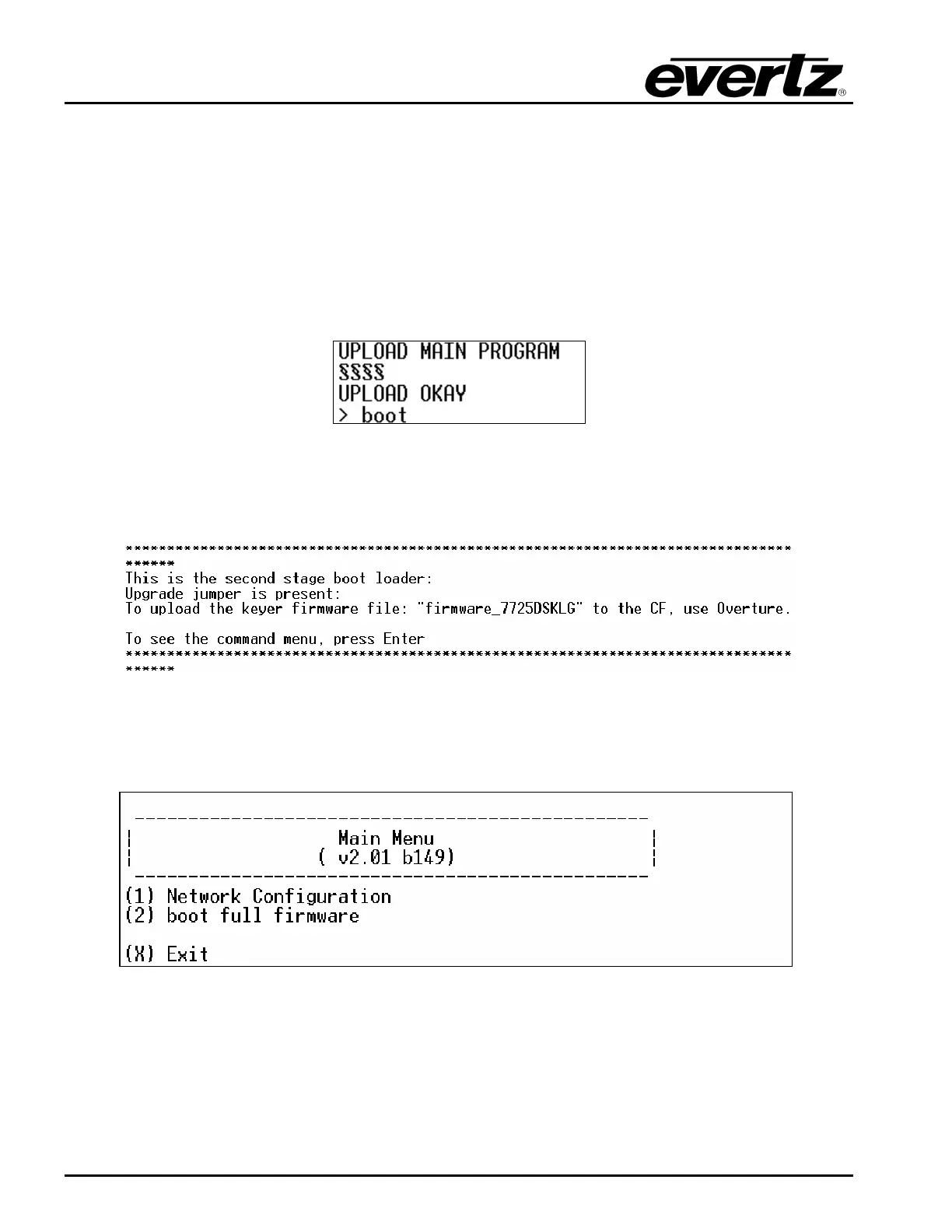
10. After “boot2.bin” fishes loading a confirmation messages such as UPLOAD OKAY should appear
and at this stage user should type in the word boot.
11. After the user types in the word boot, the message displayed in Figure 8-4 will be displayed. The
message is referring to the “firmware_7725DSKLG" file that was transferred previously in step 1.
This is a confirmation message. The user should press enter in order to continue loading the file.
Figure 8-4: Second Stage Boot Loader
12. Once the user presses enter, the following menu shown in Figure 8-5 will appear.
Figure 8-5: Main Menu
13. The user should type in the number 2 to initiate the unit to boot fully. The upgrade process will be
completed and the unit will fully boot.



 To Next Page