7700 Multiframe Manual
7725DSK-LG / 7725DSK-LG-HD HD/SD Logo Inserter & Media Keyer
Page 8-2 Revision 1.4 UPGRADING FIRMWARE
8.2. FIRMWARE UPGRADE VIA OVERTURE APPLICATION (RECOMMENDED PROCEDURE)
When updating firmware through Overture, Overture and the 7725DSK-LG communicate with each
other through Ethernet. Using Overture to upgrade the firmware is the recommended procedure as it is
a simple 1-Step Upgrade mechanism. Before you upgrade your unit, ensure that you are running
Overture Suite 2. Please refer to the Overture Suite 2 manual for Overture installation and operation
instructions.
"
If you are running Overture Version 1 then your upgrade will not work as it does
not support the 1-step upgrade process.
1. When opening Overture 2, the Media Manager will have the device information listed in the
Configuration View. If the device has not been added in Overture, right mouse click the Devices
option in the Network panel. Select the New Device… option from the menu. Once the New
Device window appears, enter a device name and the IP address, then select OK.
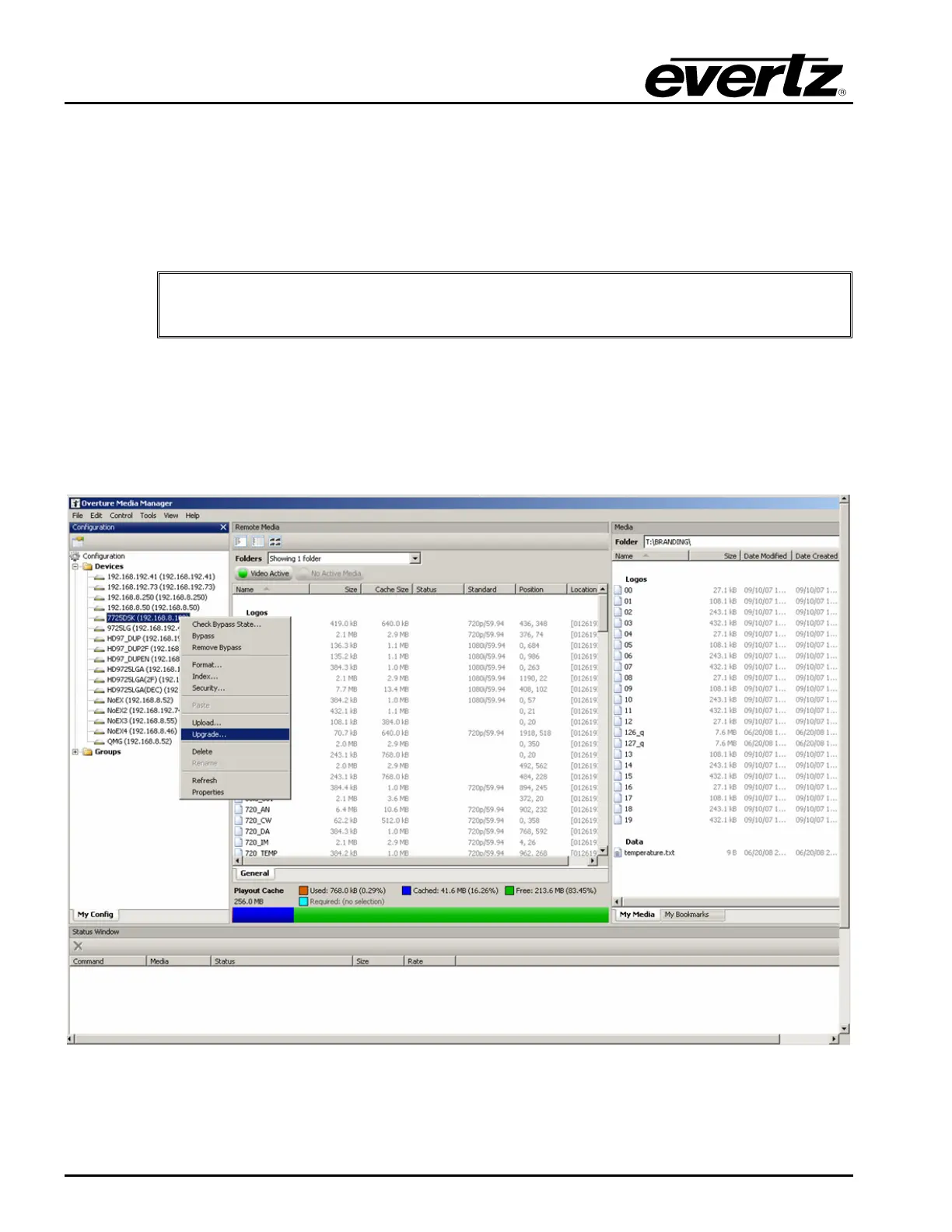
2. Select the newly created 7725DSK-LG device in the Network list and Right-click the mouse button.
Figure 8-1: Upgrading via Overture



 To Next Page