Falcon M-Class | User Guide
83
Save:
Click to save changes.
Reset:
Click to undo any changes made locally and revert to previously saved
values.
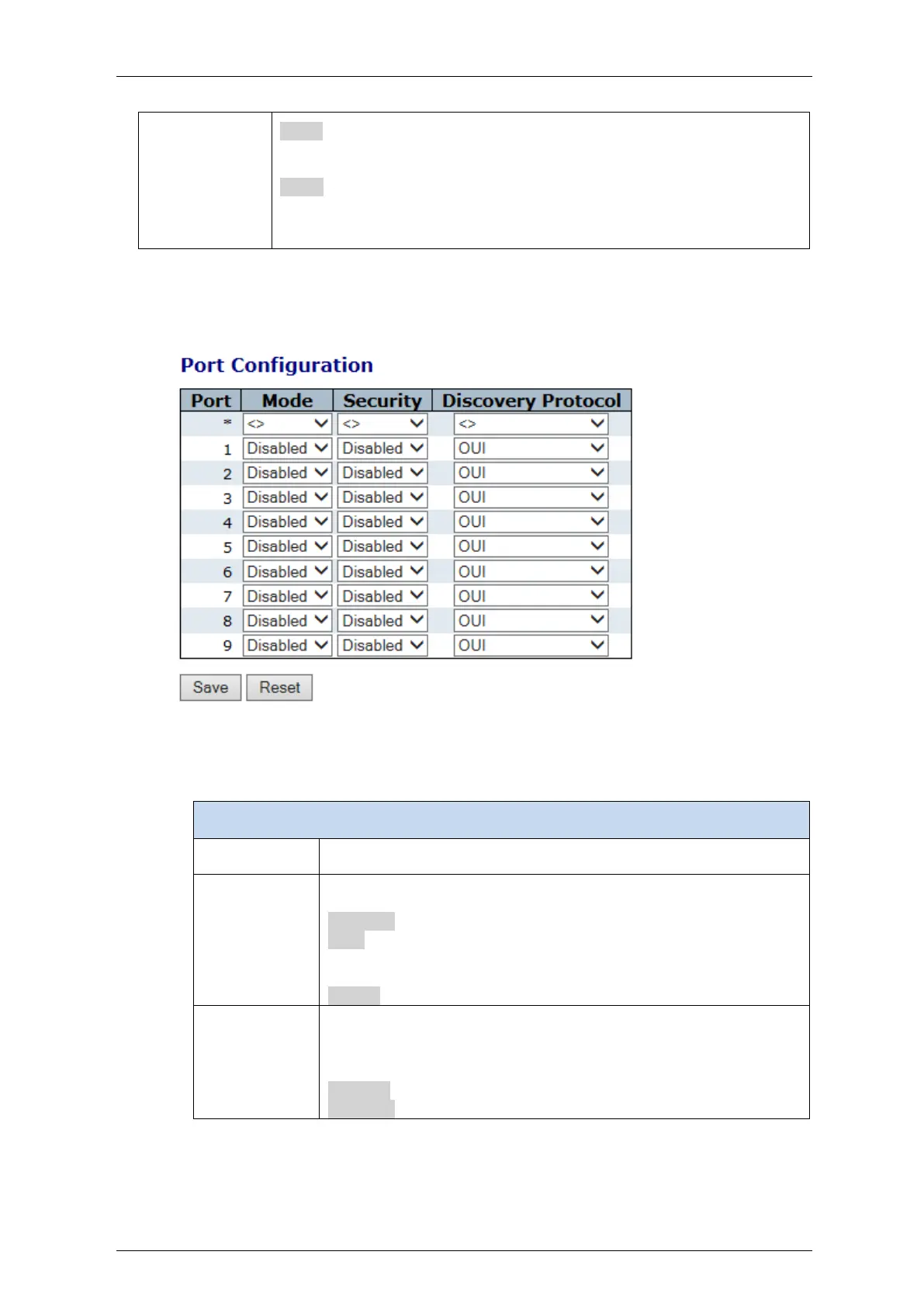
4.7.6.2 Port Configuration
Figure 4-39: Port Configuration display
Table 4-37: Port Configuration parameters
The logical port for the settings contained in the same row.
Indicates the Voice VLAN port mode
Possible modes are:
Disabled: Disjoin from Voice VLAN.
Auto: Enable auto detect mode. It detects whether there is VoIP
phone attached to the specific port and configures the Voice VLAN
members automatically
Forced: Force join to Voice VLAN..
Indicates the Voice VLAN port security mode.
When the function is enabled, all non-telephonic MAC addresses in
the Voice VLAN will be blocked for 10 seconds.
Possible port modes are:
Enabled: Enable Voice VLAN security mode operation
Disabled: Disable Voice VLAN security mode operation.



 To Next Page