Falcon M-Class | User Guide
92
4.7.7.6 MVR SFM Information
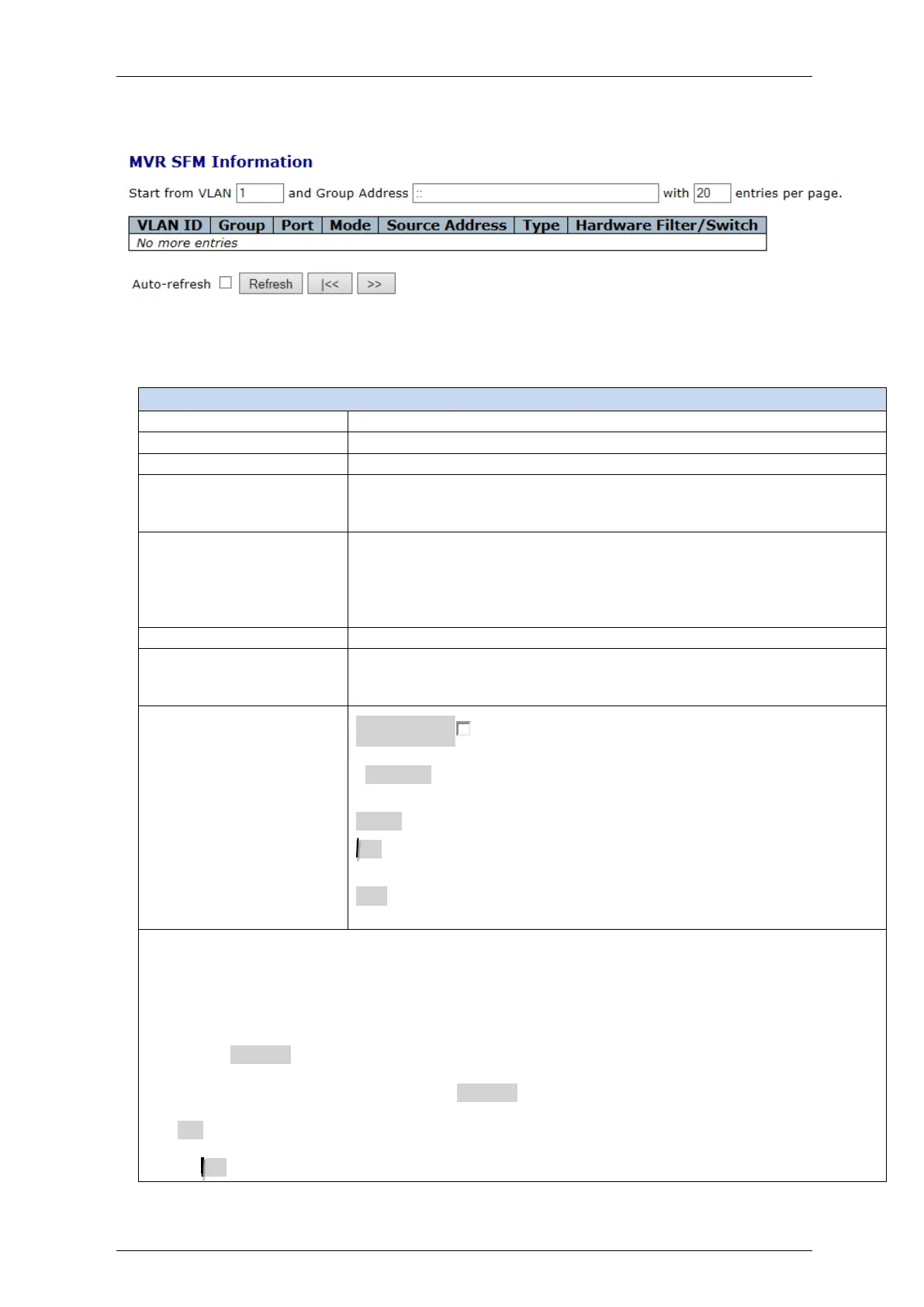
Figure 4-46: MVR SFM Information display
Table 4-44: MVR SFM Information parameters
MVR SFM) Information Table
Group address of the group displayed
Indicates the filtering mode maintained per (VLAN ID, port
number, Group Address) basis. It can be either Include or
Exclude.
IP Address of the source
Currently, the maximum number of IP source address for filtering
(per group) is 8
When there is no any source filtering address, the text "None" is
shown in the Source Address field.
Indicates the Type. It can be either Allow or Deny.
Indicates whether data plane destined to the specific group
address from the source IPv4/IPv6 address could be handled by
the chip or not.
Auto-refresh : Check this box to refresh the page automatically.
Automatic refresh occurs every 3 seconds
. Refresh: Click to refresh the page immediately
Clear: Clears all Statistics counters.
<<: Updates the table starting from the first entry in the MVR Channels
(Groups) Information Table.
>>: Updates the table, starting with the entry after the last entry currently
displayed.
Navigating the MVR SFM Information Table
Each page shows up to 99 entries from the MVR SFM Information table, default being 20, selected
through the "entries per page" input field
When first visited, the web page will show the first 20 entries from the beginning of the MVR SFM
Information table.
Clicking the Refresh button will update the displayed table starting from that or the closest next MVR
SFM Information Table match
In addition, the two input fields will - upon a Refresh button click - assume the value of the first
displayed entry, allowing for continuous refresh with the same start address.
The >> will use the last entry of the currently displayed table as a basis for the next lookup. When the
end is reached the text "No more entries" is shown in the displayed table.
Use the << button to start over.


 To Next Page