POTS Testing and Fault Location
Dial-Up Test Group
4
4-53
Table 4-13. Dial-Up Tests and Associated Subtests (continued)
Dial-Up Test Associated Subtests
Monitor Line None
Smart-Pro Test Group
(C.O. Smart-Pro unit)
VF Loss, VF Noise, Caller ID tests
SASS Test Group
(C.O. SASS unit)
VF Loss & VF Noise tests
DATU Test Group
(C.O. DATU & Switch NTT)
Opens, Shorts & Grounds & other
desired tests
DATU EXP Auto-Test
(C.O. DATU EXP & Switch NTT)
2-Ended test suite: DCV, ACV, S&G,
Opens, VF Noise & Loss, Noise Bal.
2. Select the desired test in the Dial-Up Test Toolbox shown in Figure 4-30,
and press L. The
Select Dialing Mode screen is displayed.
3. Press D(
Setups) to display the Setups – Dial-up Tests screen.
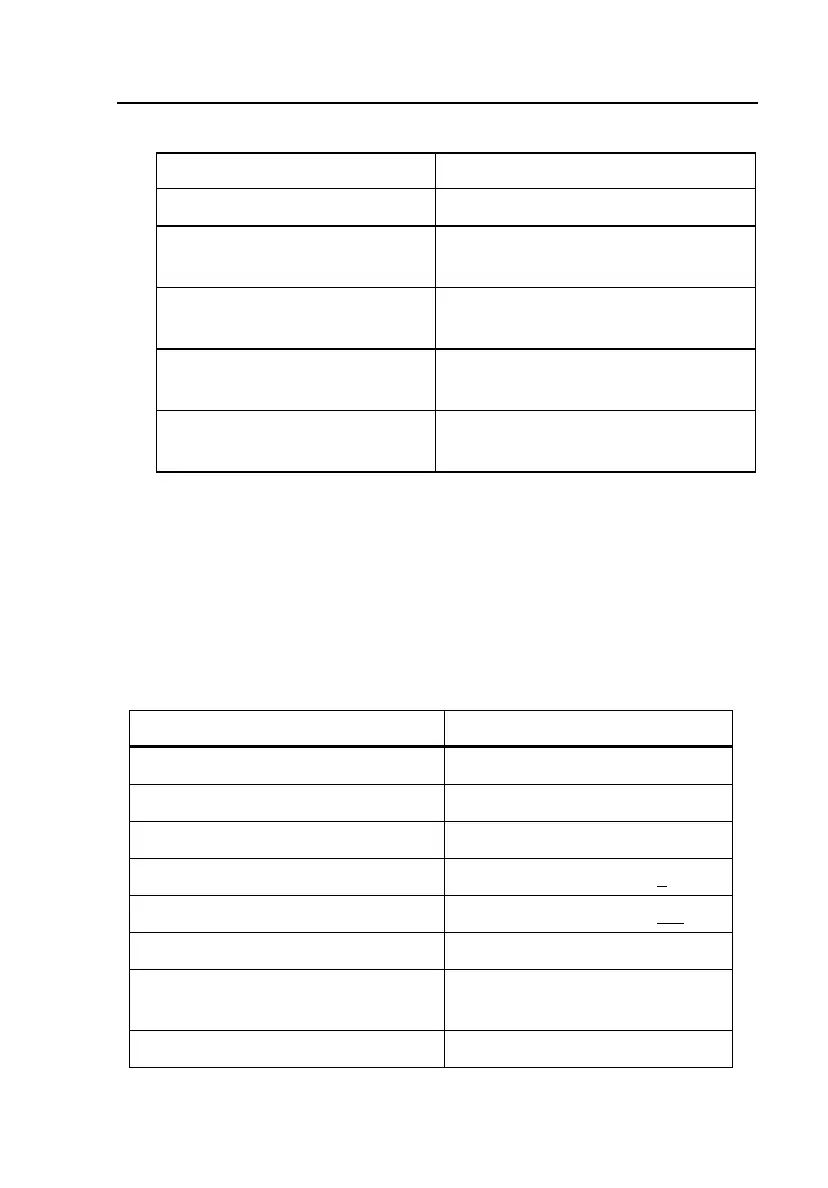
4. Select the desired Dialing parameters, listed in Table 4-14.
5. Press M twice to return to the Dial-Up Test Toolbox.
Table 4-14. Dial-Up Test Setup Parameters
Setup Parameter Setting (default in bold)
Dialing Type DTMF or Rotary Dialing
Start Mode Loop or Ground Start
Centrex Dialing N or Y
Centrex Prefix None or user entry (ex.: 9)
Feature Disable Prefix None or user entry (ex.: *82)
Dialtone Detection Y or N
DTMF Duration
(digit on / off times)
50 ms (Range = 50 to 250)
Rotary Dial Break / Make Ratio 60% (Range = 5 to 95%)



 To Next Page