TDR Testing and Fault Location
TDR Auto-Test
6
6-7
TDR Auto-Test Results
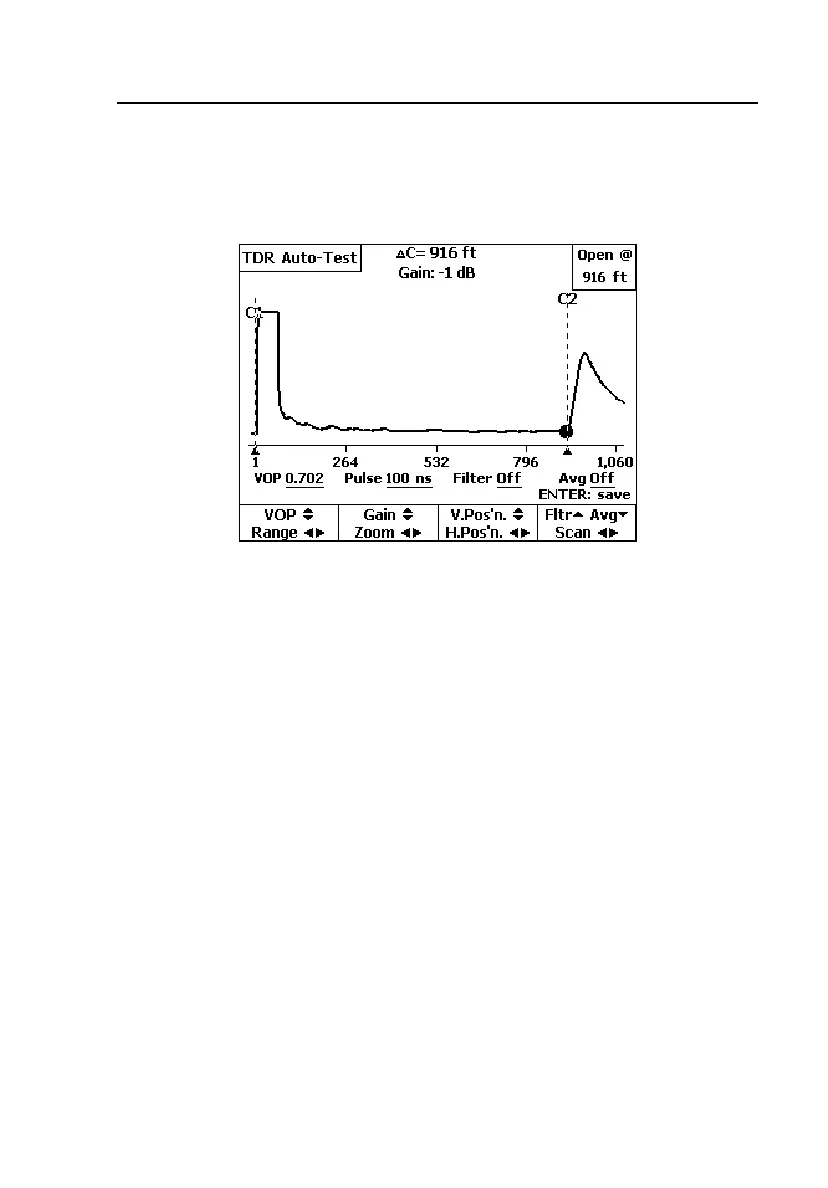
When the TDR Auto-Test ends, the CopperPro displays the TDR Auto-Test
result screen. Figure 6-1 shows an example of a balanced open pair.
acy71s.eps
Figure 6-1. TDR Auto-Test Results: Open
Figure 6-1 is a typical TDR Auto-Test result screen. It has the following
elements:
•
Pair Status Message: shown in the upper right corner of the screen and
highlighted (
Open @ 916 ft). This is a final overall result that the
CopperPro derives by interpreting results from all of the individual tests
that it runs.
•
Launch Pulse: appears as the larger, positive pulse on the left side of the
screen.
•
Launch Cursor (C1): the vertical line that marks the start of the launch
pulse. To manually move the launch cursor, press F to move right and H
to move left.
•
Reflection Pulse(s): appear as smaller positive pulses (as seen in Figure
6-1) or negative pulses to the right of the launch pulse.
•
Reflection Cursor (C2): the vertical line that marks the position of the
largest detected reflection. To manually move the reflection cursor, press
G to move right and I to move left.



 To Next Page