990DSL
Users Guide
5-30
WB Noise/Level Test Results for a Spare Pair
To run a WB Noise / Level test on a spare pair, select WB Noise / Level from
the XDSL Toolbox, and then press K.
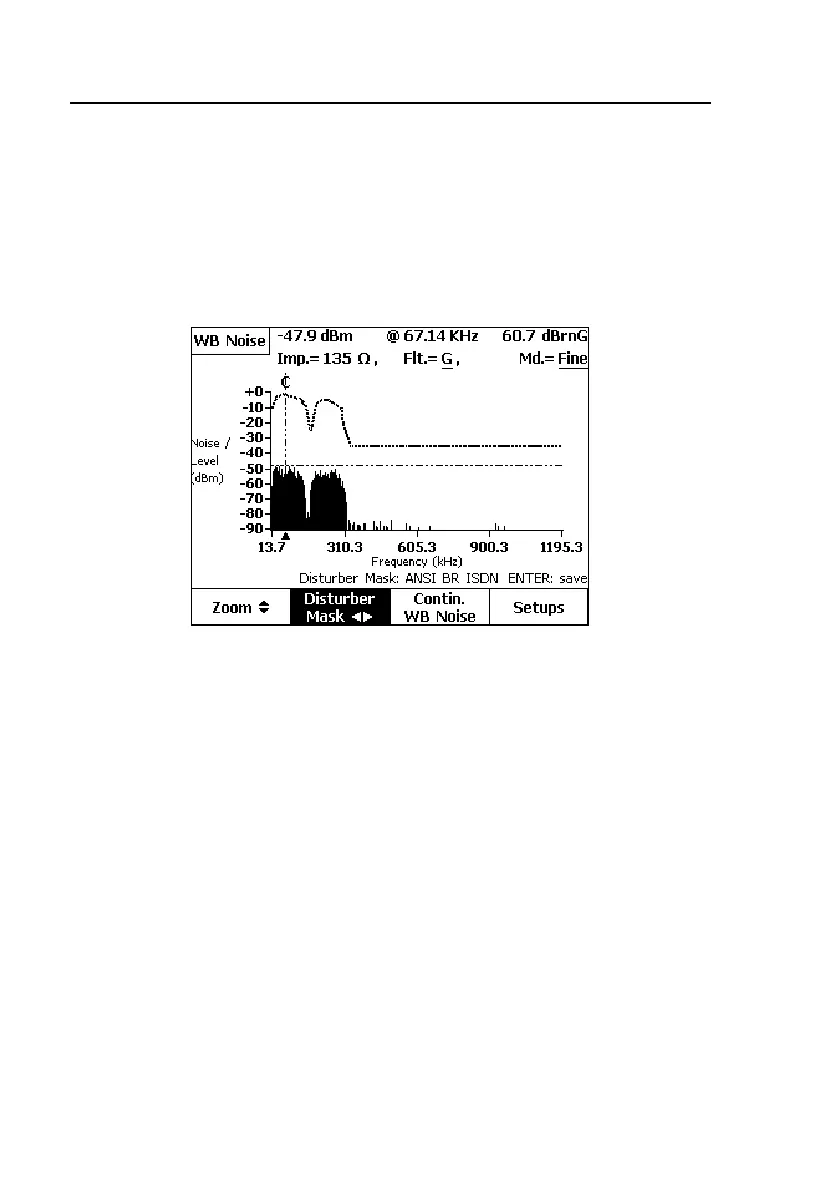
The graph in Figure 5-15 shows the results of a WB Noise / Level test with an
ADSL/2 Target Service Type that was run on a spare pair having crosstalk
from an adjacent ISDN Basic Rate circuit.
acy62s.eps
Figure 5-15. WB Noise/Level Test Results: ISDN Crosstalk
The noise level and frequency at the cursor position are displayed at the top of
the screen (
-47.9 dBm @ 67.14 kHz). The aggregate “Weighted Noise” across
the filter band is shown in the upper right corner of the screen (
60.7 dBrnG).
To zoom in or out horizontally, press A(
Zoom), then press H to zoom in or
F to zoom out.
You can select any of several Disturber Masks to overlay the noise graph,
shown as dotted lines above the noise waveform. By comparing the disturber
mask and the noise waveform, you can more easily identify the type of
crosstalk interference. If the shape of a particular mask matches that of the
noise waveform, the disturber is the same type as the mask label (as in Figure
5-10, where the noise pattern exactly matches the ISDN BR crosstalk pattern).
To select a mask to overlay, press B(
Disturber Mask). Then, repeatedly press
I or G until a matching mask is displayed.



 To Next Page