990DSL
Users Guide
5-34
Running a WB Loss Test
To run a WB Loss test, do the following:
1. From the XDSL toolbox, select
WB Loss and press L.
The
WB Loss connection diagram is displayed.
2. Connect the CopperPro tester and the Sending Unit as shown, and then
press K.
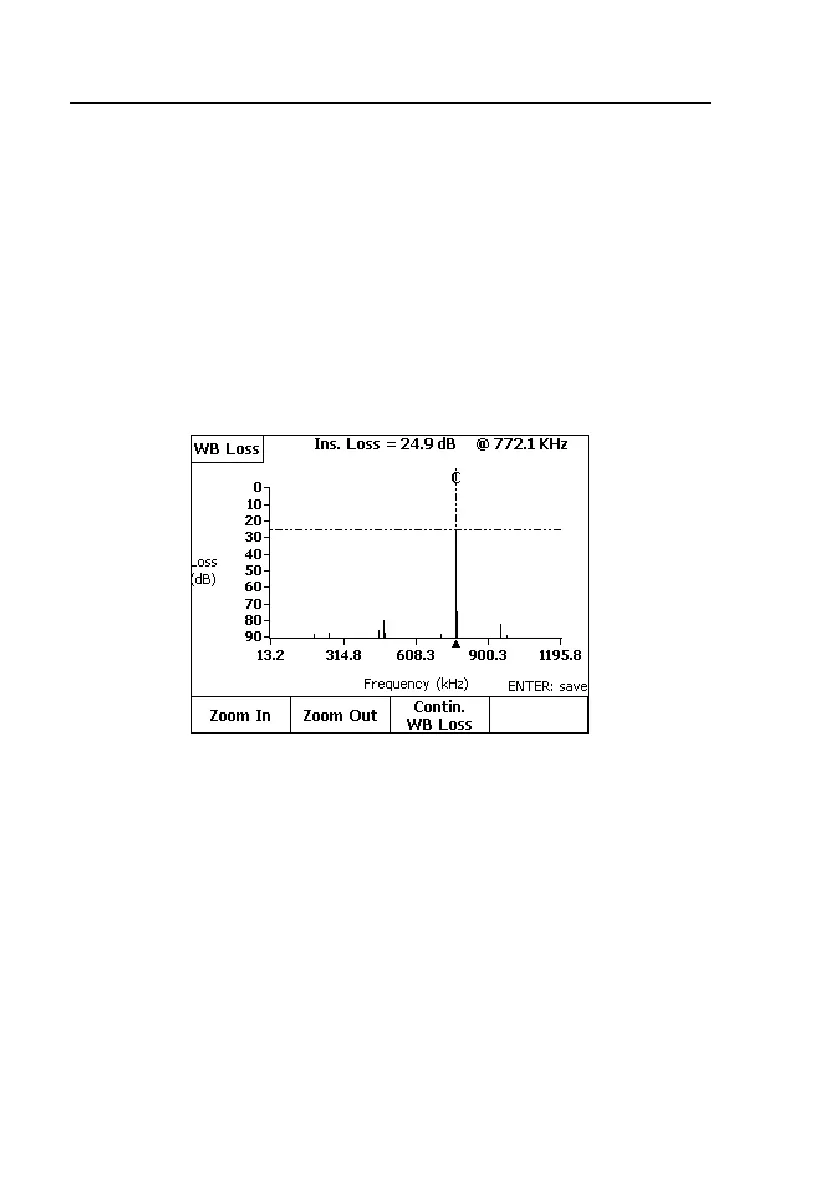
For the ADSL/2 range selection, the CopperPro tester measures all signals
in the 10 kHz to 1200 kHz spectrum and positions the cursor on the largest
signal as shown in Figure 5-17.
acy64s.eps
Figure 5-18. WB Loss Test Results Screen
In the above test, the transmitted signal was 772 kHz (theT1 Nyquist
frequency) to qualify the test pair for T1 service. The result at the top of
the screen indicates the pair’s insertion loss at the displayed frequency.
3. Press A(
Zoom In) once or twice to expand the horizontal scale for easier
viewing of adjacent frequency components, and
B(Zoom Out) to
compress the scale back again.
4. Press C(
Contin. WB Loss) to monitor the signal at the selected
frequency in real-time.
5. Press L to save the waveform in the Frequency Graph storage memory.



 To Next Page