8 Appendix
288
Appendix
8
• Entering a positive or negative value adjusts the squareness as shown below.
4 Press [Save].
Scale Adjustment
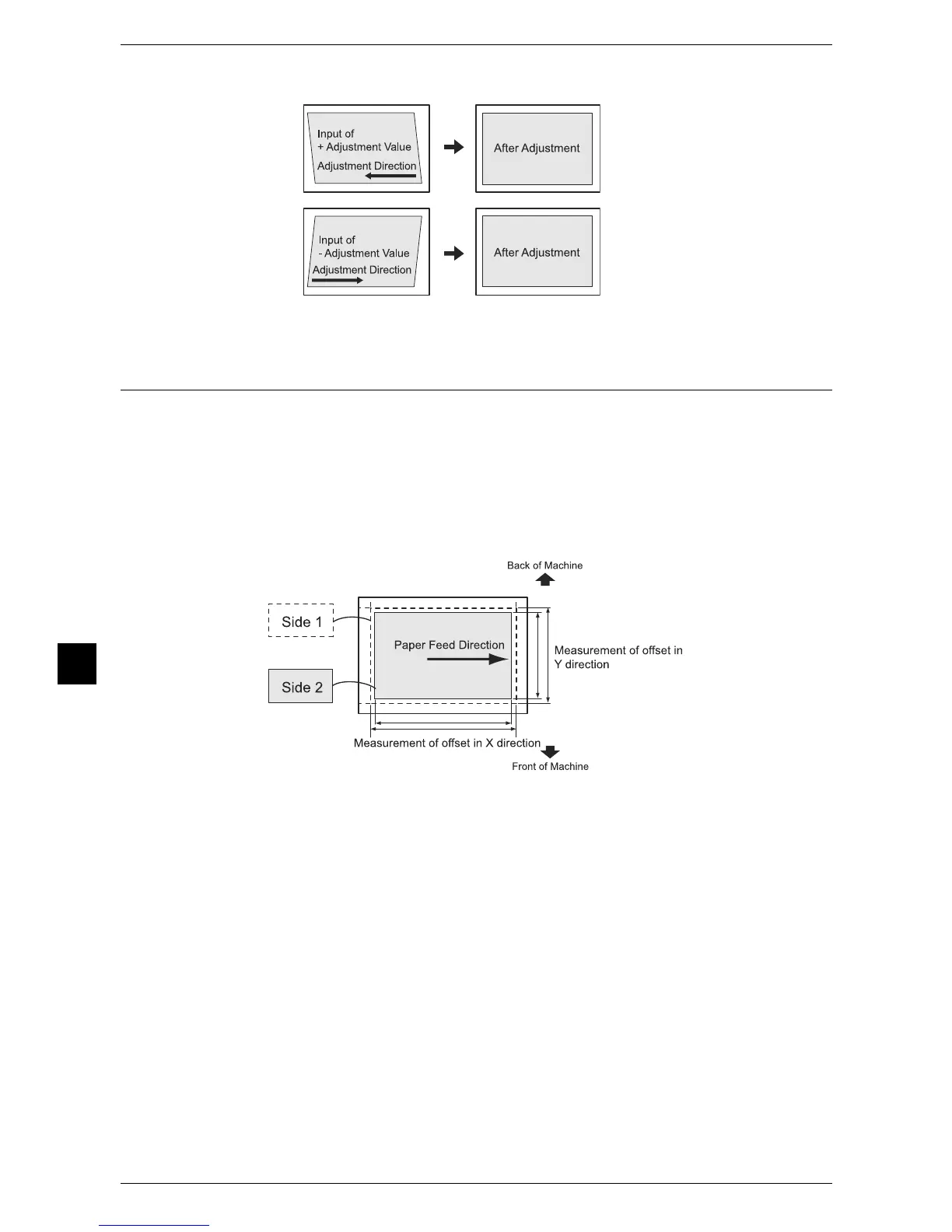
Adjust the size (scale) of the image in the paper feed direction and the vertical direction
in relation to the paper feed direction in 0.025% increments for each of sides 1 and 2.
Specify a positive value when you want to increase the scale, and a negative value
when you want to reduce it.
1 Check the sample printout, and measure the scale offset amount that occurred.
The scale may become a negative value depending on the scale offset amount.
z
Paper feed direction: X direction scale
X direction scale offset amount = image actual measurement length in the X direction
- image reference length in the X direction
X direction scale correction amount = -1 × (X direction scale offset amount ÷ image
reference length in the X direction) × 100
z
Vertical direction in relation to the paper feed direction: Y direction scale
Y direction scale offset amount = image actual measurement length in the Y direction
- image reference length in the Y direction
Y direction scale correction amount = -1 × (Y direction scale offset amount ÷ image
reference length in the Y direction) × 100


 To Next Page
 Loading...