Cockpit Reference Guide for the Cirrus SR2x with Perspective Touch+ by Garmin
190-02954-01 Rev. A
Appendix
278
Flight
InstrumentsEIS
Nav/Com/
XPDR/Audio
Flight
Management
Hazard
AvoidanceAFCS
Additional
FeaturesAnnun/AlertsAppendixIndex
Flight
InstrumentsEAS
Audio and
CNS
Flight
Management
Hazard
AvoidanceAFCS
Additional
Features
Abnormal
OperationAnnun/AlertsAppendixIndex
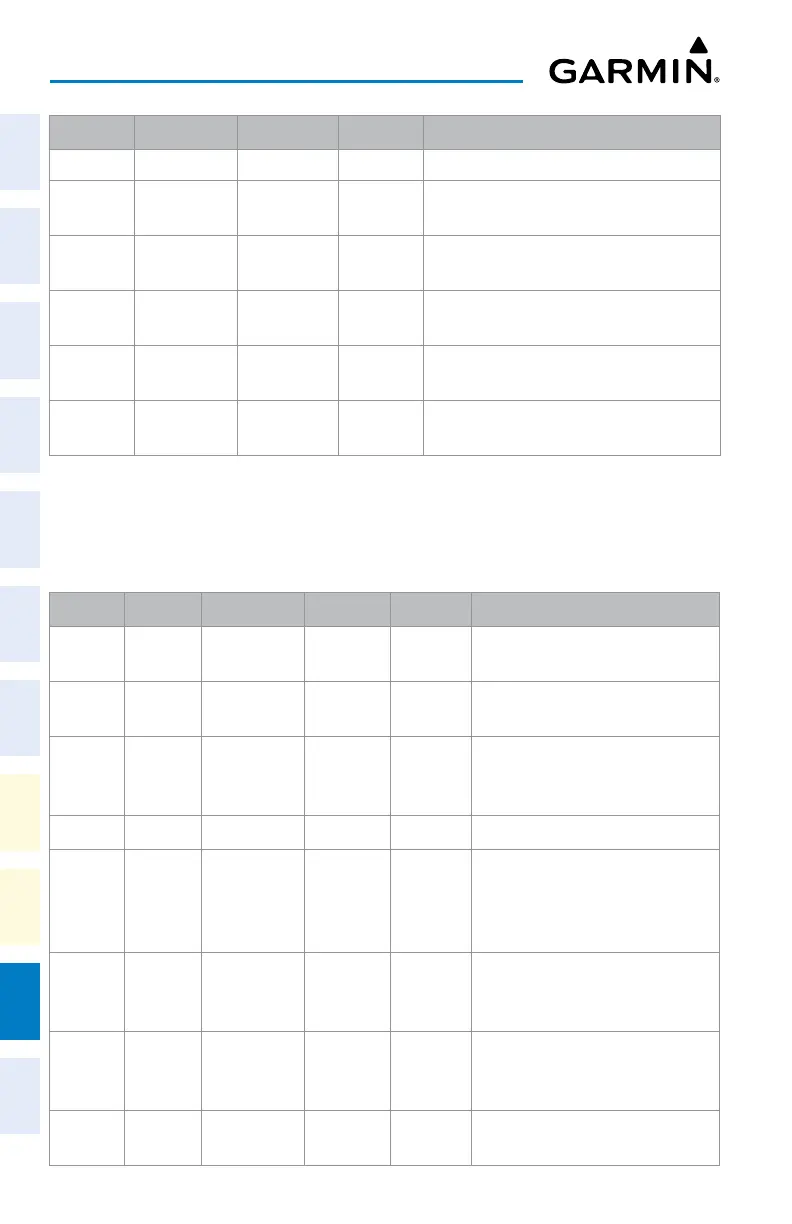
Level 1 Level 2 Level 3 Level 4
Description
ADC Settings Displays the ADC selection softkeys.
ADC 1 Selects the number 1 ADC. The softkey
annunciator is green when selected.
ADC 2 Selects the number 2 ADC. The softkey
annunciator is green when selected.
AHRS
Settings
Displays the AHRS selection softkeys.
AHRS 1 Selects the number 1 AHRS. The softkey
annunciator is green when selected.
AHRS 2 Selects the number 2 AHRS. The softkey
annunciator is green when selected.
PFD / PFW Softkeys – Full Mode
When Split Mode is enabled on the PFD / PFW, an MFD / MFW Display Pane will be shown
on the PFD / PFW, replacing five softkeys. The following table lists PFD / PFW softkey func-
tions when operating the PFD / PFW in Split Mode.
Level 1 Level 2 Level 3 Level 4 Level 5 Description
Traffic Displays the Traffic Map on the
Display Pane on the PFD / PFW.
PFD
Settings
Displays the PFD / PFW settings
softkeys.
Attitude
Settings
Displays the softkeys for enabling or
disabling Synthetic Vision Technology
(SVT) features.
SVT Mode Displays buttons for SVT mode.
Auto Selects SVT Auto Mode (Auto Mode
is identical to Flight Mode). The
softkey annunciator is green when
the function is on.
Flight Selects SVT Flight Mode. The softkey
annunciator is green when the
function is on.
Off SVT mode off. The softkey
annunciator is green when the
function is off.
SVT
Settings
Displays additional SVT overlay
softkeys (optional).












 To Next Page