Cockpit Reference Guide for the Cirrus SR2x with Perspective Touch+ by Garmin
190-02954-01 Rev. A 13
Engine & Airframe Systems
Flight
Instruments EIS
Nav/Com/
XPDR/Audio
Flight
Management
Hazard
Avoidance AFCS
Additional
Features Annun/Alerts Appendix Index
Flight
Instruments EAS
Audio and
CNS
Flight
Management
Hazard
Avoidance AFCS
Additional
Features
Abnormal
Operation Annun/Alerts Appendix Index
5
Flap Position
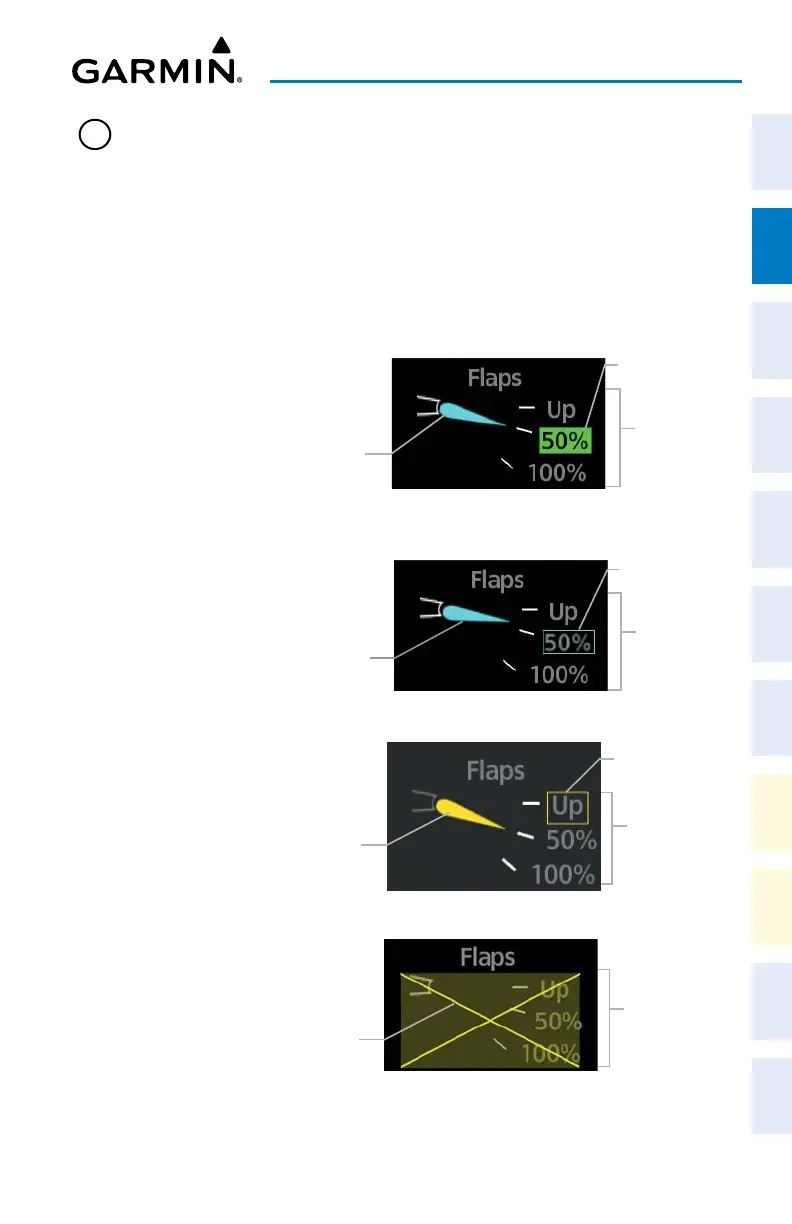
Flap position is normally displayed using a rotating pointer and the flap
lever setting (Up, 50%, 100%). When the actual flap position is not the
same as the commanded flap position, an amber box will be displayed
around the commanded position and the pointer will be amber. When
the actual flap position and the commanded flap position are the same,
a green box will be displayed, and the pointer will be cyan. When the
flaps are in transition to the commanded position, a white box will be
displayed around the commanded position and the pointer will be cyan.
Invalid flap position is indicated by an amber ‘X’ across the display.
Flap
Positions
Actual Flap
Position
Commanded Flap Position Box - Transition
Commanded
Flap Position
Flap
Positions
Actual Flap
Position
Commanded Flap Position Box - Caution
Commanded
Flap Position
Flap
Positions
Actual Flap
Position
Commanded Flap Position Box - Normal
Commanded
Flap Position
Flap
Positions
Invalid Flap
Indication
Invalid Flap Position Box - Amber X












 To Next Page