Home
HTA
Laboratory Equipment
HT2800T
Page 47
HTA HT2800T - Page 47
275 pages
Manual
Save Page as PDF
To Next Page
To Next Page
To Previous Page
To Previous Page
Loading...
HT2800T_en_c.
doc
Page 47 of 275
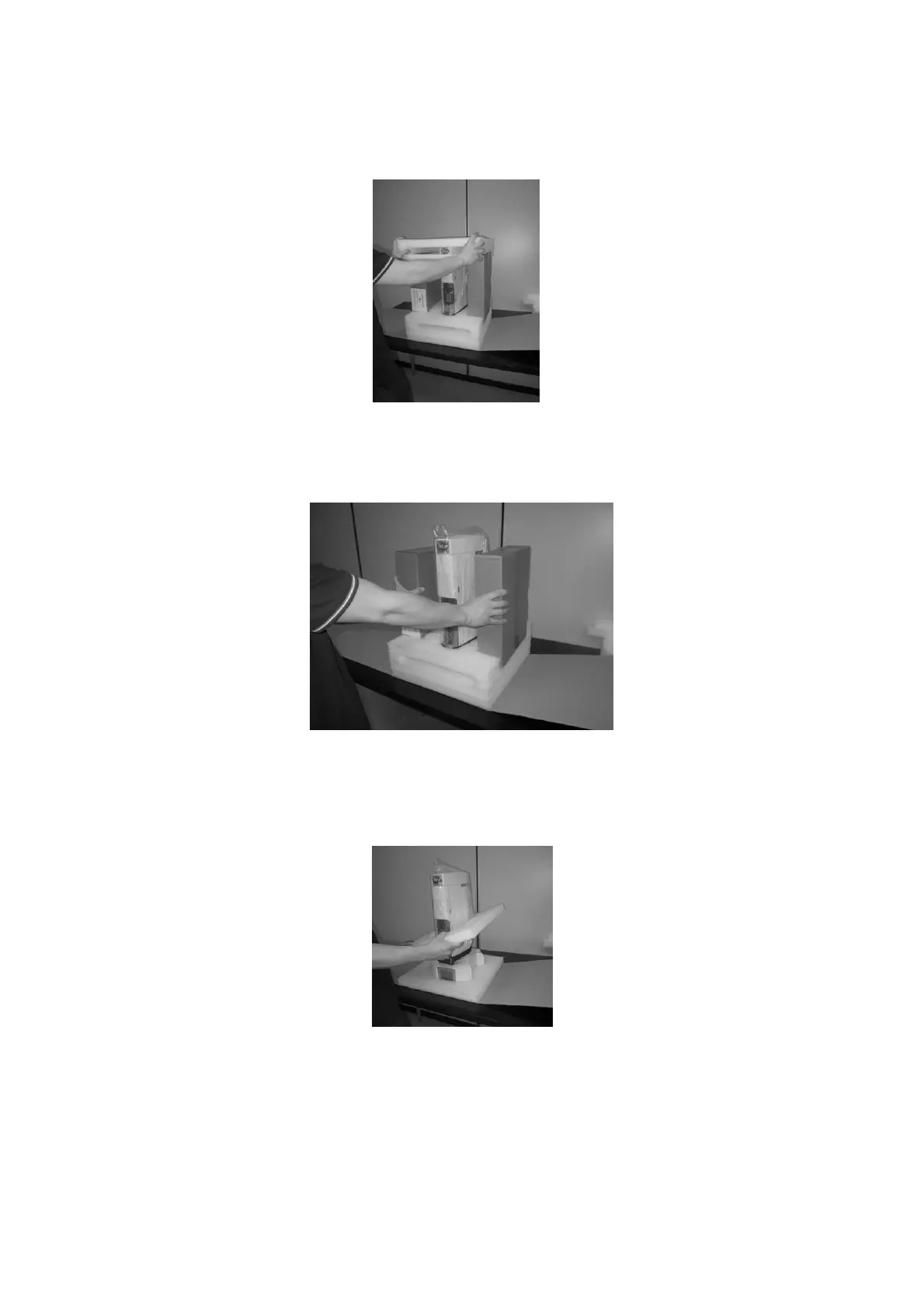
Figure 48: Remove the u
pper
cushions
6.
Remove t
he a
cce
ssory
bo
xes an
d ex
trac
t the
inc
luded a
cce
ssor
ies.
Figure 49: Remove t
he accessory boxes
7.
Remove t
he lo
we
r pr
otec
tive c
ush
ions.
Figure 50: Remove t
he cushions
46
48
Table of Contents
Main Page
Table of Contents
3
Introduction
9
Intended Use and Restrictions
9
Symbol Table
10
Warning
11
Standards Compliance
14
General Specification
14
Functions Available Only through
15
Hta Autosampler Manager
15
Vial Leakage Check (Headspace Mode)
15
Method Development Option (Headspace Mode)
15
Versions
15
Description
15
Options
16
Technical Specifications
17
PC Software Requirements (HTA Autosampler Manager)
20
Equipment Description
21
Parts Definition
21
HT2800T/HT2850T Overview
21
Syringe Location
27
Connection Panel
35
Moving Parts
36
Tool Kit
37
Touch Screen Display Description
38
Touchscreen Use
38
Limited Warranty
42
Installation
44
Unpacking and Preliminary Operations
44
Autosampler Assembly
45
How to Lift and Carry the Autosampler
49
Installation
49
Autosampler Installation on the Mounting Plate
51
Safety Lock Setting
56
Electrical Connections
57
Purge Line Connections (for Headspace and Fiber Cleaning Device)
58
Preparing the Solvent and Waste Vials (Liquid Mode)/ Preparing the Washing Vial (SPME Mode)
59
Start-Up
60
Pc Connection and Software Installation
61
Autosampler Controlled by LAN-Connected PC
61
Autosampler Connected Directly to the PC
70
Accessories Installation
71
External Pressure Regulator Installation (Only for Headspace and SPME Mode)
71
Swagelok Adapter Installation (Only Forheadspace and SPME Mode)
72
System Integrity Tool Installation (Only for Headspace Mode)
73
Vial Locator: Installing and Removing (Liquid Mode)
75
Preparing Sample Vial
78
Vial Filling in Liquid Mode
79
Vial Capping (Screw Cap)
79
Vial Capping (Crimping Cap)
79
Final Installation Operations
83
Basic Training
83
Set up Operations
84
View Parameters
84
Setup
85
Setup: Alignment
85
Setup: Syringe Warmer Assembly Installation/ Replacement (Headspace Mode)
92
Syringe Installation/ Replacement (Liquid Mode)
101
SPME Fiber Holder Installation/ Replacement
111
Setup: Manual Operations
119
Setup: Configuration
123
Setup: Service
135
Programming Method
136
Method (Headspace Mode)
136
Method Menu
136
Method X: Setting Method Parameters
136
Method Tools
140
Example
140
Method (Liquid Mode)
141
Method Menu
141
Method X: Setting Method Parameters
142
Method Tools
146
Example
146
Method: SPME Mode
147
Method Menu
147
Method X: Setting Method Parameters
147
Method Tools
153
Example
153
Programming Sequence
155
Sequence: Headspace Mode
155
Sequence Menu
155
Setting Sequence Step Parameters
155
Sequence Tools
156
Sequence: Liquid Mode
157
Sequence Menu
157
Setting Sequence Step Parameters
157
Sequence Tools
159
Sequence: SPME Mode
159
Sequence Menu
159
Setting Sequence Step Parameters
160
Sequence Tools
161
Operations
162
Home Screen
162
Home Screen: Standard User Interface
162
Home Screen: Quick Start User Interface
164
Single Injection
165
Automatic Run
166
Interrupting an Automatic Run
167
Immediate Injection
167
Skip Next Vial Option
167
Priority Injection
168
Syringe Purge
169
Syringe Wash
169
Fiber Cleaning/Conditioning
170
Load and Unload Sample Vial
170
Load and Unload Solvent Vials
171
Settings Menu
171
Change Tray/Rack Type
171
Eco Savings
173
Change Mode
174
Change from Headspace to Liquid Mode
175
Change from SPME to Liquid Mode
182
Change from Liquid to Headspace Mode
189
Change from Liquid to SPME Mode
195
Change from Headspace to SPME Mode
201
Change from SPME to Headspace Mode
204
Troubleshooting
207
Introduction
207
Start up Errors
208
Safety Lock Error
208
Vial Locator Error
208
Memory Error
209
Method Errors
209
Fill Volume/Pull up Strokes Setting Incompatibility
209
Fill Volume/Syringe Pre-Fill Setting Incompatibility
210
Internal Standard Setting Error
210
Sample Washes" Setting Error
211
Touch Sensor Problems
211
Falling Vials
211
Obstacle Found
212
Obstacle Found During Cover Movement
213
Lack of a Vial (Waste or Solvent Vial for Liquid Mode, Washing Vial for SPME Mode)
213
Mismatch Errors
214
Syringe Wash Mismatch Error
214
Single Injection Mismatch Error
214
Automatic Run Mismatch Errors
215
Missing Errors
217
Missing: Rear Injector Alignment
217
Timeout Error
218
Peripheral Communication Timeout
218
Syringeid Timeout
218
Mechanical Errors
219
Heating Errors
219
System Integrity Test Fail
220
Damage to Syringe Needle
220
Syringe Inspection
221
Tray Emergency Release
222
Tray Opening by Hand
222
HTA Autosampler Manager" Troubleshooting
224
Autosampler and PC Do Not Communicate (Connection by LAN)
224
Analytical Troubleshooting
226
Analytical Troubleshooting (Headspace Mode)
226
Analytical Troubleshooting (Liquid Mode)
228
Bar Code Reader Troubleshooting
230
Maintenance
232
Ordinary Maintenance
232
Cleaning of Vial Rack/Tray
232
External Cleaning of Cabinet
233
Incubation Oven Cleaning
233
Touch Screen Display Cleaning
234
Syringe Replacement in the Syringe Warmer Assembly (Headspace Mode)
234
Fiber Replacement in the Fiber Holder (SPME Mode)
241
Septum of the System Integrity Tool Replacement (Headspace Mode)
243
Preventive Maintenance Pack
243
Extraordinary Maintenance
244
Uninstalling and Disposal
245
Autosampler Uninstalling
245
Autosampler Shipping
246
Autosampler Disposal
250
Disposal Instructions
251
Appendix A - Glossary
252
Headspace Mode
252
Liquid Mode
253
Spme Mode
254
Appendix B - Consumables
256
Consumables for Headspace Mode
256
Syringes
256
Sample Vials
256
Consumables for Liquid Mode
260
Syringes
260
Sample Vials
263
Solvent and Waste Vials
266
Consumables for Spme Mode
266
Fibers
266
Washing Vial
266
Appendix C - Analyzer Connector
267
RS232C Interface (Optional)
269
Related product manuals
HTA HT2000H
167 pages



 To Next Page