iTero Element 2 and iTero Element Flex User Manual
© 2019 Align Technology, Inc. All rights reserved.
iTero Element 2 and iTero Element Flex User Manual
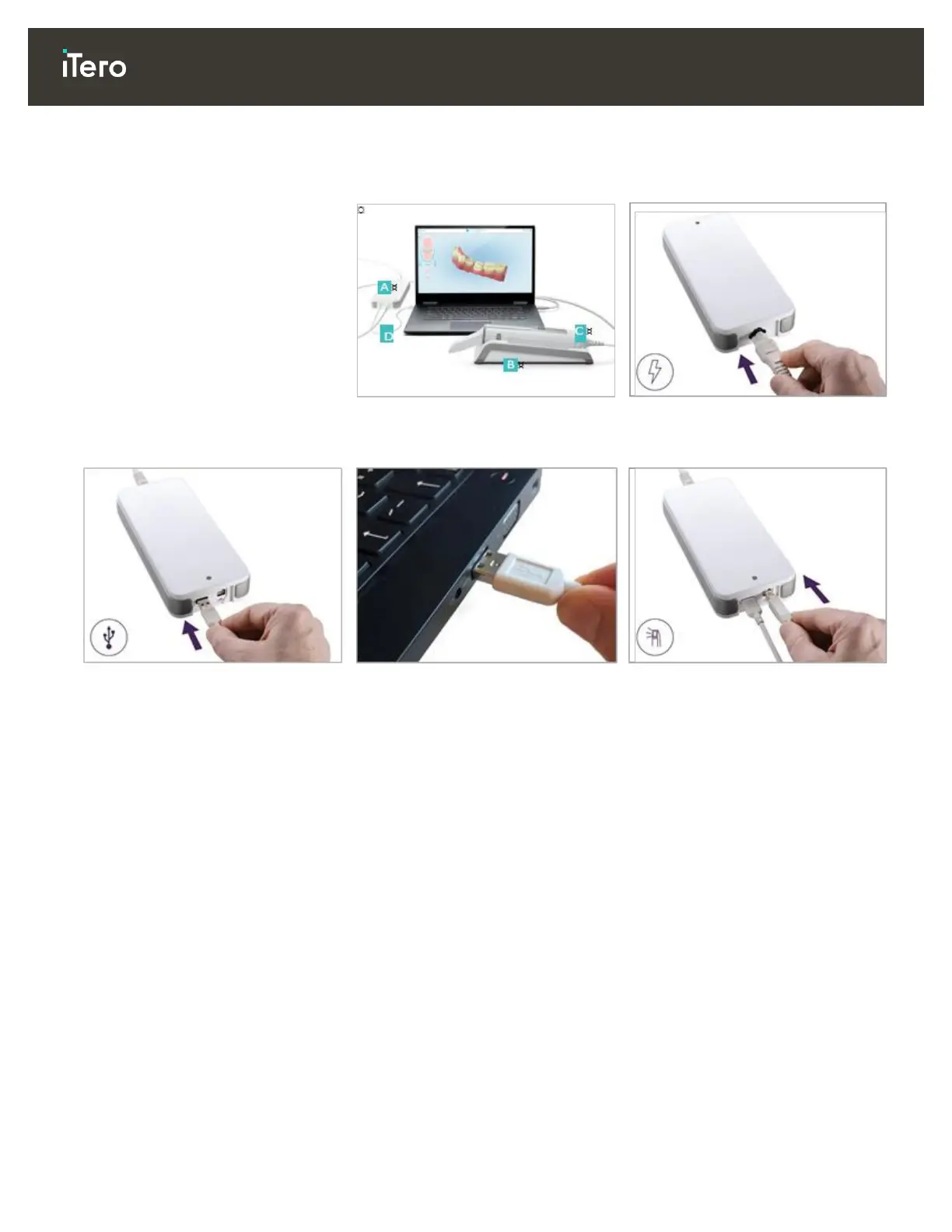
2.1.3 Assembling the iTero Element Flex scanner
Follow the instructions below to assemble the iTero Element Flex scanner.
A Hub and hub power cable
B Cradle
C Wand and wand cable
D USB cable to connect laptop and
hub
1. Place the wand in the cradle.
2. Connect the hub power cable to
the hub.
3. Connect the USB cable to the
hub.
4. Connect the USB cable to the
laptop.
5. Connect the wand cable to the
hub.
6. Plug the hub power cable into the
AC power outlet.
Notes:
The hub must be connected
to an AC wall outlet at all
times
The laptop should be
connected to an AC wall
outlet during intraoral
scanning.



 To Next Page