(Continued)
• At times, the Smart High Beam
system may not work properly, al‐
ways check the road conditions for
your safety. When the system
does not operate normally, man‐
ually change between the high
beam and low beam.
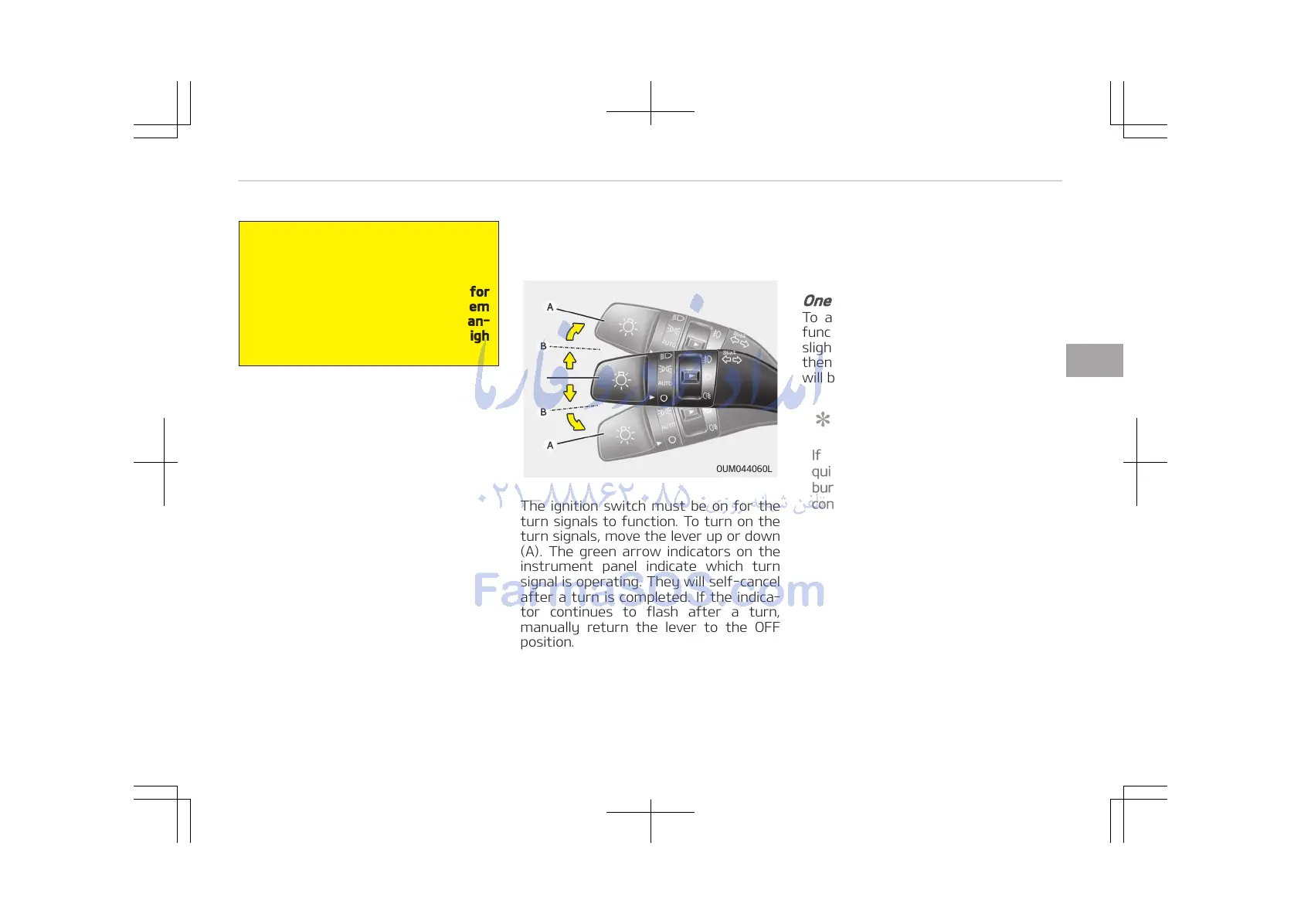
Turn signals and lane change
signals
The ignition switch must be on for the
turn signals to function. To turn on the
turn signals, move the lever up or down
(A). The green arrow indicators on the
instrument panel indicate which turn
signal is operating. They will self-cancel
after a turn is completed. If the indica‐
tor continues to flash after a turn,
manually return the lever to the OFF
position.
To signal a lane change, move the turn
signal lever slightly and hold it in posi‐
tion (B). The lever will return to the OFF
position when released.
If an indicator stays on and does not
flash or if it flashes abnormally, one of
the turn signal bulbs may be burned
out and will require replacement.
One-touch lane change function
To activate an one-touch lane change
function, move the turn signal lever
slightly for less than 0.7 second and
then release it. The lane change signals
will blink 3 times.
NOTICE
If an indicator flash is abnormally
quick or slow, the bulb may be
burned out or have a poor electrical
connection in the circuit.
4-131
4
Features of your vehicle















 To Next Page